> ## Documentation Index
> Fetch the complete documentation index at: https://code.claude.com/docs/llms.txt
> Use this file to discover all available pages before exploring further.

# Week 32 · August 3–7, 2026

> Claude Code sessions message each other, self-hosted environments run cloud sessions on your infrastructure, and auto mode becomes the default permission mode.

<div className="digest-meta">
  <span>Releases <a href="/docs/docs/en/changelog#2-1-220">v2.1.220 → v2.1.224</a></span>
  <span>3 features · August 3–7</span>
</div>

<div className="digest-feature">
  <div className="digest-feature-header">
    <span className="digest-feature-title">Cross-session messaging</span>
    <span className="digest-feature-pill">v2.1.224</span>
  </div>

  <p className="digest-feature-lede">Your Claude Code sessions can now message each other. Claude discovers your other sessions with the <code>ListAgents</code> tool and sends with <code>SendMessage</code>, either when you ask it to or on its own, such as after a change in one session affects what another is working on. A message is text Claude writes for the other session, never your conversation history or files. Available on macOS and Linux. Requires v2.1.224 or later.</p>

  <Frame>
    <video autoPlay muted loop playsInline className="w-full" src="https://mintcdn.com/claude-code/N3yEaTYPXMXFrF6k/images/whats-new/cross-session-messaging.mp4?fit=max&auto=format&n=N3yEaTYPXMXFrF6k&q=85&s=8f33c3390f78660a4a26dc980f46159f" data-path="images/whats-new/cross-session-messaging.mp4" />
  </Frame>

  <p className="digest-feature-try">With two sessions open on the same machine, ask one of them to pass something along:</p>

  ```text title="Claude Code" wrap theme={null}
  Tell the session working on the payments API that users.name is now users.display_name
  ```

  <p className="digest-feature-try">The other session shows a <code>Message from</code> row once Claude has read the message; press <code>Ctrl+O</code> to expand it. To see which sessions Claude can reach, run <code>/list-agents</code>.</p>

  <a className="digest-feature-link" href="/docs/docs/en/cross-session-messaging#message-another-session">Message another session</a>
</div>

<div className="digest-feature">
  <div className="digest-feature-header">
    <span className="digest-feature-title">Self-hosted environments</span>
    <span className="digest-feature-pill">v2.1.224</span>
  </div>

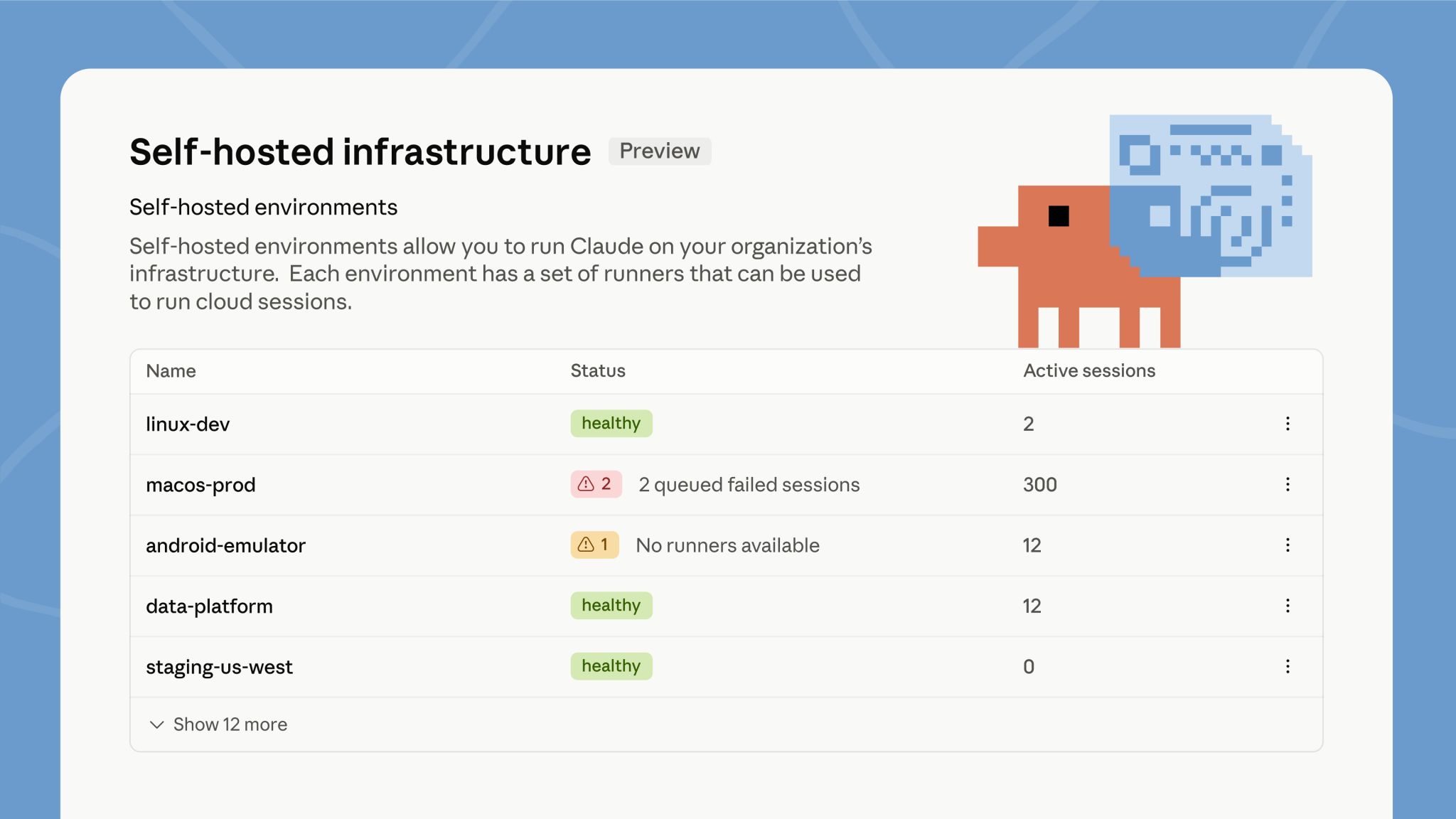
  <p className="digest-feature-lede">Self-hosted environments run Claude Code cloud sessions on your organization's own infrastructure, in public beta on Team and Enterprise plans. Run <code>claude self-hosted-runner</code> on your machines or containers to turn them into runners. When someone picks your environment while starting a session from claude.ai, the mobile or desktop apps, or `claude --cloud`, that session runs inside your network, with access to your internal services. An Owner or admin turns on <strong>Allow self-hosted environments</strong> in <a href="https://claude.ai/admin-settings/cloud-environments">admin settings</a> first.</p>

  <Frame>
    <img className="w-full" src="https://mintcdn.com/claude-code/N3yEaTYPXMXFrF6k/images/whats-new/self-hosted-environments.jpg?fit=max&auto=format&n=N3yEaTYPXMXFrF6k&q=85&s=ae9152cb1670c8af517d1aee57689b14" alt="The self-hosted environments admin page listing environments such as linux-dev and macos-prod with their status and active session counts" width="2048" height="1152" data-path="images/whats-new/self-hosted-environments.jpg" />
  </Frame>

  <p className="digest-feature-try">Signed in as an Owner or admin, run the guided setup, which walks you through creating the environment and starts a runner:</p>

  ```bash terminal theme={null}
  claude self-hosted-runner setup
  ```

  <p className="digest-feature-try">The environment shows <strong>Healthy</strong> in admin settings once the runner registers.</p>

  <a className="digest-feature-link" href="/docs/docs/en/self-hosted-environments-quickstart#set-up-an-environment-and-runner">Self-hosted environments quickstart</a>
</div>

<div className="digest-feature">
  <div className="digest-feature-header">
    <span className="digest-feature-title">Auto mode becomes the default</span>
    <span className="digest-feature-pill">CLI</span>
  </div>

  <p className="digest-feature-lede">Starting August 14, auto mode is the default permission mode for new sessions on Pro, Max, and Team plans. If you set a default mode yourself, it stays in place unless you accept the one-time switch prompt, and a default your organization manages doesn't change. You can still switch modes at any time. Already in effect on those plans: the classifier calls auto mode makes no longer count toward your usage limits.</p>

  <p className="digest-feature-try">To start every session in auto mode before the switch, set it as your default in your user settings:</p>

  ```json ~/.claude/settings.json {3} theme={null}
  {
    "permissions": {
      "defaultMode": "auto"
    }
  }
  ```

  <p className="digest-feature-try">New sessions then show <code>auto mode on</code> in the status bar.</p>

  <a className="digest-feature-link" href="/docs/docs/en/permission-modes#eliminate-prompts-with-auto-mode">Auto mode requirements and controls</a>
</div>

<div className="digest-wins">
  <p className="digest-wins-title">Other wins</p>

  <div className="digest-wins-grid">
    <div>The VS Code extension gets <a href="/docs/docs/en/vs-code#extension-settings">Focus view</a>, which hides tool activity behind one expandable row per turn; toggle it from the command menu or with <code>Ctrl+Alt+F</code> (<code>Ctrl+Option+F</code> on Mac)</div>
    <div>Sandbox credential files accept <a href="/docs/docs/en/sandboxing#mask-credential-files"><code>mode: "mask"</code></a> on Linux and WSL2, so sandboxed commands read a sentinel copy while the sandbox proxy substitutes the real value on egress; credential masking also gains <code>extract</code>, JWT-aware <code>decode</code>, and AWS SigV4 re-signing options</div>
    <div>Marketplaces can distribute a plugin as a <a href="/docs/docs/en/plugin-marketplaces#zip-archives">zip archive</a> with the new <code>archive</code> source, downloaded over HTTPS with an optional SHA-256 pin, so installs work without git or npm</div>
    <div><code>/review</code> is now an alias of <a href="/docs/docs/en/code-review#review-a-diff-locally"><code>/code-review</code></a>, and <code>/code-review</code> with no effort level reuses the level you typed last</div>
    <div>A session you copy with <a href="/docs/docs/en/agent-view#copy-the-session-with-%2Ffork"><code>/fork</code></a> now makes its code changes in a worktree of its own instead of the original session's checkout</div>
    <div>Plugins you install from <a href="/docs/docs/en/discover-plugins#install-plugins"><code>/plugin</code></a> activate in the current session when it's safe to do so; the install summary reports <code>Plugin is now active.</code> or tells you to run <code>/reload-plugins</code></div>
    <div><a href="/docs/docs/en/agent-view#how-file-edits-are-isolated">Background sessions</a> that changed code in a worktree now commit and push before finishing, open a draft pull request only when the task calls for one, and follow the git instructions in your <code>CLAUDE.md</code></div>
    <div>The 200-subagent-per-session cap is removed, so long-running sessions no longer refuse new subagents; the <a href="/docs/docs/en/sub-agents#concurrent-subagent-limit">concurrency</a> and depth limits still apply</div>
    <div>A repository's checked-in settings can no longer turn on <a href="/docs/docs/en/remote-control#enable-remote-control-for-all-sessions">Remote Control auto-connect</a>; set <code>remoteControlAtStartup</code> in your user or managed settings instead, and project and local settings can only turn it off</div>
    <div><a href="/docs/docs/en/worktrees#how-claude-code-enforces-isolation">Worktree isolation</a> now blocks not only file edits but also Bash commands and git redirects that reach the main checkout, in every session type and in the session's subagents</div>
    <div>A Bash command can no longer hide part of itself from permission checks, and tab or invisible-Unicode padding no longer hides part of a command from the approval dialog</div>
    <div>PreToolUse auto-allow hooks no longer bypass tool restrictions in Claude Code's internal side tasks such as summaries and compaction</div>
    <div>The <a href="/docs/docs/en/ultraplan">Ultraplan</a> research preview is removed, including the <code>/ultraplan</code> command and the <code>ultraplan</code> keyword; use plan mode or Claude Code on the web instead</div>
  </div>
</div>

[Full changelog for v2.1.220–v2.1.224 →](/docs/en/changelog#2-1-220)