> ## Documentation Index
> Fetch the complete documentation index at: https://code.claude.com/docs/llms.txt
> Use this file to discover all available pages before exploring further.

# Week 34 · August 17–21, 2026

> Draft editable UI artboards with the /design skill, set the Concise output style, and start a Claude Code session on your machine from your phone.

<div className="digest-meta">
  <span>Releases <a href="/docs/docs/en/changelog#2-1-234">v2.1.234 → v2.1.239</a></span>
  <span>3 features · August 17–21</span>
</div>

<div className="digest-feature">
  <div className="digest-feature-header">
    <span className="digest-feature-title">/design</span>
    <span className="digest-feature-pill">research preview</span>
  </div>

  <p className="digest-feature-lede">The <code>/design</code> skill brings Claude Design's artboard workflow into the CLI and Claude Code Desktop, built on artifacts. Run it with a brief and Claude publishes a canvas of editable artboards for your UI. Pick one, tweak it, then have Claude implement it. Available on Pro, Max, Team, and Enterprise. Requires v2.1.233 or later.</p>

  <Frame>
    <video autoPlay muted loop playsInline className="w-full" src="https://mintcdn.com/claude-code/2SnAdpL4dJ18nKb3/images/whats-new/design-skill.mp4?fit=max&auto=format&n=2SnAdpL4dJ18nKb3&q=85&s=0b376a94227c14a4204af89c4c9fd7ac" data-path="images/whats-new/design-skill.mp4" />
  </Frame>

  <p className="digest-feature-try">Describe what you want designed and let Claude draft the options:</p>

  ```text Claude Code theme={null}
  > /design redesign the composer based on what people actually use it for
  ```

  <p className="digest-feature-try">Claude prints a link to the published canvas. Open it, pick an artboard, and tell Claude which option to implement.</p>

  <a className="digest-feature-link" href="/docs/docs/en/artifacts#availability">Where artifacts are available</a>
</div>

<div className="digest-feature">
  <div className="digest-feature-header">
    <span className="digest-feature-title">Concise output style</span>
    <span className="digest-feature-pill">v2.1.237</span>
  </div>

  <p className="digest-feature-lede">Concise is a new built-in output style. Claude leads with the result and skips preamble and narration, while doing the work as thoroughly as in the Default style. When you ask for an explanation or more detail, Claude answers in full. Error reports, security warnings, and confirmations for destructive actions keep their complete content.</p>

  <Frame>
    <video autoPlay muted loop playsInline className="w-full" src="https://mintcdn.com/claude-code/2SnAdpL4dJ18nKb3/images/whats-new/concise-output-style.mp4?fit=max&auto=format&n=2SnAdpL4dJ18nKb3&q=85&s=dfb40ec8921ed1bc82eb629042a8ec17" data-path="images/whats-new/concise-output-style.mp4" />
  </Frame>

  <p className="digest-feature-try">Turn it on under <strong>Output style</strong> in <code>/config</code>, or set it in your settings file:</p>

  ```json ~/.claude/settings.json {2} theme={null}
  {
    "outputStyle": "Concise"
  }
  ```

  <p className="digest-feature-try">Run <code>/clear</code> or start a new session, and Claude's replies lead with the result.</p>

  <a className="digest-feature-link" href="/docs/docs/en/output-styles#built-in-output-styles">Built-in output styles</a>
</div>

<div className="digest-feature">
  <div className="digest-feature-header">
    <span className="digest-feature-title">Start a session on your machine from your phone</span>
    <span className="digest-feature-pill">mobile</span>
  </div>

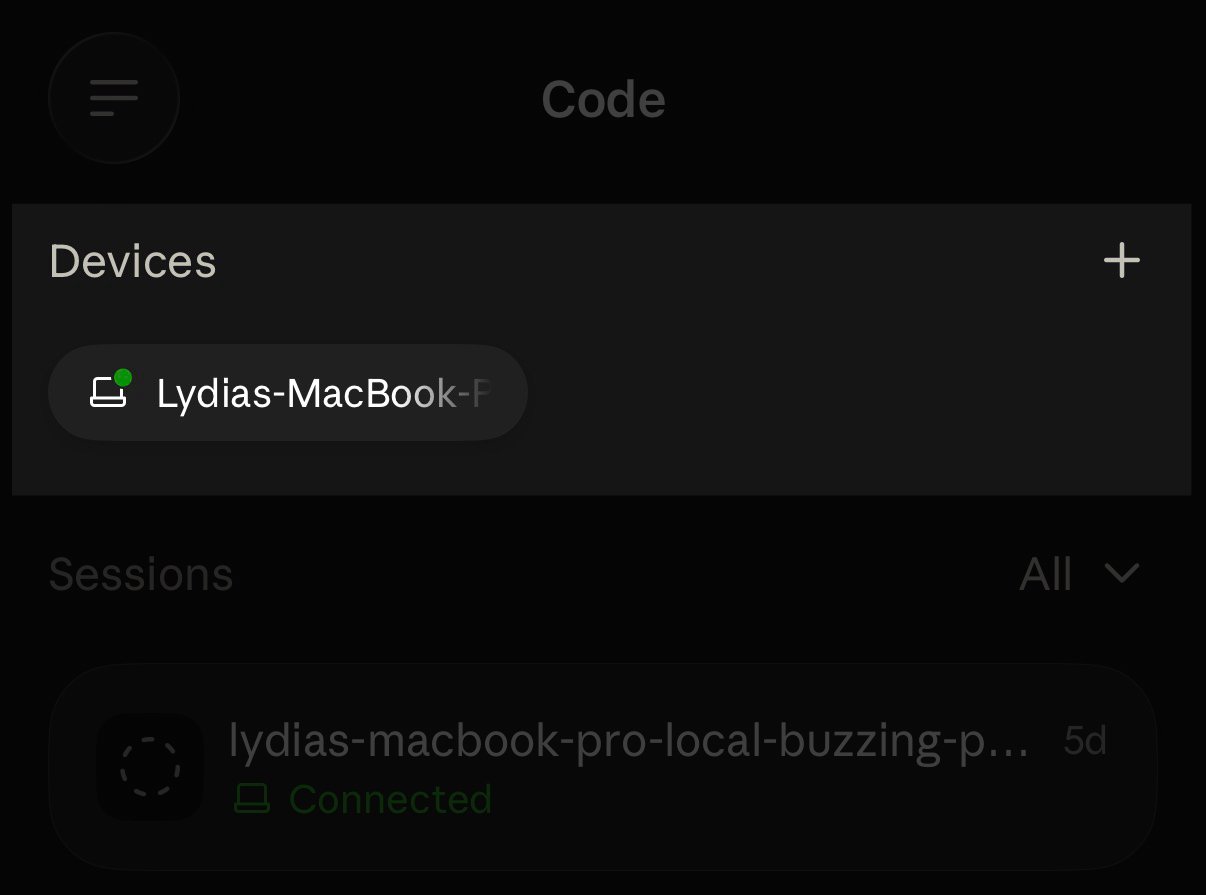
  <p className="digest-feature-lede">Any machine running <code>claude remote-control</code> now shows up as a device card at the top of the Code tab in the Claude app. Remote Control is also out of research preview.</p>

  <Frame>
    <img className="w-full" src="https://mintcdn.com/claude-code/2SnAdpL4dJ18nKb3/images/whats-new/remote-control-phone-start.jpg?fit=max&auto=format&n=2SnAdpL4dJ18nKb3&q=85&s=9f0ebedab23aa0e1732cc37782573907" alt="The Code tab in the Claude mobile app with a Devices section showing a connected MacBook as a device card above the sessions list" width="1206" height="895" data-path="images/whats-new/remote-control-phone-start.jpg" />
  </Frame>

  <p className="digest-feature-try">Start Remote Control on the machine you want to reach, then open the Code tab on your phone:</p>

  ```bash terminal theme={null}
  claude remote-control
  ```

  <p className="digest-feature-try">Your machine appears as a device card at the top of the Code tab. Tap it to pick a directory and start a session there.</p>

  <a className="digest-feature-link" href="/docs/docs/en/remote-control#start-a-remote-control-session">Start a Remote Control session</a>
</div>

<div className="digest-wins">
  <p className="digest-wins-title">Other wins</p>

  <div className="digest-wins-grid">
    <div>Claude Code now continues your session automatically when a claude.ai usage limit resets; turn it off from the <strong>Continue automatically at usage limit</strong> row in <code>/config</code></div>
    <div>The optional <a href="/docs/docs/en/interactive-mode#check-spelling-as-you-type"><code>spellcheck</code> setting</a> underlines misspelled words in the prompt input as you type, using your installed <code>aspell</code>, <code>hunspell</code>, or <code>ispell</code></div>
    <div>On a branch with an open GitLab merge request, with the <code>glab</code> CLI authenticated through <code>glab auth login</code>, the footer shows an <a href="/docs/docs/en/interactive-mode#gitlab-merge-requests"><code>MR !N</code> badge</a> colored by whether the merge request is a draft, open, or mergeable</div>
    <div>Change the effort level from your phone or claude.ai/code and it <a href="/docs/docs/en/remote-control#what-connected-devices-see">applies to the session on your machine</a>; Remote Control sessions hosted by Desktop or VS Code also show connected devices the session's current permission mode</div>
    <div>You can open <a href="/docs/docs/en/permissions#manage-permissions"><code>/permissions</code></a> or run <code>/add-dir \<path></code> while Claude is working; permission rule changes apply to the rest of the current turn</div>
    <div>When background tasks keep a <a href="/docs/docs/en/goal#background-work-defers-evaluation"><code>/goal</code></a> waiting, Claude checks in on them after 30 minutes instead of waiting indefinitely and keeps checking in, at longer intervals while the session sits idle; set <code>CLAUDE\_CODE\_GOAL\_CHECKIN\_MINUTES=0</code> to opt out</div>
    <div>Your own prompts now render markdown in the transcript, with highlighted code blocks, inline code, and lists, the same way replies do</div>
    <div>The new <a href="/docs/docs/en/model-config#set-a-default-model-for-new-sessions"><code>ANTHROPIC\_DEFAULT\_MODEL</code></a> environment variable sets the model new sessions start on; a <code>/model</code> pick still overrides it and persists across restarts</div>
    <div>With the <code>notify\_when\_idle</code> input on <code>SendMessage</code>, Claude can ask another Claude Code session on the same machine to <a href="/docs/docs/en/cross-session-messaging#get-a-notice-when-another-session-goes-idle">send one notice when it next goes idle</a></div>
    <div>Set <a href="/docs/docs/en/interactive-mode#make-ctrl-w-delete-back-to-whitespace"><code>keybindingFlavor</code></a> to <code>"readline"</code> to make <code>Ctrl+W</code> in the prompt delete back to the previous whitespace, as Bash does, instead of stopping at punctuation such as <code>/</code></div>
    <div>On native Windows, your Claude Code sessions can now <a href="/docs/docs/en/cross-session-messaging#availability">message each other</a> with <code>SendMessage</code> and find each other with <code>ListAgents</code>, as on macOS and Linux</div>
    <div>Self-hosted runners accept `--defer-shutdown-max-min`, which <a href="/docs/docs/en/self-hosted-environments-deploy#defer-the-drain-past-the-first-signal">keeps serving attached sessions</a> for a set number of minutes after SIGTERM</div>
    <div>Self-hosted runners accept `--proxy-authorization-command` or `--proxy-authorization-file` to supply a fresh `Proxy-Authorization` header for <a href="/docs/docs/en/self-hosted-environments-deploy#authenticate-to-an-egress-proxy">egress proxies that require one</a></div>
  </div>
</div>

[Full changelog for v2.1.234–v2.1.239 →](/docs/en/changelog#2-1-234)