> ## Documentation Index
> Fetch the complete documentation index at: https://code.claude.com/docs/llms.txt
> Use this file to discover all available pages before exploring further.
# Plugins 概述
> 了解什麼是 Claude Code plugin,何時需要使用 plugin 而不是獨立的 skill 或 MCP 伺服器,以及應該閱讀哪個頁面來安裝或建立 plugin。
Claude Code plugin 是一個目錄,包含 skills、agents、hooks、MCP 伺服器或其他元件,Claude Code 會將其作為一個單位進行安裝和載入。大多數 plugins 來自 marketplace,marketplace 是一個目錄,列出 plugins 及其取得位置。您也可以從某人提供給您的資料夾中載入 plugin,或[建立您自己的](/docs/zh-TW/plugins/create)。
如果您使用 claude.ai 聊天或 Cowork 而不是 Claude Code,請參閱[claude.ai 和 Cowork 中的 Plugins](https://claude.com/docs/plugins/overview)。
若要立即試用 plugin,請在 Claude Code 終端機工作階段中執行 `/plugin`,並從 **Discover** 標籤安裝一個,該標籤列出來自 Anthropic 官方 marketplace 和您已新增的任何 marketplace 的 plugins。從那裡:
* [安裝和管理 plugins](/docs/zh-TW/plugins/install):完整的安裝步驟、範圍和其他介面
* [建立 plugin](/docs/zh-TW/plugins/create):建立您自己的
* [決定您是否需要 plugin](#decide-whether-you-need-a-plugin):plugin 是否是您想要的正確工具
了解什麼是 plugin
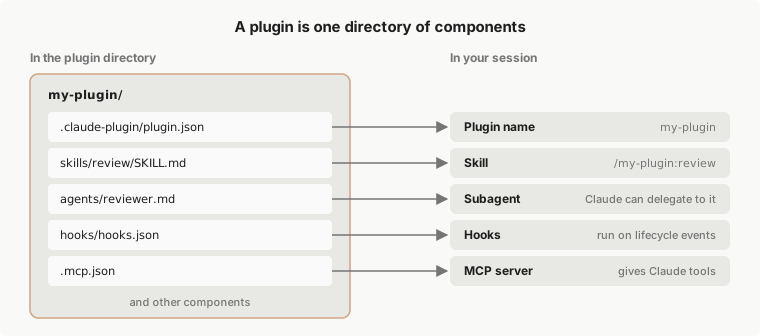
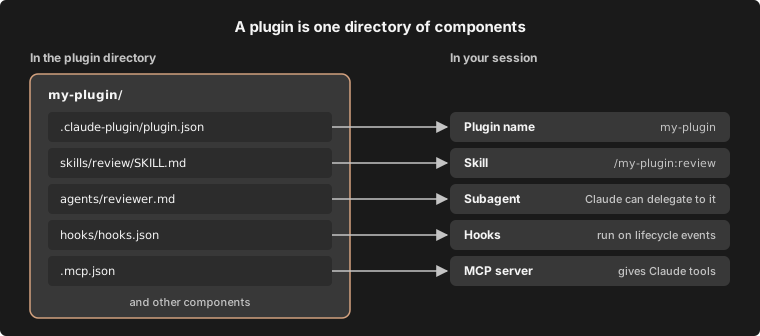
Plugin 是一個元件目錄,通常帶有 manifest。Manifest 是位於 `.claude-plugin/plugin.json` 的 JSON 檔案,它為 plugin 提供名稱,並可以新增版本、描述和其他[中繼資料](/docs/zh-TW/plugins/manifest-reference)。元件是 plugin 新增到 Claude Code 的內容,例如:
* [**Skills**](/docs/zh-TW/plugins/components#skills):`SKILL.md` 指令,Claude 在相關時載入,您也可以作為命令執行
* [**Agents**](/docs/zh-TW/plugins/components#agents):Claude 可以委派給的子代理定義
* [**Hooks**](/docs/zh-TW/plugins/components#hooks):Claude Code 在其生命週期中的特定點執行的命令,例如每次編輯後
* [**MCP servers**](/docs/zh-TW/plugins/components#mcp-servers):工具伺服器,Claude Code 在啟用 plugin 時連接到
此圖表顯示一個名為 `my-plugin` 的 plugin,其中包含上述每種元件之一,以及 plugin 載入後您從每個檔案獲得的內容。
 如需 plugin 可以包含的每種元件類型及其示例,請參閱 [Plugin 元件](/docs/zh-TW/plugins/components)。若要查看每個部分在 plugin 目錄中的位置,請使用該頁面上的 [plugin 探索工具](/docs/zh-TW/plugins/components#explore-the-plugin-directory)。
決定您是否需要 plugin
Skills、子代理、hooks 和 MCP 伺服器都可以獨立運作,無需 plugin。例如,您在 `~/.claude/skills/` 中保存的 skill 在您機器上的每個專案中都可用。若要單獨設定其中一個,請參閱 [Skills](/docs/zh-TW/skills)、[Subagents](/docs/zh-TW/sub-agents)、[Hooks](/docs/zh-TW/hooks-guide) 或 [MCP](/docs/zh-TW/mcp)。
當您想要將多個 skills、子代理、hooks 或 MCP 伺服器打包為一個單位時,請使用 plugin。安裝一個以獲得某人建立的設定,只需一個命令並從其 marketplace 獲得更新。建立一個以將您自己的設定提供給隊友,在許多專案中安裝它,或發佈版本化版本。
啟用的 plugin 對您的工作階段的影響
啟用的 plugin 是每個工作階段的一部分,不僅是您使用它的工作階段。這有幾個後果值得在安裝之前了解:
* **上下文和使用情況**:對於每個 skill、agent 和 [Claude 可以自行調用](/docs/zh-TW/skills#control-who-invokes-a-skill)的命令,名稱和描述都在 Claude 的每個回合的上下文中,以便 Claude 知道它存在。這些令牌計入您的使用情況,並在[上下文視窗](/docs/zh-TW/context-window)中留下更少的空間,即使在 plugin 中沒有任何內容執行的工作階段中也是如此。skill 或 agent 的完整文本僅在使用時載入。Plugin 的 MCP 伺服器每個回合新增的內容遵循 [MCP 工具搜尋](/docs/zh-TW/mcp#scale-with-mcp-tool-search)。
* **程序**:plugin 定義的 MCP 伺服器在啟用它的每個工作階段旁邊執行,其 hooks 在其事件處觸發。
* **權限**:plugin 執行的內容以您的身份執行。請參閱 [Plugin 安全性和信任](/docs/zh-TW/plugins/security),了解首先要檢查的內容。
您可以在每個階段檢查 plugin 的佔用空間:
* **安裝前**:從 `/plugin` 中的 **Marketplaces** 標籤開啟 plugin。Anthropic 官方 marketplace 中的 Plugins 在那裡顯示 **Context cost** 估計。
* **安裝後**:[測量 plugin 的成本](/docs/zh-TW/plugins/measure#measure-what-a-plugin-costs)顯示如何讀取 plugin 的佔用空間,**Installed** 標籤的 **Not used recently** 群組列出您可以關閉的 plugins。
* **在不卸載的情況下停止它**:使用 `/plugin` 或在您的 shell 中使用 `claude plugin disable` 停用 plugin。請參閱[管理已安裝的 plugins](/docs/zh-TW/plugins/install#manage-installed-plugins)。
從 marketplace 取得 plugins
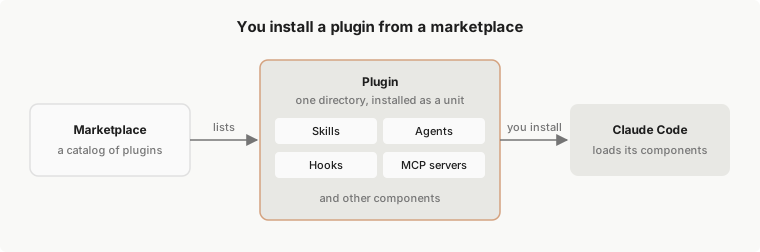
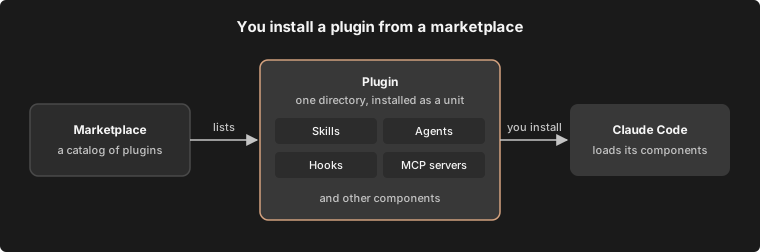
Marketplace 是一個儲存庫或目錄,具有 `.claude-plugin/marketplace.json` 檔案,該檔案列出 plugins 及其取得位置。它是一個目錄,不是託管商店。您新增一次 marketplace,然後按名稱從中安裝 plugins,例如 `commit-commands@claude-plugins-official`。
Plugin marketplace 不是 [Claude Marketplace](https://claude.com/marketplace)。Claude Marketplace 是 claude.com/marketplace 上的網站,您可以在其中瀏覽 plugins、連接器、合作夥伴產品和服務合作夥伴。它不是您使用 `/plugin marketplace add` 新增的 marketplace。
Claude Code 在您第一次啟動互動式終端機工作階段時新增 Anthropic 的官方 marketplace,除非[受管原則](/docs/zh-TW/plugins/org#allow-the-official-marketplace-and-your-own)阻止它。Claude Code 不會自行新增任何其他 marketplace,包括 Anthropic 的社群和演示 marketplaces。若要區分三個 Anthropic marketplaces,請閱讀 [Anthropic 的 marketplaces](/docs/zh-TW/plugins/anthropic-marketplaces)。若要查看官方 marketplace 列出的內容,請在工作階段中開啟 `/plugin` 的 **Discover** 標籤或瀏覽 [Claude Marketplace](https://claude.com/marketplace/plugins)。
此圖表顯示從 marketplace 到您的工作階段的路徑。Marketplace 列出 plugin,您安裝該 plugin,Claude Code 載入其元件。
 [安裝和管理 plugins](/docs/zh-TW/plugins/install#install-a-plugin) 有您執行 Claude Code 的每個位置的安裝步驟。在您開發 plugin 時,您不需要 marketplace:使用 `--plugin-dir` 直接從其資料夾載入它,如[在沒有 marketplace 的情況下開發](/docs/zh-TW/plugins/create#develop-without-a-marketplace)所示。
在您的工作階段中提供已安裝的 plugin
在您安裝的 plugin 為您提供可以執行的 skill 之前,它必須存在於以下每個層級:
* **設定**:您的設定列出您已新增的 marketplaces 和啟用的 plugins。
* **磁碟**:`~/.claude/plugins/` 保存 Claude Code 已取得和安裝的內容。
* **工作階段**:plugins 在啟動時載入,或當您[重新載入 plugins](/docs/zh-TW/plugins/loading#check-which-stage-a-plugin-reached)時。
閱讀 [Plugin 載入參考](/docs/zh-TW/plugins/loading),了解每個層級的規則,包括哪個設定檔優先以及檔案在磁碟上的位置。
區分 Anthropic 的 marketplaces 和第三方 marketplaces
Marketplace 的名稱將其放在三個層級之一中。Claude Code 僅接受來自 `github.com/anthropics/` 儲存庫的 marketplaces 的官方和社群名稱:
* **官方**:具有 Anthropic [官方 marketplace 名稱](/docs/zh-TW/plugins/security#official-marketplace-names)之一的 marketplaces,包括 `claude-plugins-official` 和演示 marketplace `claude-code-plugins`。
* **社群**:具有 Anthropic 社群名稱之一的 marketplaces,例如 `claude-community`。[按名稱識別 Anthropic 的 marketplaces](/docs/zh-TW/plugins/security#marketplace-tiers) 列出它們。
* **第三方**:所有其他 marketplaces。您的同事或您的組織發佈的 marketplace 是第三方。
無論層級如何,您安裝的 plugin 都可以使用您的使用者權限執行程式碼。閱讀 [Plugin 安全性和信任](/docs/zh-TW/plugins/security),了解如何在安裝 plugin 之前檢查它。
通過[受管設定](/docs/zh-TW/settings#settings-files),組織可以允許列表或阻止 marketplaces、強制安裝 plugins 並關閉僅工作階段載入。閱讀[為您的組織管理 plugins](/docs/zh-TW/plugins/org),了解這些控制項。
了解安裝範圍
當您安裝 plugin 時,您選擇一個範圍,範圍決定誰啟用了 plugin:
* **使用者範圍**:在此電腦上的每個專案中為您啟用
* **專案範圍**:通過已提交的 `.claude/settings.json` 為在此儲存庫中工作的每個人啟用。每個協作者仍然[在自己的機器上安裝它](/docs/zh-TW/plugins/loading#enabled-in-project-settings-but-not-installed)
* **本機範圍**:僅在此儲存庫中為您啟用
您在終端機、桌面應用程式的本機工作階段或 VS Code 擴充功能中以使用者範圍安裝的 plugin 在該電腦上的其他兩個中可用,因為所有三個都讀取相同的設定檔。請參閱[選擇安裝範圍](/docs/zh-TW/plugins/install#choose-an-install-scope),了解如何選擇一個。
雲端工作階段(包括瀏覽器中 claude.ai/code 的工作階段)不會載入您本機設定中的 plugins。如需終端機、VS Code 和桌面應用程式中的安裝步驟,以及雲端工作階段載入的內容,請參閱[安裝 plugin](/docs/zh-TW/plugins/install#install-a-plugin)。
相同的 plugin 格式也安裝在 claude.ai 和 Cowork 上,其中載入了不同的元件集。對於這些介面,請參閱 claude.com 上的 [claude.ai 和 Cowork 中的 Plugins](https://claude.com/docs/plugins/overview)。
後續步驟
大多數人首先從 Anthropic 的官方 marketplace 安裝 plugin,Claude Code 在您第一次啟動互動式終端機工作階段時新增該 marketplace。在終端機工作階段中執行 `/plugin` 以瀏覽它,或遵循[安裝和管理 plugins](/docs/zh-TW/plugins/install),其中也涵蓋桌面應用程式和 VS Code。若要在開啟 Claude Code 之前查看該 marketplace 中的內容,請在網路上瀏覽 [Claude Marketplace](https://claude.com/marketplace/plugins)。
若要建立您自己的,[建立 plugin](/docs/zh-TW/plugins/create) 從空目錄開始,以工作中的 plugin 結束。
安裝或建立 plugin 後,這些頁面涵蓋接下來的內容:
* **分享您建立的內容**:[發佈和分發 plugin](/docs/zh-TW/plugins/publish)
* **檢查它是否有效且被使用**:[使用 evals 測試 plugins](/docs/zh-TW/plugin-evals) 和[測量 plugin 成本和使用情況](/docs/zh-TW/plugins/measure)
* **為您的團隊執行 marketplace**:[建立 marketplace](/docs/zh-TW/plugins/create-marketplace),然後[託管和維護 marketplace](/docs/zh-TW/plugins/host-marketplace)
* **為組織設定 plugin 原則**:[為您的組織管理 plugins](/docs/zh-TW/plugins/org)
* **修復問題**:[Plugin 故障排除](/docs/zh-TW/plugins/troubleshooting)