> ## Documentation Index
> Fetch the complete documentation index at: https://code.claude.com/docs/llms.txt
> Use this file to discover all available pages before exploring further.

# 第 20 週 · 2026 年 5 月 11–15 日

> 從一個螢幕管理每個 Claude Code 工作階段，使用代理檢視，讓 Claude 持續朝著目標工作直到條件成立，並在 Opus 4.7 上預設執行快速模式。

<div className="digest-meta">
  <span>版本 <a href="/zh-TW/changelog#2-1-139">v2.1.139 → v2.1.142</a></span>
  <span>3 項功能 · 5 月 11–15</span>
</div>

<div className="digest-feature">
  <div className="digest-feature-header">
    <span className="digest-feature-title">Agent view</span>
    <span className="digest-feature-pill">research preview</span>
  </div>

  <p className="digest-feature-lede"><code>claude agents</code> 為每個 Claude Code 工作階段開啟一個螢幕：什麼正在執行、什麼在等待您的輸入，以及什麼已完成。分派一個錯誤修復、一個拉取請求審查和一個不穩定測試調查作為三行，在另一個視窗中繼續工作，只在一行需要您時才介入。附加到任何一行以進入其完整對話，然後按 <code>←</code> 返回列表。每個背景工作階段在沒有終端連接的情況下繼續執行。</p>

  <Frame>
    <video autoPlay muted loop playsInline className="w-full" src="https://mintcdn.com/claude-code/ITvjicPxe1SM3GX7/images/whats-new/agent-view.mp4?fit=max&auto=format&n=ITvjicPxe1SM3GX7&q=85&s=0eefe6cbe75464c8f7902bba630ab7a4" data-path="images/whats-new/agent-view.mp4" />
  </Frame>

  <p className="digest-feature-try">從您的 shell 開啟儀表板：</p>

  ```bash terminal theme={null}
  claude agents
  ```

  <a className="digest-feature-link" href="/zh-TW/agent-view">Agent view</a>
</div>

<div className="digest-feature">
  <div className="digest-feature-header">
    <span className="digest-feature-title">/goal</span>
    <span className="digest-feature-pill">v2.1.139</span>
  </div>

  <p className="digest-feature-lede">設定完成條件，Claude 會在多個回合中持續朝著它工作，無需您提示每一步。在每個回合之後，一個快速模型檢查條件是否成立；如果不成立，Claude 會開始另一個回合，而不是將控制權交回。適用於具有可驗證終止狀態的大量工作，例如遷移模組直到每個呼叫位置都編譯並通過測試。目標在條件滿足後清除，並在互動、<code>-p</code> 和 Remote Control 中工作。</p>

  <Frame>
    <video autoPlay muted loop playsInline className="w-full" src="https://mintcdn.com/claude-code/ITvjicPxe1SM3GX7/images/whats-new/goal.mp4?fit=max&auto=format&n=ITvjicPxe1SM3GX7&q=85&s=6806df3780c548b93a02d6fa71da276b" data-path="images/whats-new/goal.mp4" />
  </Frame>

  <p className="digest-feature-try">設定目標並讓 Claude 執行直到它成立：</p>

  ```text Claude Code theme={null}
  > /goal all tests in test/auth pass and the lint step is clean
  ```

  <a className="digest-feature-link" href="/zh-TW/goal">Goals</a>
</div>

<div className="digest-feature">
  <div className="digest-feature-header">
    <span className="digest-feature-title">Fast mode on Opus 4.7</span>
    <span className="digest-feature-pill">research preview</span>
  </div>

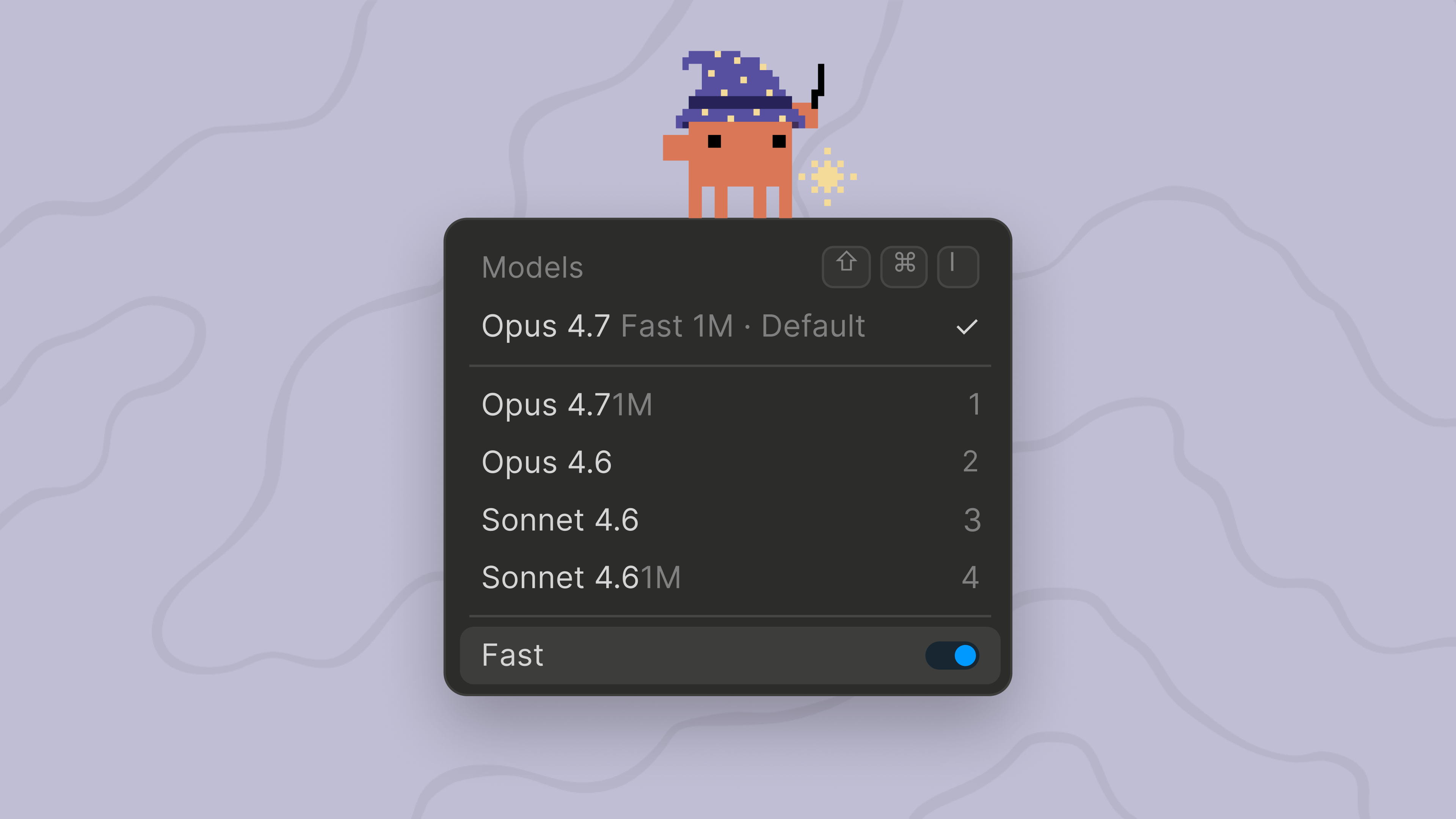
  <p className="digest-feature-lede"><code>/fast</code> 現在預設在 Opus 4.7 上執行，而不是 Opus 4.6。快速模式是高速 Opus 配置：相同的模型品質，速度約快 2.5 倍，但每個 token 成本更高，適用於快速迭代和即時除錯。定價保持不變，為 $30/$150 per MTok，與 Opus 4.6 快速模式相同。要將快速模式固定到 Opus 4.6，請設定 <code>CLAUDE\_CODE\_OPUS\_4\_6\_FAST\_MODE\_OVERRIDE=1</code>。</p>

  <Frame>
    <img className="w-full" src="https://mintcdn.com/claude-code/ITvjicPxe1SM3GX7/images/whats-new/fast-mode-opus-47.png?fit=max&auto=format&n=ITvjicPxe1SM3GX7&q=85&s=6b6d92f7748ce5328a1ee9a269fb1a87" alt="Claude Code 模型選擇器顯示 Opus 4.7 Fast 1M 作為預設值，並啟用了 Fast 切換" width="3840" height="2160" data-path="images/whats-new/fast-mode-opus-47.png" />
  </Frame>

  <p className="digest-feature-try">切換快速模式，現在在 Opus 4.7 上執行：</p>

  ```text Claude Code theme={null}
  > /fast
  ```

  <a className="digest-feature-link" href="/zh-TW/fast-mode#understand-the-cost-tradeoff">Fast mode on Opus 4.7</a>
</div>

<div className="digest-wins">
  <p className="digest-wins-title">其他成果</p>

  <div className="digest-wins-grid">
    <div><code>claude agents</code> 獲得了分派標誌（<code>--add-dir</code>、<code>--settings</code>、<code>--mcp-config</code>、<code>--plugin-dir</code>、<code>--permission-mode</code>、<code>--model</code>、<code>--effort</code>、<code>--dangerously-skip-permissions</code>）來配置背景工作階段，<code>claude agents --cwd \<path></code> 將工作階段列表限制在一個目錄</div>
    <div>新的 hook <code>args: string\[]</code> exec 形式直接生成命令而不使用 shell，因此路徑佔位符永遠不需要引用</div>
    <div>新的 <code>continueOnBlock</code> 配置選項用於 <code>PostToolUse</code> hooks，將 hook 的拒絕原因反饋給 Claude 並繼續回合，而不是結束它</div>
    <div>hook JSON 輸出中的新 <code>terminalSequence</code> 欄位讓 hooks 發出桌面通知、視窗標題和鈴聲，無需控制終端</div>
    <div>Rewind 菜單新增了「在此處總結」以壓縮較早的上下文，同時保持最近的回合完整</div>
    <div>當設定 <code>ANTHROPIC\_API\_KEY</code>、<code>apiKeyHelper</code> 或 <code>ANTHROPIC\_AUTH\_TOKEN</code> 時，Remote Control、<code>/schedule</code>、Claude.ai MCP 連接器和通知偏好設定現在被禁用，即使與 Claude.ai 登入並行；取消設定 API 金鑰以使用這些功能</div>
    <div>MCP stdio 伺服器現在在其環境中接收 <code>CLAUDE\_PROJECT\_DIR</code>，與 hooks 相符，plugin 配置可以在命令中參考 <code>\${"{"}CLAUDE\_PROJECT\_DIR{"}"}</code></div>
    <div><code>claude plugin details \<name></code> 顯示 plugin 的元件清單和預計的每個工作階段 token 成本，<code>/plugin</code> 詳細資訊窗格現在也列出 plugin 提供的 LSP 伺服器</div>
    <div>具有根級 <code>SKILL.md</code> 且沒有 <code>skills/</code> 子目錄的 Plugins 現在被呈現為一個 skill</div>
    <div><code>/feedback</code> 現在可以包含過去 24 小時或 7 天內的最近工作階段，用於跨越超過當前工作階段的問題</div>
    <div>Agent tool <code>subagent\_type</code> 現在不區分大小寫和分隔符地匹配，因此 <code>"Code Reviewer"</code> 解析為 <code>code-reviewer</code></div>
  </div>
</div>

[v2.1.139–v2.1.142 的完整變更日誌 →](/zh-TW/changelog#2-1-139)