> ## Documentation Index
> Fetch the complete documentation index at: https://code.claude.com/docs/llms.txt
> Use this file to discover all available pages before exploring further.

# Week 37 · September 7–11, 2026

> Test your plugins with claude plugin eval and pop Claude Code Desktop panes out into their own windows.

<div className="digest-meta">
  <span>Releases <a href="/docs/en/changelog#2-1-263">v2.1.263 → v2.1.269</a></span>
  <span>2 features · September 7–11</span>
</div>

<div className="digest-feature">
  <div className="digest-feature-header">
    <span className="digest-feature-title">Test plugins with claude plugin eval</span>
    <span className="digest-feature-pill">v2.1.269</span>
  </div>

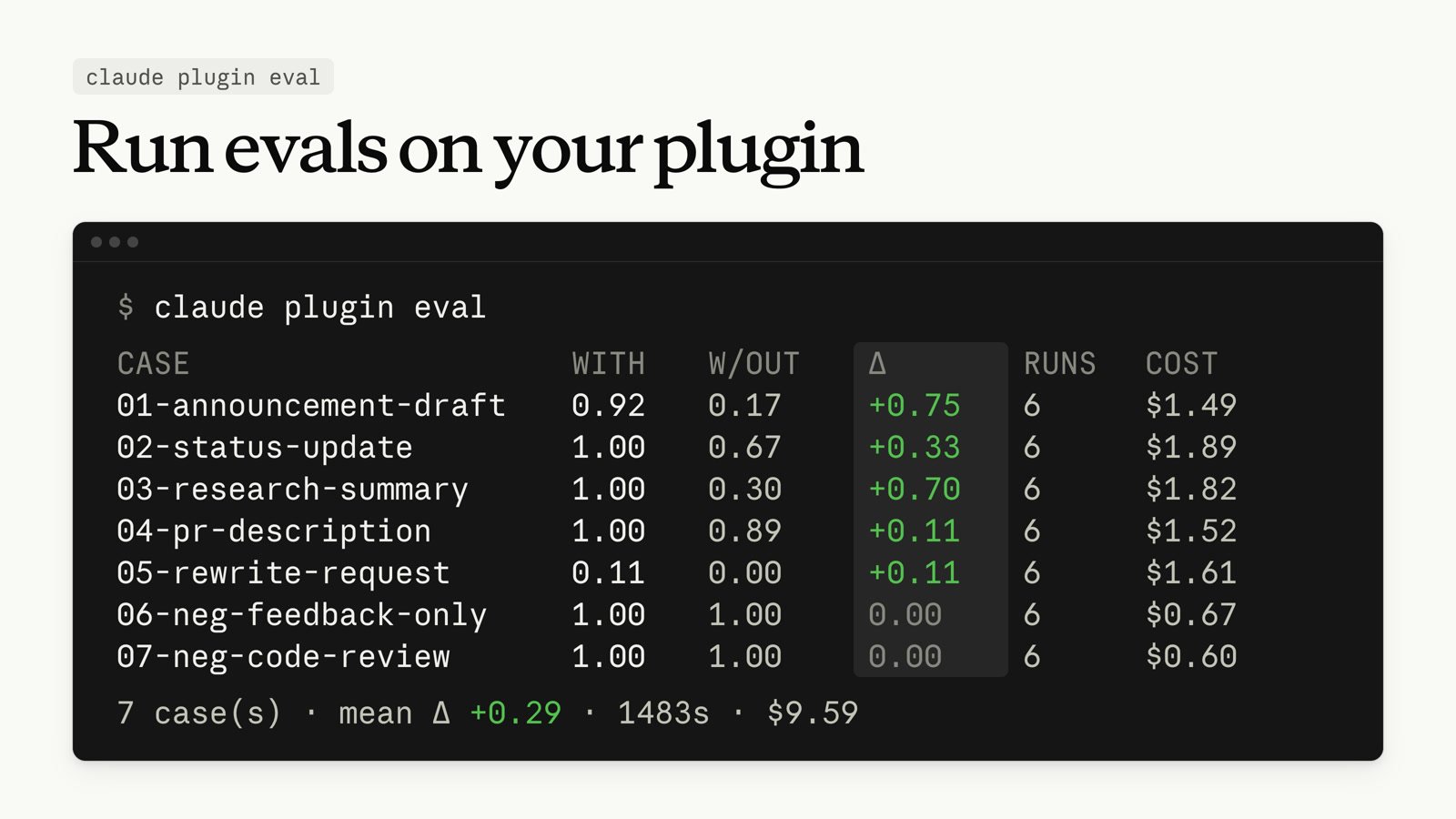
  <p className="digest-feature-lede"><code>claude plugin eval</code> runs your plugin against a suite of test cases, scores the results, and by default runs each case again without the plugin so you can see what it contributes. <code>claude plugin eval init</code> asks you what a good result looks like, then proposes test cases and the checks that score them, tries the suite once, and writes the files. Every run, and every check that has a second model judge the reply, is a real model call on your account.</p>

  <Frame>
    <img className="w-full" src="https://mintcdn.com/claude-code/f9HTZGyMtxIFOUgt/images/whats-new/plugin-eval.jpg?fit=max&auto=format&n=f9HTZGyMtxIFOUgt&q=85&s=913066f6d4a2a15426e98a627802f47f" alt="Terminal output of claude plugin eval: a table of seven cases with each case's score with and without the plugin, the delta between them, the run count, and the cost, followed by a summary line with the mean delta, total duration, and total cost" width="1600" height="900" data-path="images/whats-new/plugin-eval.jpg" />
  </Frame>

  <p className="digest-feature-try">From your plugin's root directory, have Claude draft the suite:</p>

  ```bash terminal theme={null}
  claude plugin eval init
  ```

  <p className="digest-feature-try">When Claude tells you the suite is ready, exit the session that <code>claude plugin eval init</code> opened and run <code>claude plugin eval .</code> to score every case. The summary table prints in your terminal, and <code>report.html</code> under <code>evals/results/</code> has the per-run detail.</p>

  <a className="digest-feature-link" href="/docs/en/plugin-evals">Test plugins with evals</a>
</div>

<div className="digest-feature">
  <div className="digest-feature-header">
    <span className="digest-feature-title">Pop Desktop panes out into their own windows</span>
    <span className="digest-feature-pill">Desktop</span>
  </div>

  <p className="digest-feature-lede">In the Claude Code Desktop app, you can pop any pane out into its own window. Drag the diff or terminal to a second screen while Claude keeps working in the main window, then dock the pane back when you're done.</p>

  <Frame>
    <video autoPlay muted loop playsInline className="w-full" src="https://mintcdn.com/claude-code/f9HTZGyMtxIFOUgt/images/whats-new/desktop-pop-out-panes.mp4?fit=max&auto=format&n=f9HTZGyMtxIFOUgt&q=85&s=ff3770dd09bb15ed9cf17a460f3d1e23" data-path="images/whats-new/desktop-pop-out-panes.mp4" />
  </Frame>

  <a className="digest-feature-link" href="/docs/en/desktop#arrange-your-workspace">Arrange your workspace</a>
</div>

<div className="digest-wins">
  <p className="digest-wins-title">Other wins</p>

  <div className="digest-wins-grid">
    <div>Set <a href="/docs/en/settings-reference#maxeffortlevel"><code>maxEffortLevel</code></a> at the top level or per model under <code>modelSettings</code> to cap the effort level on every provider, including Amazon Bedrock, Google Cloud's Agent Platform, and Microsoft Foundry; any higher level runs at the cap</div>
    <div>Point `--plugin-dir` at a folder of plugins to <a href="/docs/en/plugins#test-your-plugins-locally">load each immediate subfolder that has a manifest</a></div>
    <div>If WebFetch hasn't finished downloading a page within five minutes, <a href="/docs/en/tools-reference#webfetch-tool-behavior">the fetch fails with a deadline error</a> instead of hanging; set <code>CLAUDE\_CODE\_WEBFETCH\_DEADLINE\_MS</code> to change the deadline, or to <code>0</code> to remove the limit</div>
    <div>Pass `--json` to <code>claude plugin install</code>, <code>uninstall</code>, <code>update</code>, <code>enable</code>, or <code>disable</code> to print the result as <a href="/docs/en/plugins-reference#plugin-json-result">one JSON object on the last line of stdout</a></div>
    <div>When the auto mode classifier blocks an action, the reason Claude receives <a href="/docs/en/auto-mode-config#fix-a-denial-with-an-allow-rule-an-environment-entry-or-a-retry">usually names the rule that matched</a>, such as <code>\[Data Exfiltration]</code></div>
    <div>When you type <code>/</code> partway through a prompt, you can now pick from <a href="/docs/en/interactive-mode#complete-a-command-mid-prompt">a list of matching commands</a> instead of a single suggestion. The list opens as you type in fullscreen rendering. A plugin skill also matches on its name without the plugin prefix</div>
    <div>In the VS Code extension, click the agent count at the bottom of the prompt box to open the <a href="/docs/en/vs-code#use-the-prompt-box">agent map</a>, where you can open a subagent's read-only transcript or stop it</div>
    <div>In the VS Code extension, select <strong>Hooks</strong> or <strong>Permissions</strong> in the command menu's Customize section to <a href="/docs/en/vs-code#use-the-prompt-box">add or remove hooks and permission rules</a> in your user, project, and local settings</div>
    <div>Claude can pick a <a href="/docs/en/artifacts#create-an-artifact">browser-tab icon</a> to match each artifact it publishes</div>
    <div>In Claude Code on the web, take back a queued message in a cloud session before Claude reads it: remove it from the queue, or press <code>Esc</code> or <code>Up</code>, and the text returns to the message box</div>
  </div>
</div>

[Full changelog for v2.1.263–v2.1.269 →](/docs/en/changelog#2-1-263)