> ## Documentation Index
> Fetch the complete documentation index at: https://code.claude.com/docs/llms.txt
> Use this file to discover all available pages before exploring further.

# 第 30 周 · 7 月 20–24 日，2026 年

> Opus 5 成为默认的 Opus 模型，Claude Code Desktop 添加了 iOS 模拟器窗格，Claude Security 插件扫描您的代码以查找漏洞。

<div className="digest-meta">
  <span>发布版本 <a href="/docs/en/changelog#2-1-214">v2.1.214 → v2.1.219</a></span>
  <span>3 项功能 · 7 月 20–24 日</span>
</div>

<div className="digest-feature">
  <div className="digest-feature-header">
    <span className="digest-feature-title">Claude Opus 5</span>
    <span className="digest-feature-pill">新模型</span>
  </div>

  <p className="digest-feature-lede">Claude Opus 5 是 Claude Code 中新的默认 Opus 模型。它是 Max、Team Premium、Enterprise 按量付费以及 Anthropic API 上的默认模型，也是 AWS 上的 Claude Platform、Amazon Bedrock 和 Google Cloud 的 Agent Platform 上的默认模型。在 Anthropic API 以及 Max、Team 和 Enterprise 计划上，Opus 5 运行时具有 <a href="/docs/zh-CN/model-config#extended-context">100 万令牌上下文窗口</a>；在 Amazon Bedrock 和 Google Cloud 的 Agent Platform 上，选择 100 万模型变体。快速模式转移到 Opus 5，价格为每百万令牌 $10/$50。需要 v2.1.219 或更高版本。</p>

  <Frame>
    <video autoPlay muted loop playsInline className="w-full" src="https://mintcdn.com/claude-code/N3yEaTYPXMXFrF6k/images/whats-new/opus-5.mp4?fit=max&auto=format&n=N3yEaTYPXMXFrF6k&q=85&s=8536b1cb3180e539008f39930403e47b" data-path="images/whats-new/opus-5.mp4" />
  </Frame>

  <p className="digest-feature-try">按名称切换到 Opus 5，或从模型选择器中选择它：</p>

  ```text Claude Code theme={null}
  > /model claude-opus-5
  ```

  <a className="digest-feature-link" href="/docs/zh-CN/model-config#available-models">模型配置</a>
</div>

<div className="digest-feature">
  <div className="digest-feature-header">
    <span className="digest-feature-title">Claude Code Desktop 中的 iOS 模拟器</span>
    <span className="digest-feature-pill">Desktop</span>
  </div>

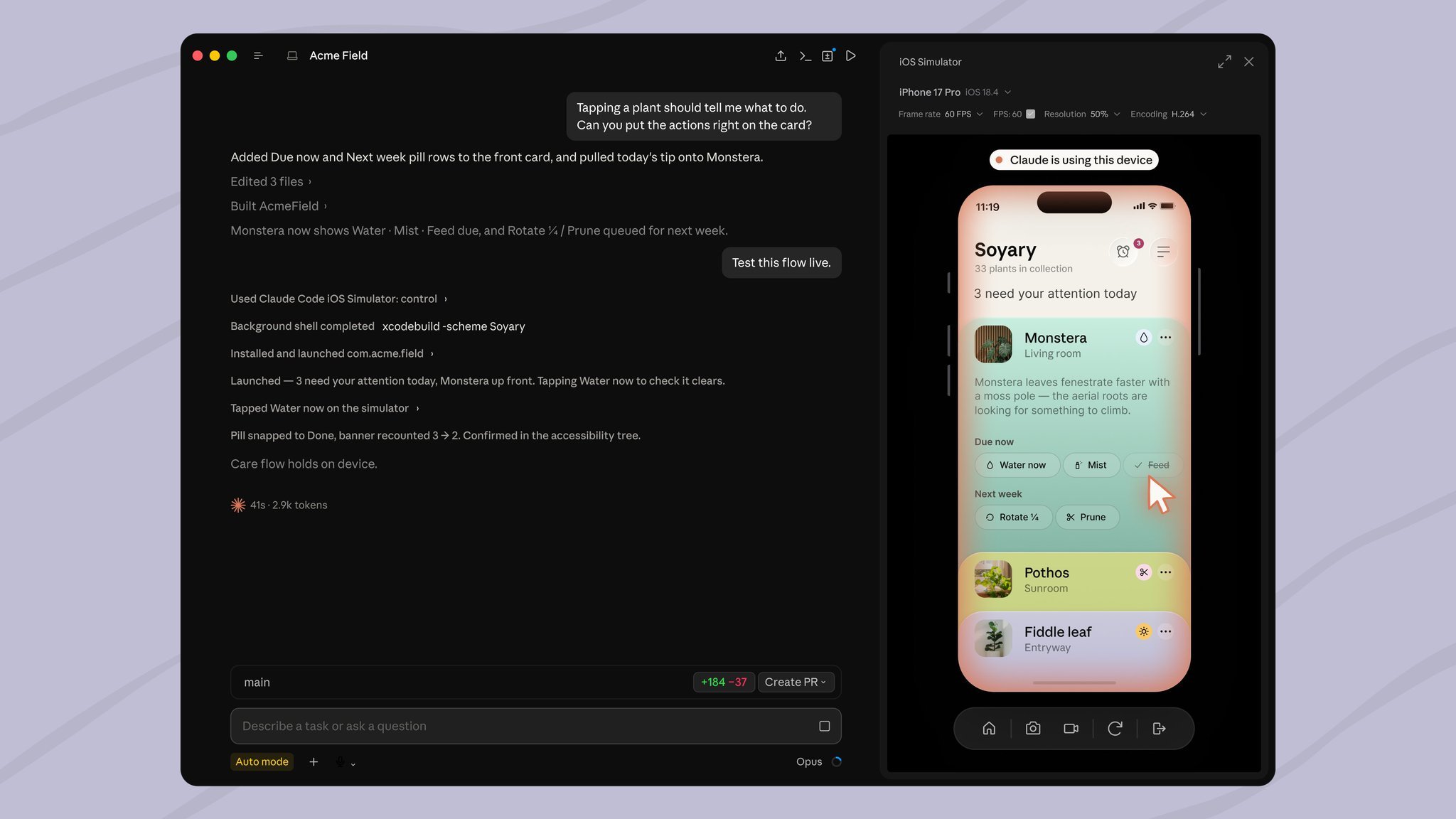
  <p className="digest-feature-lede">macOS 上的 Claude Code Desktop 获得了 iOS 模拟器窗格，在 Pro、Max 和 Team 计划上处于公开测试版。当 Claude 在模拟器中构建、启动或检查您的应用时，该窗格会在对话旁边打开并实时流式传输设备屏幕，因此您可以观看 Claude 点击应用以验证其更改或自己驱动设备。需要安装了 iOS 平台的 Xcode 以及 Claude Desktop v1.24012.0 或更高版本。</p>

  <Frame>
    <img className="w-full" src="https://mintcdn.com/claude-code/N3yEaTYPXMXFrF6k/images/whats-new/ios-simulator.jpg?fit=max&auto=format&n=N3yEaTYPXMXFrF6k&q=85&s=6c88418ed14ed0fb12cc1af75b17f2ee" alt="Claude Code Desktop 显示 iOS 模拟器窗格，在对话旁边显示 iPhone 应用" width="2048" height="1152" data-path="images/whats-new/ios-simulator.jpg" />
  </Frame>

  <p className="digest-feature-try">要求 Claude 运行或测试您的应用，当应用启动时窗格会打开：</p>

  ```text Claude Code theme={null}
  > Build the app and run it in the simulator to check the onboarding flow.
  ```

  <a className="digest-feature-link" href="/docs/zh-CN/desktop-ios-simulator#run-your-app-in-the-simulator">在模拟器中测试 iOS 应用</a>
</div>

<div className="digest-feature">
  <div className="digest-feature-header">
    <span className="digest-feature-title">Claude Security 插件</span>
    <span className="digest-feature-pill">plugin</span>
  </div>

  <p className="digest-feature-lede">Claude Security 插件在 Claude Code 会话内运行代码库的多代理漏洞扫描：代理映射您的架构、构建威胁模型、搜索漏洞，并在将报告写入 <code>CLAUDE-SECURITY-\<timestamp>/</code> 目录之前独立审查每项发现。扫描整个存储库或仅扫描分支的差异、拉取请求或单个提交，然后将您选择的发现转换为经过审查的补丁，您可以自己应用。</p>

  <p className="digest-feature-try">从官方 Anthropic 市场安装插件，运行 <code>/reload-plugins</code>，然后使用 <code>/claude-security</code> 启动扫描：</p>

  ```text Claude Code theme={null}
  > /plugin install claude-security@claude-plugins-official
  ```

  <a className="digest-feature-link" href="/docs/zh-CN/claude-security#scan-and-fix-your-codebase">扫描并修复您的代码库</a>
</div>

<div className="digest-wins">
  <p className="digest-wins-title">其他改进</p>

  <div className="digest-wins-grid">
    <div><a href="/docs/zh-CN/code-review#review-a-diff-locally"><code>/code-review</code></a> 现在作为具有自己上下文窗口的后台子代理运行，因此审查工作不会进入您的对话，发现会在完成时到达</div>
    <div><code>/verify</code>、<code>/code-review</code> 和 <code>/deep-research</code> 仅在您调用时运行；Claude 不再自动启动它们</div>
    <div><a href="/docs/zh-CN/interactive-mode#emoji-shortcodes">Emoji 快捷代码</a>在提示输入中自动完成：输入 <code>:heart:</code> 以插入 emoji，或在 <code>:</code> 后输入两个或更多字符以获得建议；使用 <code>emojiCompletionEnabled</code> 关闭它</div>
    <div>具有 <code>context: fork</code> 的 Skills <a href="/docs/zh-CN/skills#run-skills-in-a-subagent">默认在后台运行</a>，skill 的 frontmatter 中的 <code>background: false</code> 在同一轮中等待结果</div>
    <div>会话默认运行最多 20 个子代理并发；使用 <code>CLAUDE\_CODE\_MAX\_CONCURRENT\_SUBAGENTS</code> 更改 <a href="/docs/zh-CN/sub-agents#concurrent-subagent-limit">限制</a></div>
    <div>`--max-budget-usd` 现在对子代理强制执行上限：一旦支出达到上限，Claude 无法启动更多，运行中的后台子代理会停止</div>
    <div>新的 <a href="/docs/zh-CN/sandboxing#disable-filesystem-isolation"><code>sandbox.filesystem.disabled</code></a> 设置跳过文件系统隔离，同时保持网络出口控制</div>
    <div>在自动模式下，对危险 <code>rm</code> 命令、后台作业和可疑 Windows 路径的检查不再打开权限对话框；自动模式分类器会对其进行判决</div>
    <div>Bash 权限检查在更多 shell 形式上失败关闭，包括文件描述符重定向、<code>\[\[</code> 比较中的 Zsh 变量下标、可能运行不安全选项的 <code>help</code> 和 <code>man</code> 调用，以及超过 10,000 个字符的命令</div>
    <div><a href="/docs/zh-CN/fast-mode">快速模式</a>不再支持 Opus 4.7：<code>/fast</code> 现在适用于 Opus 5 和 Opus 4.8</div>
    <div>长时间运行的工具调用会发出定期进度心跳，而不是保持沉默</div>
  </div>
</div>

[v2.1.214–v2.1.219 的完整更新日志 →](/docs/en/changelog#2-1-214)