> ## Documentation Index
> Fetch the complete documentation index at: https://code.claude.com/docs/llms.txt
> Use this file to discover all available pages before exploring further.

# Week 36 · August 31 – September 4, 2026

> Switch to Claude Fable 5.1, let computer use run in the background on Desktop, and watch Claude's edits in a live /diff panel.

<div className="digest-meta">
  <span>Releases <a href="/docs/en/changelog#2-1-251">v2.1.251 → v2.1.261</a></span>
  <span>4 features · August 31 – September 4</span>
</div>

<div className="digest-feature">
  <div className="digest-feature-header">
    <span className="digest-feature-title">Claude Fable 5.1</span>
    <span className="digest-feature-pill">new model</span>
  </div>

  <p className="digest-feature-lede">Claude Fable 5.1 is available in Claude Code with a 1M-token context window, and the <code>fable</code> alias now selects it. In Claude apps gateway sessions, <code>fable</code> still selects Fable 5. If your gateway serves Fable 5.1, run <code>/model claude-fable-5-1</code>. Requires v2.1.257 or later.</p>

  <p className="digest-feature-try">Switch the current session to Fable 5.1 and save it as your default:</p>

  ```text Claude Code theme={null}
  > /model fable
  ```

  <p className="digest-feature-try">On the Anthropic API, the picker lists Fable only once the server reports it available for your organization, but typing <code>/model fable</code> checks with the server directly.</p>

  <a className="digest-feature-link" href="/docs/en/model-config#work-with-fable">Work with Fable</a>
</div>

<div className="digest-feature">
  <div className="digest-feature-header">
    <span className="digest-feature-title">Computer use runs in the background on Desktop</span>
    <span className="digest-feature-pill">Desktop</span>
  </div>

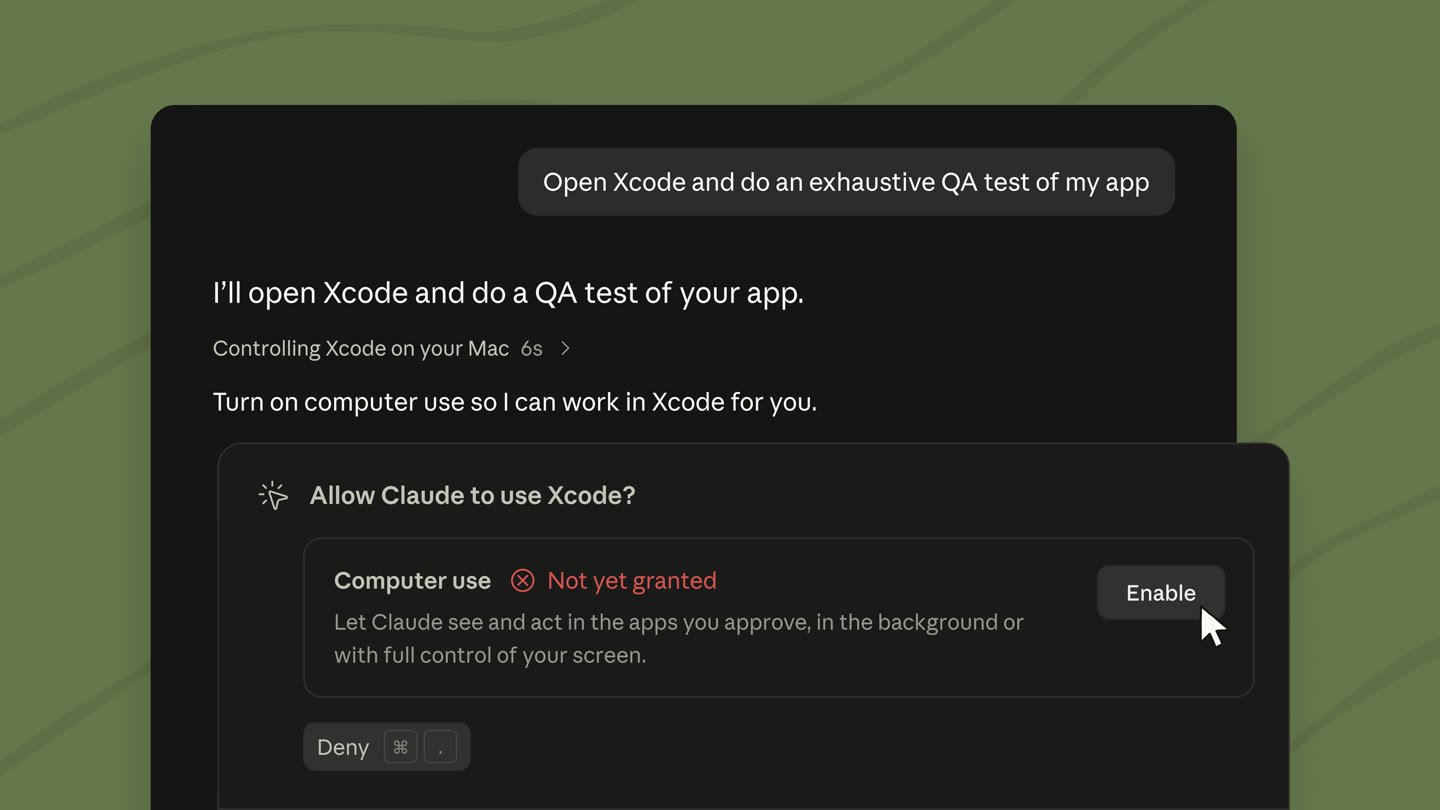
  <p className="digest-feature-lede">On macOS, computer use in the Claude Code Desktop app now works in the background: Claude sees and acts in the apps you've approved while you keep working. Background computer use is in beta on Pro and Max plans.</p>

  <Frame>
    <img className="w-full" src="https://mintcdn.com/claude-code/f9HTZGyMtxIFOUgt/images/whats-new/background-computer-use.jpg?fit=max&auto=format&n=f9HTZGyMtxIFOUgt&q=85&s=a599a6c6fa544cb8d1b426b93706caf4" alt="A Claude Code Desktop session where Claude asks to use Xcode, with a Computer use permission card that reads Let Claude see and act in the apps you approve, in the background or with full control of your screen, next to an Enable button" width="1440" height="810" data-path="images/whats-new/background-computer-use.jpg" />
  </Frame>

  <a className="digest-feature-link" href="/docs/en/desktop#let-claude-use-your-computer">Let Claude use your computer</a>
</div>

<div className="digest-feature">
  <div className="digest-feature-header">
    <span className="digest-feature-title">Live diff panel in fullscreen rendering</span>
    <span className="digest-feature-pill">v2.1.260</span>
  </div>

  <p className="digest-feature-lede">In fullscreen rendering, <code>/diff</code> now opens a panel beside the conversation instead of a viewer you have to close. The panel lists the changed files with their added and removed line counts and refreshes each time Claude edits a file or runs a shell command. Select lines in the panel with the mouse to attach them to your next prompt.</p>

  <Frame>
    <video autoPlay muted loop playsInline className="w-full" src="https://mintcdn.com/claude-code/f9HTZGyMtxIFOUgt/images/whats-new/diff-panel.mp4?fit=max&auto=format&n=f9HTZGyMtxIFOUgt&q=85&s=9d7553c19e7f227891cd95f1f59d796d" data-path="images/whats-new/diff-panel.mp4" />
  </Frame>

  <p className="digest-feature-try">With fullscreen rendering on, inside a git repository, and in a terminal at least 110 columns wide, toggle the panel:</p>

  ```text Claude Code theme={null}
  > /diff
  ```

  <p className="digest-feature-try">Run <code>/diff</code> again or click the <code>✕</code> in its header to close it.</p>

  <a className="digest-feature-link" href="/docs/en/interactive-mode#diff-panel">Diff panel</a>
</div>

<div className="digest-feature">
  <div className="digest-feature-header">
    <span className="digest-feature-title">Find unused skills with /skill-doctor</span>
    <span className="digest-feature-pill">CLI</span>
  </div>

  <p className="digest-feature-lede"><code>/skill-doctor</code> shows what each of your skills costs in context and how often it gets used, so you can decide which ones to turn off. Every skill in the <a href="/docs/en/skills#skill-descriptions-are-cut-short">skill listing</a> adds to your context on every turn, whether or not Claude ever uses it. Requires v2.1.252 or later and isn't available in sessions that skip <a href="/docs/en/env-vars#features-that-need-feature-flag-fetching">feature-flag fetching</a>.</p>

  <p className="digest-feature-try">Run it in an interactive session to open the report in the <code>/plugin</code> manager's <strong>Stats</strong> tab:</p>

  ```text Claude Code theme={null}
  > /skill-doctor
  ```

  <p className="digest-feature-try">In non-interactive mode with <code>-p</code>, Claude Code prints the report as text instead.</p>

  <a className="digest-feature-link" href="/docs/en/skills#find-unused-skills">Find unused skills</a>
</div>

<div className="digest-wins">
  <p className="digest-wins-title">Other wins</p>

  <div className="digest-wins-grid">
    <div>A <a href="/docs/en/hooks#premodelswitch"><code>PreModelSwitch</code></a> hook can block a model switch you request, and a <a href="/docs/en/hooks#postmodelswitch"><code>PostModelSwitch</code></a> hook can add context for Claude after the session's model changes</div>
    <div><a href="/docs/en/costs#prompt-cache-statistics"><code>/cost</code></a> adds a <code>Prompt cache (main)</code> line: the share of input tokens served from cache, the cache misses, whether the cache is warm, and a likely cause for the last miss when Claude Code can name one. Status line scripts get a matching <code>prompt\_cache</code> object</div>
    <div>Organizations can list HTTP and SSE MCP servers under the <a href="/docs/en/managed-mcp#provide-servers-through-managed-settings"><code>managedMcpServers</code></a> managed setting to give them to every user, in addition to the servers that users add on their own</div>
    <div><code>/effort</code> and the <code>/model</code> picker now <a href="/docs/en/model-config#adjust-effort-level">save a separate effort level for each model</a>; press <code>s</code> instead of <code>Enter</code> to apply a level to the current session only</div>
    <div>By default, the auto mode classifier <a href="/docs/en/permission-modes#what-the-classifier-blocks-by-default">now also blocks</a> actions such as requesting credentials from the cloud instance-metadata endpoint or connecting to sibling containers that Claude didn't start</div>
    <div>In auto mode, Claude Code asks you before Claude <a href="/docs/en/permission-modes#first-read-outside-the-working-directories">first reads a file outside your working directories</a>, with an option to block such reads from then on</div>
    <div>Raise <a href="/docs/en/settings-reference#bashoutputmaxchars"><code>bashOutputMaxChars</code></a> and <a href="/docs/en/settings-reference#taskoutputmaxchars"><code>taskOutputMaxChars</code></a>, up to 128,000 characters, so Claude receives more of the output from a successful command or background task inline</div>
    <div>The prompt's <a href="/docs/en/interactive-mode#make-ctrl-w-delete-back-to-whitespace">word-editing shortcuts follow readline</a> for everyone, and the <code>keybindingFlavor</code> setting no longer has any effect. <code>Ctrl+W</code> deletes back to the previous whitespace, and <code>Alt+B</code>, <code>Alt+F</code>, and <code>Alt+D</code> treat punctuation such as <code>/</code> and <code>.</code> as word breaks</div>
    <div>If you set <code>defaultMode</code> to <code>"bypassPermissions"</code> in a project's <code>.claude/settings.json</code> or <code>.claude/settings.local.json</code>, it <a href="/docs/en/permission-modes#which-mode-a-session-starts-in">no longer takes effect</a> and the session starts in Manual mode; set <code>"bypassPermissions"</code> in user or managed settings instead, or pass `--permission-mode`</div>
    <div>Seat-based Enterprise plans now <a href="/docs/en/model-config#default-model-setting">default to Opus 5</a></div>
    <div>In the VS Code extension, click the model name at the bottom of the prompt box to <a href="/docs/en/vs-code#use-the-prompt-box">open the model picker</a></div>
    <div>In the VS Code extension, select <strong>Output styles</strong> in the command menu's Customize section to <a href="/docs/en/vs-code#use-the-prompt-box">pick an output style</a>, including your custom ones</div>
  </div>
</div>

[Full changelog for v2.1.251–v2.1.261 →](/docs/en/changelog#2-1-251)