

- 您想在工作時監控 context window 使用情況
- 您需要追蹤工作階段成本
- 您跨多個工作階段工作,需要區分它們
- 您希望 git 分支和狀態始終可見
esc to interrupt、? for shortcuts 後備選項,以及 hold space to speak 語音聽寫提示。若要在對話中出現 ID 時在頁尾新增可點擊的連結徽章,而不需要撰寫指令碼,請改為設定 footerLinksRegexes。
以下是一個多行狀態列的範例,在第一行顯示 git 資訊,在第二行顯示顏色編碼的 context 列。
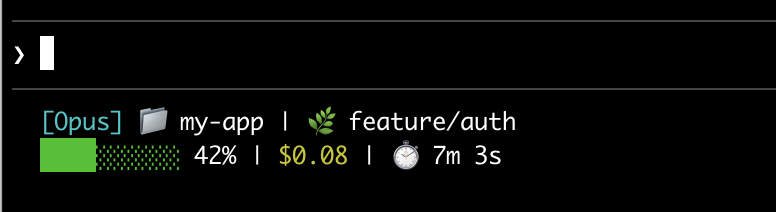
設定狀態列
使用/statusline 命令讓 Claude Code 為您產生指令碼,或手動建立指令碼並將其新增到您的設定。
使用 /statusline 命令
/statusline 命令接受描述您想顯示內容的自然語言指令。Claude Code 在 ~/.claude/ 中產生指令碼檔案並自動更新您的設定:
手動設定狀態列
將statusLine 欄位新增到您的使用者設定(~/.claude/settings.json,其中 ~ 是您的主目錄)或專案設定。將 type 設定為 "command",並將 command 指向指令碼路徑或內聯 shell 命令。如需建立指令碼的完整逐步說明,請參閱逐步建立狀態列。
command 欄位在 shell 中執行,因此您也可以使用內聯命令而不是指令碼檔案。此範例使用 jq 解析 JSON 輸入並顯示模型名稱和 context 百分比:
padding 欄位為狀態列內容新增額外的水平間距(以字元為單位)。預設為 0。此填充是在介面的內建間距之外,因此它控制相對縮排而不是距離終端邊緣的絕對距離。
可選的 refreshInterval 欄位除了事件驅動的更新外,每 N 秒重新執行一次您的命令。最小值為 1。當您的狀態列顯示基於時間的資料(例如時鐘)或背景子代理在主工作階段閒置時變更 git 狀態時,請設定此項。保持未設定以僅在事件上執行。
可選的 hideVimModeIndicator 欄位會隱藏提示下方的內建 -- INSERT -- 文字。當您的指令碼自行呈現 vim.mode 時,請將此設定為 true,以便模式不會顯示兩次。
停用狀態列
執行/statusline 並要求它移除或清除您的狀態列(例如 /statusline delete、/statusline clear、/statusline remove it)。您也可以手動從 settings.json 中刪除 statusLine 欄位。
逐步建立狀態列
此逐步說明透過手動建立顯示目前模型、工作目錄和 context window 使用百分比的狀態列來展示/statusline 為您設定的內容。
使用
/statusline 和您想要的內容描述會自動為您設定所有這些。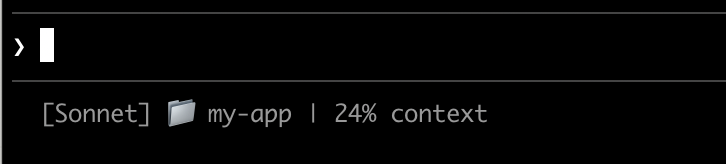
1
建立讀取 JSON 並列印輸出的指令碼
Claude Code 透過 stdin 將 JSON 資料傳送到您的指令碼。此指令碼使用
jq(一個您可能需要安裝的命令列 JSON 解析器)來提取模型名稱、目錄和 context 百分比,然後列印格式化的行。將此儲存到 ~/.claude/statusline.sh(其中 ~ 是您的主目錄,例如 macOS 上的 /Users/username 或 Linux 上的 /home/username):2
使其可執行
將指令碼標記為可執行,以便您的 shell 可以執行它:
3
新增到設定
告訴 Claude Code 執行您的指令碼作為狀態列。將此設定新增到 您的狀態列出現在介面底部。Claude Code 會自動重新載入設定,並在您儲存檔案後立即執行您的指令碼。
~/.claude/settings.json,它將 type 設定為 "command"(意思是「執行此 shell 命令」)並將 command 指向您的指令碼:狀態列的運作方式
Claude Code 會在 stdin 上執行您的指令碼,並傳入 JSON 工作階段資料,然後顯示指令碼列印到 stdout 的任何內容。 何時更新 您的指令碼會在工作階段開始時執行一次,包括當您復原工作階段時。之後,它會在以下情況下再次執行:- 新的助理訊息到達
/compact完成- 權限模式變更
- Vim 模式切換
- 您變更
statusLine設定中的command - 如果您設定了
refreshInterval,計時器會經過 - 您的指令碼最後接收的資料中的速率限制視窗達到其
resets_at時間 - 您的指令碼最後接收的資料中的預熱 prompt 快取達到其
expires_at時間
command 本身的變更會跳過去抖動:Claude Code 會立即執行新命令。如果在您的指令碼仍在執行時觸發新的更新,Claude Code 會取消執行中的指令碼。如果您編輯指令碼,變更會在下次更新觸發重新執行時出現。
當主工作階段閒置時,事件驅動的觸發器可能會安靜下來,例如當協調器等待背景子代理時。若要在閒置期間保持基於時間或外部來源的區段為最新狀態,請設定 refreshInterval 以同時在固定計時器上重新執行命令。
您的指令碼可以輸出什麼
- 多行:每個
echo或print陳述式會顯示為單獨的列。請參閱多行範例。 - 顏色:使用 ANSI 逸出碼,例如
\033[32m表示綠色(終端機必須支援)。請參閱 git 狀態範例。 - 連結:使用 OSC 8 逸出序列 使文字可點擊(macOS 上為 Cmd+click,Windows/Linux 上為 Ctrl+click)。需要支援超連結的終端機,例如 iTerm2、Kitty 或 WezTerm。請參閱可點擊連結範例。
tput cols 和語言層級的寬度偵測無法從指令碼內部讀取終端機大小。請改為讀取 COLUMNS 和 LINES 環境變數。Claude Code 會在執行您的指令碼之前將這些設定為目前的終端機尺寸。
狀態列在本機執行,不會消耗 API 權杖。它會在某些 UI 互動期間暫時隱藏,包括說明功能表和權限提示。
可用資料
Claude Code 透過 stdin 將以下 JSON 欄位傳送到您的指令碼:完整 JSON 架構
完整 JSON 架構
您的狀態列命令透過 stdin 接收此 JSON 結構:可能不存在的欄位(不在 JSON 中):
session_name:當使用--name或/rename設定自訂名稱時出現,或一旦存在 AI 產生的工作階段標題。預設顯示名稱(例如my-app-3f)不會填入此欄位prompt_id:僅在第一次使用者輸入後出現workspace.git_worktree:僅當目前目錄位於連結 git worktree 內時出現workspace.repo:僅在 git 儲存庫內且設定了origin遠端時出現effort:僅當目前模型支援推理努力參數時出現vim:僅在啟用 vim 模式時出現agent:僅在使用--agent旗標或設定的代理設定執行時出現pr:僅在為目前分支找到開啟 PR 或 GitLab merge request 時出現,一旦它合併或關閉就會移除。pr.review_state和pr.kind可能獨立不存在worktree:僅在 worktree 工作階段期間出現。存在時,對於基於 hook 的 worktree,branch和original_branch也可能不存在rate_limits:僅對 Claude.ai Pro 和 Max 訂閱者,或在設定支出限制的 Claude apps gateway 後面,以及僅在工作階段中第一次 API 回應後出現。每個視窗(five_hour、seven_day、spend_limit)可能獨立不存在,Claude Code 會在其resets_at時間過去後捨棄視窗。使用jq -r '.rate_limits.five_hour.used_percentage // empty'以優雅地處理不存在的情況。prompt_cache:在主對話的第一次 API 回應後出現。請參閱 prompt cache 欄位
null 的欄位:context_window.current_usage:在工作階段中第一次 API 呼叫之前為null,以及在/compact之後直到下一次 API 呼叫重新填入為止context_window.used_percentage,context_window.remaining_percentage:在工作階段早期可能為null
Context window 欄位
context_window 物件描述來自最近 API 回應的即時 context window。
- 合併總計(
total_input_tokens,total_output_tokens):目前在 context window 中的令牌。total_input_tokens是input_tokens、cache_creation_input_tokens和cache_read_input_tokens的總和;total_output_tokens是最近回應中的輸出令牌。在第一次 API 回應之前兩者都是0。 - 按元件使用情況(
current_usage):相同的令牌計數按類別分解。當您需要將快取命中與新輸入分開時,請使用此項。
current_usage 物件包含:
input_tokens:目前 context 中的輸入令牌output_tokens:產生的輸出令牌cache_creation_input_tokens:寫入快取的令牌cache_read_input_tokens:從快取讀取的令牌
used_percentage 欄位僅從輸入令牌計算:input_tokens + cache_creation_input_tokens + cache_read_input_tokens。它不包括 output_tokens。
如果您從 current_usage 手動計算 context 百分比,請使用相同的僅輸入公式以符合 used_percentage。
current_usage 物件在工作階段中第一次 API 呼叫之前為 null,以及在 /compact 之後直到下一次 API 呼叫重新填入為止再次為 null。
Prompt cache 欄位
prompt_cache 物件總結工作階段的主對話如何使用 prompt cache。Claude Code 從 API 回應中的快取令牌計數計算它,因此它適用於每個提供者。
該物件在主對話的第一次 API 回應後出現。Claude Code 不會在這些統計資料中計算子代理請求。需要 Claude Code v2.1.251 或更新版本。
該表列出每個欄位及其含義。時間戳記是 Unix 紀元秒,與 rate_limits.*.resets_at 相同的單位。簡短的狀態列通常顯示其中一個或兩個;warm 和 hit_ratio 最直接地總結快取狀態。
Claude Code 在終端機上顯示相同的統計資料,在
/usage 命令的 Prompt cache (main) 行上。
Last miss cause
last_miss_cause 物件報告 Claude Code 識別為最後一次未命中可能原因的內容。其 causes 陣列保留一個或多個原因名稱,例如 tools_changed、system_prompt_changed、ttl_expired_5m 或 likely_server_side。該物件在工作階段的第一次未命中之前為 null,以及每當 Claude Code 無法識別最後一次未命中的原因時再次為 null。需要 Claude Code v2.1.260 或更新版本。
兩個原因將計數新增到物件:
tools_added和tools_removed:使用tools_changed,有多少工具被新增到或從請求中移除system_char_delta:使用system_prompt_changed,系統提示長度的變化(以字元為單位)
範例
這些範例展示常見的狀態列模式。若要使用任何範例:- 將指令碼儲存到檔案,例如
~/.claude/statusline.sh(或.py/.js) - 使其可執行:
chmod +x ~/.claude/statusline.sh - 將路徑新增到您的設定
jq 來解析 JSON。Python 和 Node.js 具有內建的 JSON 解析。
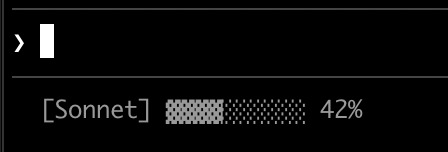
Context window 使用情況
顯示目前模型和 context window 使用情況,帶有視覺進度列。每個指令碼從 stdin 讀取 JSON,提取used_percentage 欄位,並建立一個 10 字元的列,其中填充的塊(▓)代表使用情況:
Git 狀態與顏色
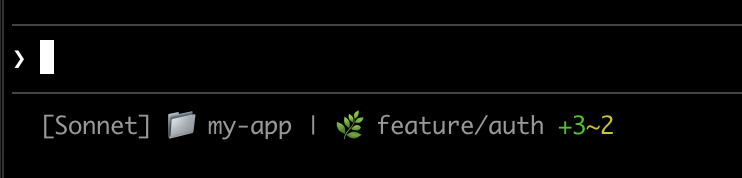
顯示 git 分支,帶有暫存和修改檔案的顏色編碼指示器。此指令碼使用 ANSI 逃逸碼表示終端顏色:\033[32m 是綠色,\033[33m 是黃色,\033[0m 重設為預設值。
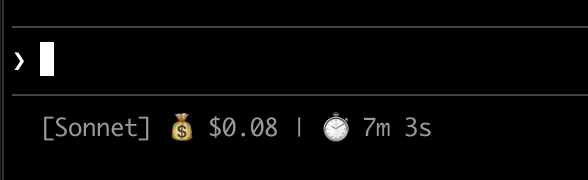
成本和持續時間追蹤
追蹤您的工作階段 API 成本和經過的時間。cost.total_cost_usd 欄位累積目前工作階段中所有 API 呼叫的估計成本。cost.total_duration_ms 欄位測量自工作階段開始以來的總經過時間,而 cost.total_api_duration_ms 僅追蹤等待 API 回應所花費的時間。
每個指令碼將成本格式化為貨幣,並將毫秒轉換為分鐘和秒:
顯示多行
您的指令碼可以輸出多行以建立更豐富的顯示。print 或 echo 陳述式建立單獨的行:
可點擊的連結
此範例建立指向您的 GitHub 儲存庫的可點擊連結。按住 Cmd(macOS)或 Ctrl(Windows/Linux)並點擊以在瀏覽器中開啟連結。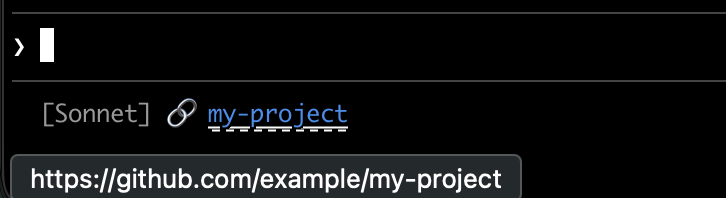
printf '%b',它比 echo -e 更可靠地跨不同 shell 解釋反斜杠逃逸:
速率限制使用情況
在狀態列中顯示 claude.ai 訂閱速率限制使用情況。rate_limits 物件包含滾動 five_hour 視窗和每週 seven_day 視窗。每個視窗提供 used_percentage(0 到 100)和 resets_at(Unix 紀元秒,視窗重設時)。
在具有支出限制的 Claude 應用程式閘道後面,rate_limits 攜帶 spend_limit,其中包含適用於您的支出限制的相同兩個欄位,除了其 used_percentage 可以在您超過限制後超過 100。需要 Claude Code v2.1.251 或更新版本。
rate_limits 物件僅對 claude.ai Pro 和 Max 訂閱者或具有支出限制的 Claude 應用程式閘道後面出現,並且僅在第一次 API 回應後出現。每個指令碼優雅地處理不存在的欄位:
快取昂貴的操作
您的狀態列指令碼在活躍工作階段期間頻繁執行。git status 或 git diff 等命令可能很慢,特別是在大型儲存庫中。此範例將 git 資訊快取到臨時檔案,並且僅每 5 秒重新整理一次。
快取檔案名稱需要在工作階段內的狀態列呼叫中保持穩定,但在工作階段之間保持唯一,以便不同儲存庫中的並行工作階段不會讀取彼此的快取 git 狀態。基於程序的識別碼(如 $$、os.getpid() 或 process.pid)在每次呼叫時都會變更,並會破壞快取。改用 JSON 輸入中的 session_id:它在工作階段的生命週期內保持穩定,並且每個工作階段都是唯一的。
每個指令碼在執行 git 命令之前檢查快取檔案是否遺漏或超過 5 秒:
Windows 設定
在 Windows 上,Claude Code 透過 Git Bash 執行狀態列命令(如果已安裝 Git Bash),或在 Git Bash 不存在時透過 PowerShell 執行。 Git Bash 將未引用的反斜杠視為逃逸字元,因此 Windows 風格的路徑(例如C:\Users\username\script.mjs)到達指令碼執行器時會移除其分隔符,命令會失敗而沒有可見的錯誤。在 command 字串中使用正斜杠寫入檔案路徑,如下面的範例所示。~ 快捷方式也有效,並展開到您的 Windows 主目錄。
若要執行 PowerShell 指令碼作為您的狀態列,請透過 powershell 呼叫它。無論 Claude Code 透過 Git Bash 或 PowerShell 路由命令,這都有效:
子代理狀態列
subagentStatusLine 設定為子代理面板中顯示的每個子代理呈現自訂行主體。使用它來用您自己的格式化取代預設的 name · description · token count 行。
columns 欄位(可用行寬度)和 tasks 陣列。每個任務具有 id、name、type、status、description、label、startTime、model、effort、contextWindowSize、tokenCount、tokenSamples 和 cwd。
每個任務的 model 欄位是任務執行所在的已解析模型 ID。contextWindowSize 是該模型的內容視窗(以 token 計),計算方式與主狀態列的 context_window.context_window_size 相同,因此您可以從 tokenCount 呈現每行百分比。兩個欄位都需要 Claude Code v2.1.205 或更新版本,並且對於模型尚未解析的任務會被省略。
每個任務的 effort 欄位是為該子代理設定的推理努力程度,在其定義 frontmatter 或個別調用上設定。該值是努力程度字串 low、medium、high、xhigh 或 max 之一,或數值 token 預算。該欄位報告設定的值(如所寫):如果模型不支援該程度,Claude Code 實際應用的努力程度可能會有所不同。該欄位需要 Claude Code v2.1.214 或更新版本,當子代理繼承工作階段的努力程度時不存在。
將一個 JSON 行寫入 stdout,每行您想要覆蓋,形式為 {"id": "<task id>", "content": "<row body>"} 。content 字串按原樣呈現,包括 ANSI 顏色和 OSC 8 超連結。省略任務的 id 以保持該行的預設呈現;發出空 content 字串以隱藏它。
適用於 statusLine 的相同信任、disableAllHooks 和 allowManagedHooksOnly 閘門也適用於此。外掛程式可以在其 settings.json 中提供預設 subagentStatusLine,但與 hooks 不同,即使外掛程式在受管設定 enabledPlugins 中被強制啟用,外掛程式值也不會在 allowManagedHooksOnly 下執行。
提示
- 使用模擬輸入測試:
echo '{"model":{"display_name":"Opus"},"workspace":{"current_dir":"/home/user/project"},"context_window":{"used_percentage":25},"session_id":"test-session-abc"}' | ./statusline.sh - 保持輸出簡短:狀態列寬度有限,因此長輸出可能會被截斷或換行不當
- 快取慢速操作:您的指令碼在活躍工作階段期間頻繁執行,因此
git status等命令可能會導致延遲。請參閱快取範例以瞭解如何處理此問題。
疑難排解
狀態列未出現- 驗證您的指令碼是否可執行:
chmod +x ~/.claude/statusline.sh - 檢查您的指令碼是否輸出到 stdout 而不是 stderr
- 手動執行您的指令碼以驗證它產生輸出
- 在安裝了 Git Bash 的 Windows 上,
command路徑中的反斜線可能在指令碼執行前被當作逃逸字元消耗。在路徑中使用正斜線。請參閱 Windows 設定。 - 如果在套用設定優先順序後
disableAllHooks在受管設定外為true,Claude Code 只會執行來自受管設定的statusLine,且沒有受管statusLine時狀態列會被停用。移除此設定或在設定它的檔案中將其設定為false以重新啟用。請參閱disableAllHooks。 - 如果您的組織在受管設定中設定
allowManagedHooksOnly,您的自訂狀態列會無警告地消失:您只能從那些受管設定中的statusLine值取得狀態列。請參閱在allowManagedHooksOnly下執行的內容以了解完整行為,並詢問您的管理員此設定是否適用於您。 - 執行
claude --debug以在每次狀態列呼叫時記錄您的指令碼的 stderr,以及在工作階段中第一次呼叫時記錄其結束代碼 - 要求 Claude 讀取您的設定檔案並直接執行
statusLine命令以顯示錯誤
-- 或空值
- 欄位在第一次 API 回應完成之前可能為
null - 在您的指令碼中使用後備(例如 jq 中的
// 0)處理 null 值 - 如果多個訊息後值仍為空,請重新啟動 Claude Code
- 使用
used_percentage以取得最簡單的準確 context 狀態 - Context 百分比可能與
/context輸出不同,因為每個計算時間不同
- 驗證您的終端支援 OSC 8 超連結(iTerm2、Kitty、WezTerm)
- Terminal.app 不支援可點擊連結
-
如果連結文字出現但不可點擊,Claude Code 可能未在您的終端中偵測到超連結支援。設定
FORCE_HYPERLINK環境變數以在啟動 Claude Code 之前覆蓋偵測:在 PowerShell 中,先在目前工作階段中設定變數: - SSH 和 tmux 工作階段可能根據設定去除 OSC 序列
-
如果逃逸序列顯示為文字(如
\e]8;;),請使用printf '%b'而不是echo -e以獲得更可靠的逃逸處理
- 複雜的逃逸序列(ANSI 顏色、OSC 8 連結)如果與其他 UI 更新重疊,偶爾會導致輸出損壞
- 如果您看到損壞的文字,請嘗試簡化您的指令碼為純文字輸出
- 帶有逃逸碼的多行狀態列比單行純文字更容易出現呈現問題
- 因為
statusLine執行 shell 命令,Claude Code 在與設定檔案中的 hooks 相同的工作區信任規則下執行它。接受資料夾的對話,或接受其信任延伸到它的父目錄,就足夠了。 - 在此之前,狀態列保持空白,且
claude --debug記錄Status line command skipped: workspace trust not accepted。重新啟動 Claude Code 並接受信任對話以啟用它。
- 以非零代碼結束或不產生輸出的指令碼會導致狀態列變為空白
- 慢速指令碼會阻止狀態列更新,直到它們完成。保持指令碼快速以避免過時的輸出。
- 如果在慢速指令碼執行時觸發新的更新,進行中的指令碼會被取消
- 在設定之前使用模擬輸入獨立測試您的指令碼
- 系統通知(如 MCP 伺服器錯誤和自動更新)顯示在行的右側。暫時性通知(例如 context-low 警告)也會在此區域循環。
- 啟用詳細模式會在此區域新增令牌計數器
- 在狹窄的終端上,這些通知可能會截斷您的狀態列輸出