

Hook 生命週期
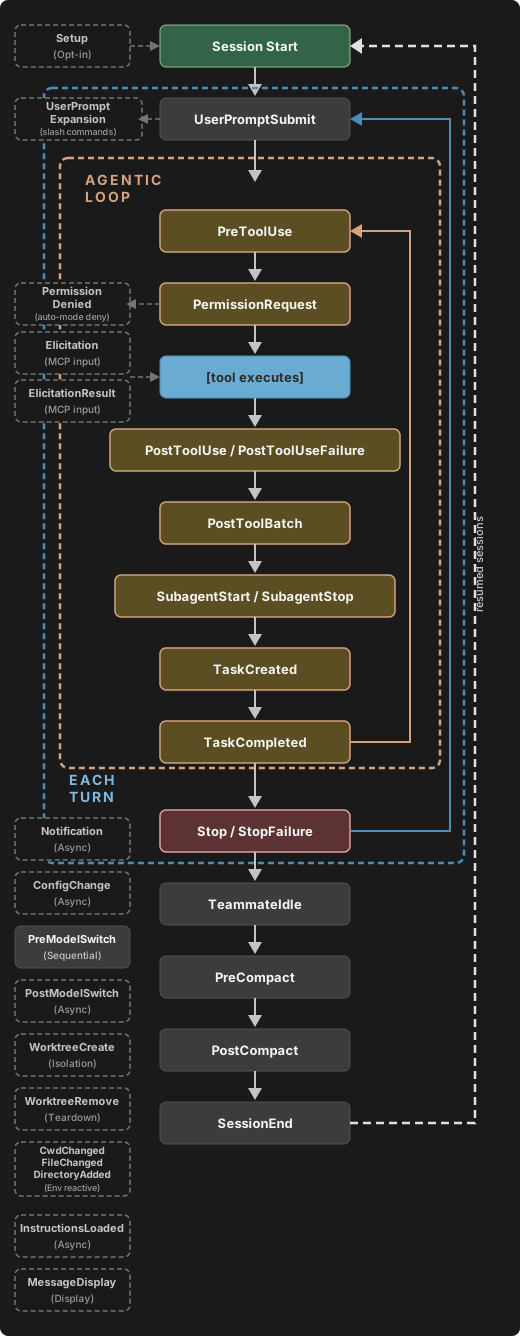
Claude Code 在工作階段期間的特定時間點執行 hooks。當事件觸發且匹配器符合時,Claude Code 會將有關該事件的 JSON 上下文傳遞給您的 hook 處理程式。對於命令 hooks,輸入會到達 stdin。對於 HTTP hooks,它會作為 POST 請求正文到達。您的處理程式可以檢查輸入、採取行動,並可選擇性地返回決定。 事件分為三種節奏:- 每個工作階段一次:
SessionStart和SessionEnd - 每個轉向一次:
UserPromptSubmit、Stop和StopFailure - 在代理迴圈內每個工具呼叫上:
PreToolUse和PostToolUse,除了EndConversation呼叫外,兩者都會跳過

Hook 如何解析
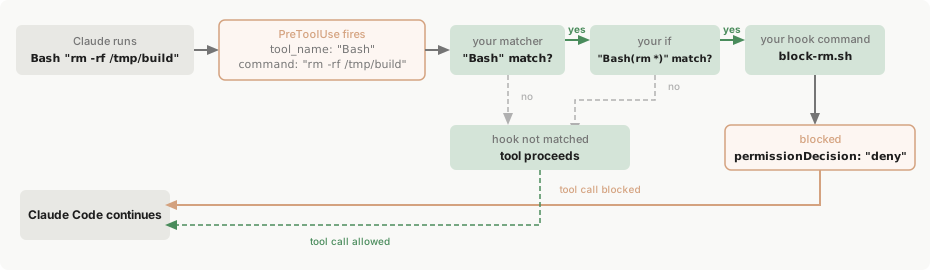
為了了解事件、匹配器和處理程式如何組合在一起,請考慮此PreToolUse hook,它會阻止破壞性 shell 命令。
- macOS/Linux
- Windows (PowerShell)
matcher 縮小到 Bash 工具呼叫,if 條件進一步縮小到符合 rm * 的 Bash 子命令,因此 block-rm.sh 僅在兩個篩選器都符合時才生成:rm -rf,則返回 permissionDecision 為 "deny"。將其儲存到您的專案中的 .claude/hooks/block-rm.sh,並使用 chmod +x .claude/hooks/block-rm.sh 使其可執行,以便 Claude Code 可以執行它:jq,因此在嘗試之前請安裝 jq 並確保它在您的 PATH 上。Bash "rm -rf /tmp/build"。以下是發生的情況:
1
事件觸發
PreToolUse 事件觸發。Claude Code 將工具輸入作為 JSON 在 stdin 上發送到 hook:2
匹配器檢查
匹配器
"Bash" 符合工具名稱,因此此 hook 群組啟動。如果您省略匹配器或使用 "*",群組在事件的每次出現時啟動。3
If 條件檢查
if 條件 "Bash(rm *)" 符合,因為 rm -rf /tmp/build 是符合 rm * 的子命令,因此此處理程式生成。如果命令是 npm test,if 檢查會失敗,block-rm.sh 永遠不會執行,避免程序生成開銷。if 欄位是可選的;沒有它,符合群組中的每個處理程式都執行。4
Hook 處理程式執行
該指令碼檢查完整命令並找到 如果命令是更安全的
rm -rf,因此它將決定列印到 stdout:rm 變體,如 rm file.txt,指令碼會改為執行 exit 0。Exit code 0 且沒有輸出表示 hook 沒有決定要報告,因此工具呼叫會繼續通過正常的權限流程。Hook 可以拒絕呼叫,但保持沉默不會批准它。5
Claude Code 根據結果採取行動
Claude Code 讀取 JSON 決定,阻止工具呼叫,並向 Claude 顯示原因。
設定
Hook 定義在 JSON 設定檔中。設定有三層巢狀結構:- 選擇要回應的 hook 事件,例如
PreToolUse或Stop - 新增 matcher 群組來篩選觸發時機,例如「僅限 Bash 工具」
- 定義一個或多個在符合時執行的 hook 處理常式
本頁針對每個層級使用特定術語:hook 事件指生命週期中的時間點,matcher 群組指篩選條件,hook 處理常式指實際執行的 shell 命令、HTTP 端點、MCP 工具、提示詞或 agent。單獨使用「hook」時指的是整體功能。
Hook 位置
定義 hook 的位置決定其範圍:
雲端工作階段不會讀取您本機的
~/.claude/settings.json。在自行託管環境中,Claude Code 也會執行操作者從 runner 主機的 ~/.claude/ 預先植入的 hook;當 runner 映像檔的受管設定檔屬於 Claude Code 套用的受管來源之一時,Claude Code 也會執行該檔案中的 hook,而依預設,這僅在伺服器受管設定與透過 MDM 傳遞的 Claude Code 政策都未提供受管層級時才會發生。請參閱從您的設定中沿用的項目,了解哪些設定檔與外掛(以及因此哪些 hook)會進入雲端工作階段。
如需設定檔解析的詳細資訊,請參閱設定。
來自設定檔、受管政策設定與外掛的 hook 也會在 subagent 內執行。當 subagent 呼叫工具時,PreToolUse 與 PostToolUse 等工具事件會觸發與主對話中相同的已設定 hook,且輸入會帶有用於識別 subagent 的 agent_id 與 agent_type 通用輸入欄位。
管理員可以在受管設定中使用 allowManagedHooksOnly 來限制可執行的 hook:
- 您的使用者、專案、本機及外掛 hook 會被封鎖。在受管設定
enabledPlugins中強制啟用的外掛所提供的 hook 不受此限 - Claude Code 也會將您的
statusLine、fileSuggestion與subagentStatusLine設定限縮為僅採用受管設定 - 除非
disableCommandPluginSources明確設為false,否則 Claude Code 也會停用具有command來源的外掛,包括在受管設定enabledPlugins中強制啟用的外掛。command來源需要 Claude Code v2.1.229 或更新版本 - 除非
disableCommandPluginSources明確設為false,否則 Claude Code 也會封鎖市集的headersHelper命令,但受管設定本身宣告的市集除外
allowManagedHooksOnly 下會執行的項目。
Hook 項目會在各設定層級之間合併,而不是互相取代:使用者、專案與本機設定會加入各自的 hook,而不會移除受管 hook;且在受管設定以外設定的 disableAllHooks 無法停用受管 hook。
HTTP hook 允許清單適用於所有來源的 hook,包括受管政策設定:
allowedHttpHookUrls:只要在任一設定層級中定義,Claude Code 僅會在 HTTP hook 處理常式的 URL 符合合併後的允許清單時執行它httpHookAllowedEnvVars:定義後,Claude Code 只會將清單上的環境變數插入 hook 標頭中
Matcher 模式
matcher 欄位用於篩選 hook 的觸發時機。Matcher 的評估方式取決於其包含的字元:
走正規表示式路徑的 matcher 會以 JavaScript 的
RegExp.prototype.test 進行測試,只要值中任何位置有符合即成功。Edit.* 同時符合 Edit 與 NotebookEdit;需要完整字串比對時,請以 ^ 與 $ 包住模式,例如 ^Edit$。
FileChanged 與 StopFailure 使用較窄的精確比對字元集,僅限字母、數字、_ 與 |。這兩個事件的 matcher 中若含有連字號、空格或逗號,就會走正規表示式路徑,且只有 | 能分隔替代項目。下表中其他支援 matcher 的事件皆接受 | 或 ,。
FileChanged 事件在建立監看清單時不遵循這些規則。請參閱 FileChanged。
每種事件類型比對的欄位不同:
以
cloud_credential_error 比對 StopFailure 需要 Claude Code v2.1.267 或更新版本,這是第一個以該值回報憑證載入失敗,而非以 server_error 或 unknown 回報的版本。
對於大多數事件,Claude Code 會以它透過 stdin 傳送給您的 hook 的 JSON 輸入中的某個欄位來評估 matcher。對於工具事件,該欄位為 tool_name。對於 PreModelSwitch 與 PostModelSwitch,Claude Code 會以從 to_model 推導出的標準名稱來評估 matcher,如 PreModelSwitch 中所述。每個 hook 事件章節都列出了該事件完整的 matcher 值與輸入 schema。
此範例僅在 Claude 寫入或編輯檔案時執行 lint 指令碼:
matcher 欄位,該欄位會被靜默忽略。
對於工具事件,您可以在個別 hook 處理常式上設定 if 欄位以進一步縮小篩選範圍。if 使用權限規則語法同時比對工具名稱與引數,因此 "Bash(git *)" 會在 Bash 輸入的任何子命令符合 git * 時執行,而 "Edit(*.ts)" 僅對 TypeScript 檔案執行。
比對 MCP 工具
MCP 伺服器的工具在工具事件(PreToolUse、PostToolUse、PostToolUseFailure、PermissionRequest、PermissionDenied)中會以一般工具的形式出現,因此您可以用比對其他工具名稱的相同方式來比對它們。
MCP 工具遵循 mcp__<server>__<tool> 命名模式,例如:
mcp__memory__create_entities:Memory 伺服器的建立實體工具mcp__filesystem__read_file:Filesystem 伺服器的讀取檔案工具mcp__github__search_repositories:GitHub 伺服器的搜尋工具
.*。.* 是必要的:像 mcp__memory 或 mcp__brave-search 這樣的 matcher 只包含精確比對字元,因此會被當作精確字串比較,不會符合任何工具。
mcp__memory__.*符合memory伺服器的所有工具mcp__brave-search__.*符合名稱含有連字號的伺服器的所有工具mcp__.*__write.*符合任何伺服器中名稱以write開頭的任何工具
mcp__plugin_<plugin-name>_<server-name>__<tool>。針對單純伺服器鍵撰寫的 matcher 永遠不會對這些工具觸發。例如名為 my-plugin 的外掛以鍵 db 綁定了一個伺服器,則 query 工具會顯示為 mcp__plugin_my-plugin_db__query,因此比對該伺服器所有工具的 matcher 為 mcp__plugin_my-plugin_db__.*。在處理常式的 if 欄位中也請使用相同的範圍化工具名稱。請參閱外掛提供的 MCP 伺服器,了解範圍化名稱的組成方式。
此範例會記錄所有 memory 伺服器的操作,並驗證來自任何 MCP 伺服器的寫入操作:
Hook 處理常式欄位
內層hooks 陣列中的每個物件都是一個 hook 處理常式:即 matcher 符合時執行的 shell 命令、HTTP 端點、MCP 工具、LLM 提示詞或 agent。共有五種類型:
- 命令 hook(
type: "command"):執行 shell 命令。您的指令碼會透過 stdin 接收事件的 JSON 輸入,並透過退出碼與 stdout 回傳結果。 - HTTP hook(
type: "http"):將事件的 JSON 輸入以 HTTP POST 請求傳送至某個 URL。端點會透過回應主體,以與命令 hook 相同的 JSON 輸出格式回傳結果。 - MCP 工具 hook(
type: "mcp_tool"):呼叫已設定的 MCP 伺服器上的工具。工具的文字輸出會比照命令 hook 的 stdout 處理。 - 提示詞 hook(
type: "prompt"):將提示詞傳送給 Claude 模型進行單回合評估。模型會以 JSON 回傳其決定。請參閱以提示詞為基礎的 hook。 - Agent hook(
type: "agent"):產生一個 subagent,可使用 Read、Grep 與 Glob 等工具驗證條件後再回傳決定。Agent hook 屬實驗性功能,可能會變更。請參閱以 agent 為基礎的 hook。
$CLAUDE_CODE_REMOTE 環境變數在遠端 Web 環境中為 "true",在本機 CLI 中則未設定。Claude Code v2.1.199 及更新版本會在本機工作階段具有作用中的 Remote Control 連線時,將 $CLAUDE_CODE_BRIDGE_SESSION_ID 設為 Remote Control 工作階段 ID。
通用欄位
這些欄位適用於所有 hook 類型:if 欄位只能容納一條權限規則。沒有 &&、|| 或清單語法可用來組合規則;若要套用多個條件,請為每個條件分別定義 hook 處理常式。
在檔案工具的 if 條件中,像 "Edit(src/**)" 這樣的單一區段目錄模式只會符合工作目錄中的 src 目錄及其下的檔案。若要符合任意深度中名為 src 的目錄,請寫成 "Edit(**/src/**)"。在 v2.1.214 之前,"Edit(src/**)" 會符合工作目錄下任意深度中名為 src 的目錄。
if 模式如何比對 Bash 命令
對於 if 欄位中的 Bash 模式,您的 hook 命令是否執行取決於模式的形式以及 Claude 所叫用的 Bash 命令。比對前會先移除開頭的 VAR=value 指派。
當 Claude Code 無法判斷 Bash 輸入會執行哪些命令時,無論模式為何都會執行您的 hook。由於
if 篩選僅為盡力而為,若要強制實施嚴格的允許或拒絕,請使用權限系統而非 hook。
命令 hook 欄位
除了通用欄位之外,命令 hook 還接受下列欄位:
設定了
args 時,命令 hook 會以 exec 形式執行;省略 args 時則以 shell 形式執行。只要 hook 參照了路徑預留位置,就請設定 args,因為每個元素都會作為單一引數傳遞,無需加引號。當您需要管線或 && 等 shell 功能,或上述兩種情況都不適用時,請省略 args。
Exec 形式在有 args 時執行。Claude Code 會將 command 解析為 PATH 上的可執行檔,並以 args 作為引數向量直接產生它。由於沒有 shell,每個 args 元素都會完全依照所寫的內容成為一個引數,而 ${CLAUDE_PLUGIN_ROOT} 等路徑預留位置會以純字串形式代入 command 與每個 args 元素。撇號、$ 與反引號等特殊字元會原封不動地傳遞,因為沒有 shell 會解譯它們。在任何平台上都不會進行 shell 斷詞。
Shell 形式在沒有 args 時執行。command 字串會傳給 shell:macOS 與 Linux 上為 sh -c,Windows 上為 Git Bash,未安裝 Git Bash 時則為 PowerShell。設定 shell 欄位可明確選擇。Shell 會對字串進行斷詞、展開變數,並解譯管線、&&、重新導向與萬用字元。
在 Windows 上,exec 形式要求
command 解析為真正的可執行檔,例如 .exe。npm、npx、eslint 與其他工具安裝在 node_modules/.bin 中的 .cmd 與 .bat shim 並非可執行檔,無法在沒有 shell 的情況下產生。若要以 exec 形式執行它們,請直接以 node 叫用底層指令碼,例如 "command": "node", "args": ["${CLAUDE_PLUGIN_ROOT}/node_modules/eslint/bin/eslint.js"]。node 加上指令碼路徑的模式在所有平台上都可運作,因為 node.exe 是真正的二進位檔。若要依名稱執行 .cmd 或 .bat shim,請使用 shell 形式。CLAUDE_PROJECT_DIR、CLAUDE_PLUGIN_ROOT 與 CLAUDE_PLUGIN_DATA,因此無論指令碼是如何啟動的,都能讀取 process.env.CLAUDE_PLUGIN_ROOT。
外掛 hook 另外還會代入 ${user_config.*} 值,但僅限 exec 形式:該值會以純字串形式代入 command 與每個 args 元素,因此不會被 shell 重新剖析。
command 參照 ${user_config.*} 的 shell 形式外掛 hook 會以錯誤失敗,而不會執行。若要在 shell 形式的 hook 中使用選項值,請讀取 $CLAUDE_PLUGIN_OPTION_<KEY> 環境變數,例如 webhook_url 選項對應的 $CLAUDE_PLUGIN_OPTION_WEBHOOK_URL,或設定 args 將 hook 切換為 exec 形式。在 v2.1.207 之前,shell 形式的外掛 hook 命令也會代入 ${user_config.*}。
在 exec 形式中,
command 只能是可執行檔名稱或路徑。若 command 是不含路徑分隔符號的單純名稱,且在有 args 的情況下包含空白,Claude Code 會記錄警告,因為產生程序將會失敗:不存在名為 node script.js 的可執行檔。請將多餘的 token 移至 args。含有空格的絕對路徑,例如 C:\Program Files\nodejs\node.exe,是單一有效的可執行檔,不會觸發警告。HTTP hook 欄位
除了通用欄位之外,HTTP hook 還接受下列欄位:
Claude Code 會將 hook 的 JSON 輸入作為 POST 請求主體傳送,並帶有
Content-Type: application/json。回應主體使用與命令 hook 相同的 JSON 輸出格式。
錯誤處理方式與命令 hook 不同;請參閱 HTTP 回應處理。
此範例將 PreToolUse 事件傳送至本機驗證服務,並使用 MY_TOKEN 環境變數中的 token 進行驗證:
MCP 工具 hook 欄位
除了通用欄位之外,MCP 工具 hook 還接受下列欄位:
此範例會在每次
Write 或 Edit 後,呼叫 my_server MCP 伺服器上的 security_scan 工具,並傳入被編輯檔案的路徑:
isError: true,hook 會產生非封鎖性錯誤,並繼續執行。
在 hook 可以封鎖或變更結果的事件上,例如 PreToolUse 或 Stop,Claude Code 會在呼叫工具前等待正在連線的伺服器,最多等待 MCP_TIMEOUT,且不超過 hook 本身的 timeout。在觀察性事件上,例如 Notification 或 SessionEnd,則不會等待。
顯示 cached 狀態的伺服器會在 hook 呼叫其工具時進行連線。若此時伺服器未連線,hook 會產生非封鎖性錯誤,並繼續執行。Hook 永遠不會啟動 OAuth 流程,因此請先從 /mcp 驗證伺服器。
啟動時的 SessionStart(包括使用 --continue 或 --resume 時)以及每個 Setup 事件,都會在工作階段的 MCP 伺服器可供 hook 使用之前觸發。Claude Code 會略過這些事件的 mcp_tool hook 而不呼叫工具,且偵錯日誌會記錄 mcp_tool hooks are not available for the 'SessionStart' hook event (no MCP client context),或指名 Setup 的相同訊息。當 SessionStart 在工作階段稍後(/clear 或壓縮之後)再次觸發時,其 mcp_tool hook 會執行。對於工作階段啟動時所需的任何內容,請改在 SessionStart 上使用 type: "command" hook。
提示詞與 agent hook 欄位
除了通用欄位之外,提示詞與 agent hook 還接受下列欄位:以路徑參照指令碼
使用這些預留位置,以相對於專案或外掛根目錄的方式參照 hook 指令碼,不受 hook 執行時的工作目錄影響:${CLAUDE_PROJECT_DIR}:工作階段啟動時的專案根目錄。Claude Code 也會在 stdio MCP 伺服器與外掛 LSP 伺服器的環境中設定此變數。${CLAUDE_PLUGIN_ROOT}:外掛的安裝目錄,用於與外掛綁定的指令碼。請參閱外掛環境變數,了解此路徑在更新時的行為。${CLAUDE_PLUGIN_DATA}:外掛的持久資料目錄,用於應在外掛更新後保留的相依性與狀態。
Worktree 的情況不同。 若 Claude 在工作階段期間進入 worktree,Claude Code 會讓
${CLAUDE_PROJECT_DIR} 維持原樣,並以另一種方式將 worktree 路徑傳給您的 hook:${CLAUDE_PROJECT_DIR}保持不變:它仍指向工作階段啟動時的專案根目錄,因此像${CLAUDE_PROJECT_DIR}/.claude/hooks/check-style.sh這樣的命令仍會在主要 checkout 中執行指令碼。cwd跟隨 Claude:Claude 進入 worktree 後,hook 輸入 JSON 中的cwd欄位為 worktree 根目錄;Claude 執行cd後則為新的目錄。當 hook 需要知道 Claude 正在哪個目錄中工作時,請讀取此欄位。
${CLAUDE_PROJECT_DIR} 指向何處。- 專案指令碼
- 外掛指令碼
此範例使用
${CLAUDE_PROJECT_DIR},在任何 Write 或 Edit 工具呼叫後,從專案的 .claude/hooks/ 目錄執行樣式檢查器:Skill 與 agent 中的 hook
除了設定檔與外掛之外,hook 也可以使用 frontmatter 直接定義在 skill 與 subagent 中,其設定格式與以設定為基礎的 hook 相同。Claude Code 保留其註冊的時間長短取決於元件:- Subagent hook:Claude Code 只會在該 subagent 執行期間執行它們,並在其完成時移除。Claude Code 會將此處的
Stophook 轉換為SubagentStop,也就是 subagent 完成時觸發的事件。 - Skill hook:Claude Code 會在您或 Claude 叫用 skill 時註冊它們,並在工作階段剩餘期間持續執行,包括 skill 本身所在回合之後的回合。若要讓 Claude Code 改為在 hook 第一次成功執行後將其移除,請在其上設定
once: true。
PreToolUse hook,會在每個 Bash 命令之前執行安全驗證指令碼:
-p 時。
專案 subagent 中的 frontmatter hook,只有在您為 agent 檔案所在的資料夾接受工作區信任對話方塊後才會執行。-p 工作階段不算作接受。信任資料夾前會執行的項目將此與設定檔規則進行比較,而 subagent 頁面列出了哪些範圍不受此限。在 v2.1.218 之前,這些 hook 可能會從您尚未信任的資料夾執行。
/hooks 選單
在 Claude Code 中輸入 /hooks,即可開啟已設定 hook 的唯讀瀏覽器。清單會標示每個 hook 的來源,例如使用者設定、專案設定、本機設定、外掛或目前的工作階段。
選取某個 hook 即可查看其執行內容的完整文字以及定義位置,例如其設定檔的路徑或其外掛的名稱。
若要瀏覽所有 hook 事件,包括未設定任何 hook 的事件,請在清單末端選取 All events。
停用或移除 hook
若要移除定義在設定檔中的 hook,請從該檔案中刪除其項目。 若要暫時停用所有 hook 而不移除它們,請在您的設定檔中設定"disableAllHooks": true。Claude Code 會讀取套用設定優先順序後剩下的值,因此專案 .claude/settings.json 中的 "disableAllHooks": false 會覆寫您使用者設定中的 true。若要不論專案設定為何都在單次執行中關閉 hook,請傳入 --settings '{"disableAllHooks": true}',它會優先於專案與本機設定。無法在保留於設定中的同時停用個別 hook。
disableAllHooks 設定會遵循受管設定的階層。若管理員已透過受管政策設定來設定 hook,則在使用者、專案或本機設定中設定的 disableAllHooks 無法停用這些受管 hook。只有在受管設定層級設定的 disableAllHooks 才能停用受管 hook。如需各層級的完整作用範圍,請參閱 disableAllHooks。
直接編輯設定檔中的 hook,通常會由檔案監看程式自動偵測並套用。
Hook 輸入和輸出
命令 hook 透過 stdin 接收 JSON 資料,並透過退出碼、stdout 和 stderr 傳回結果。HTTP hook 接收相同的 JSON 作為 POST 請求正文,並透過 HTTP 回應正文傳回結果。本部分涵蓋所有事件通用的欄位和行為。每個事件在 Hook 事件 下的部分包括其特定的輸入 schema 和決定控制選項。 在 macOS 和 Linux 上,命令 hook 在沒有控制終端機的自己的工作階段中執行。Hook 程序和任何子程序無法開啟/dev/tty 或直接向 Claude Code 介面發送逃逸序列。Windows 沒有 /dev/tty。
要在任何平台上向使用者顯示訊息,請在 JSON 輸出中返回 systemMessage。某些事件會捨棄它或將其傳遞到其他地方,每個 事件的部分 都會說明。要觸發桌面通知、設定視窗標題或響鈴,請改為返回 terminalSequence。
通用輸入欄位
Hook 事件接收這些欄位作為 JSON,除了每個 hook 事件 部分中記錄的事件特定欄位。對於命令 hook,此 JSON 透過 stdin 到達。對於 HTTP hook,它作為 POST 請求正文到達。agent_id 和 agent_type 會告訴您的指令碼 hook 是在哪個 agent 中觸發的,例如 subagent、同一程序內的隊友,或您透過 --agent 選擇的 agent:
只有
SessionStart hook 可以接收 model 欄位,且 Claude Code 不一定包含它。PreModelSwitch 和 PostModelSwitch hook 改為接收 from_model 和 to_model,因此使用 PostModelSwitch hook 來追蹤模型在工作階段期間的變化。
沒有 $CLAUDE_MODEL 環境變數。如果您在 shell 中設定了 $ANTHROPIC_MODEL,hook 可以讀取它,但當您在工作階段期間使用 /model 切換模型時,該值不會改變。
Hook 程序繼承父環境,但不包括 Claude Code 從它產生的每個子程序中移除 的 OTEL_* 匯出器變數,以及當 CLAUDE_CODE_SUBPROCESS_ENV_SCRUB 設定為 1 時它剝離的變數。在套用 HIPAA 設定的工作階段中,Claude Code 也會從 hook 的環境中移除 Anthropic 憑證。
例如,Bash 命令的 PreToolUse hook 在 stdin 上接收此內容:
tool_name、tool_input 和 tool_use_id 欄位是事件特定的。每個 hook 事件 部分記錄了該事件的額外欄位。
退出碼輸出
您的 hook 的退出碼會告訴 Claude Code 是否繼續執行觸發該 hook 的操作,例如工具呼叫或提示詞。完成的執行有以下三種結果之一:- 成功:您的 hook 以 0 退出。Claude Code 套用您的 hook 列印的任何 JSON 輸出 欄位,除非這些欄位阻止或拒絕該操作,否則操作會繼續進行。
- 阻止性錯誤:您的 hook 以 2 退出。在 可以阻止的事件 上,Claude Code 會停止該操作。
- 非阻止性錯誤:您的 hook 以任何其他代碼退出,或以其他方式失敗,例如無法啟動或列印無效的 JSON。操作會繼續進行,且在
PreToolUse等事件上,您會在逐字稿中看到<hook name> hook error通知。如果您希望失敗的 hook 阻止操作,請設定onFailure: "block"。
PreToolUse hook 以 1 退出,但列印了通過驗證的 JSON,則該次執行為成功,由 JSON 欄位決定接下來發生的情況。要找出您的 hook 在 PreToolUse 等事件上的結果,請將第一欄中它列印到 stdout 的內容與頂端的退出碼對應:
某些事件有自己的規則:
WorktreeCreate:任何非零退出碼都會使 worktree 建立失敗,無論您的 JSON 說什麼。WorktreeRemove:任何非零退出碼會在目錄之後仍然存在時使 worktree 移除失敗。Stop、SubagentStop、TaskCompleted和外掛的UserPromptSubmithook:當您的 hook 以 2 退出、stdout 沒有任何內容,且其 stderr 表示找不到檔案(例如No such file or directory)時,Claude Code 將該次執行視為非阻止性錯誤。Elicitation和ElicitationResult:當您的 hook 以 0 退出時,Claude Code 套用您的hookSpecificOutput,在任何其他退出碼上則忽略它。- 捨棄 hook 輸出的事件,例如
StopFailure:Claude Code 在任何退出碼上都會忽略您的 JSON,但terminalSequence等副作用欄位仍會觸發。
退出碼 0
退出 0 表示成功,是當您列印 JSON 進行結構化控制時的預期退出碼。 對於大多數事件,Claude Code 將 stdout 寫入偵錯日誌,不在逐字稿中顯示。例外是UserPromptSubmit、UserPromptExpansion、SessionStart 和 PostModelSwitch,其中 Claude Code 將純文字 stdout 新增為 Claude 可以看到並據以行動的上下文。
對於非 async 的 hook,當整個輸出是單一 JSON 物件且周圍只有空白時,Claude Code 會將您的 stdout 解析為 JSON 輸出,否則視為純文字或解析失敗:
- 單一 JSON 物件,位於一行或多行:解析為 JSON 輸出。
- 不以
{開頭的輸出,或以{開頭但不以}結尾的輸出:純文字。依此規則,JSON 陣列和帶引號的 JSON 字串都是純文字。 - 兩行或更多行,每行本身都可解析為 JSON,且第一行以
{開頭、最後一行以}結尾:若沒有任何一行是設定欄位的 JSON 輸出物件,則為純文字;若有,則為解析失敗。 - 其他任何以
{開頭並以}結尾但不是有效 JSON 的內容:解析失敗。
<hook name> hook error 通知帶有解析或驗證訊息。在將純文字 stdout 新增為上下文的事件上,Claude Code 不會新增其無法解析的 stdout。
Claude 永遠看不到以 0 退出的 hook 的 stderr。要在 PreToolUse 等事件上自行讀取它,請啟用 偵錯日誌。要從 PostToolUse 或 PostToolUseFailure hook 向 Claude 顯示警告,請改為退出 2,以便 Claude 看到 stderr,儘管工具已執行。
退出碼 2
以代碼 2 退出以阻止操作。在 可以阻止的事件 上,Claude Code 會停止該操作:例如,PreToolUse hook 會阻止工具呼叫,UserPromptSubmit hook 會拒絕提示詞。
隨阻止一起傳回的訊息是您的 hook 的 stderr。如果您的 hook 也列印了做出阻止決定的 JSON,Claude Code 會改用該決定的原因。
即使您的 hook 列印 JSON,退出 2 仍會阻止:
- 通過 schema 驗證的 JSON:Claude Code 仍會讀取 JSON 輸出 欄位,但它們無法覆寫阻止。即使
permissionDecision為"allow"也無法讓操作通過。在Elicitation和ElicitationResult上,exit-2 hook 的hookSpecificOutput會被忽略。 - 未通過 schema 驗證的 JSON:hook 仍會阻止。Claude Code 使用您的 stderr 作為阻止原因,並在偵錯日誌中記錄驗證失敗。
rm 命令,並將每個其他命令留給正常權限流程:
Bash 上的 PreToolUse hook 後,以 rm 開頭的命令會被阻止,Claude 會收到 hook 的 stderr 作為工具的錯誤,前綴為事件名稱、工具名稱和 hook 的命令:
其他退出碼
當您的 hook 以 0 或 2 以外的代碼退出,並在 stdout 列印純文字或不列印任何內容時,該次執行為 非阻止性錯誤。您會在逐字稿中看到<hook name> hook error 通知,帶有 Failed with non-blocking status code: 和您的 hook 的 stderr 第一行。例如,當 Bash 上的 PreToolUse hook 將 something broke 列印到 stderr 並以 1 退出時,PreToolUse:Bash hook error 通知帶有這一行:
Failed with non-blocking status code: /bin/sh: /path/to/hook.sh: No such file or directory。當您設定原則 hook 時,請在其第一次執行時留意此通知,因為 settings.json 中拼寫錯誤的路徑代表該 hook 永遠不會執行。若要改為阻止操作,請設定 onFailure: "block"。
逾時
除了您使用async: true 執行的命令 hook,Claude Code 會取消達到其 timeout 的 command、http 或 mcp_tool hook,並捨棄 hook 的輸出,因此在大多數事件上,逾時的 hook 不會做出決定。
在 PreModelSwitch 上,在其逾時時被取消的 hook 會阻止模型切換。在 PreToolUse 上,兩個 hook 系列不同:
- 逾時的
command、http或mcp_toolhook 不阻止工具呼叫。呼叫透過正常 權限流程 繼續,因此不要指望停滯的 hook 充當閘門。要在command或httphook 逾時時阻止呼叫,請設定onFailure: "block"。 - 超過其逾時的 Agent SDK 回呼 hook 阻止工具呼叫。
在 hook 失敗時阻止操作
在大多數事件上,當 hook 失敗或逾時時,Claude Code 仍會執行該操作,因此路徑錯誤或指令碼當機的原則 hook 會讓所有操作通過。若要改為阻止操作,請在command 或 http hook 上設定 "onFailure": "block"。預設值為 "continue"。需要 Claude Code v2.1.295 或更新版本。
.claude/settings.json 中的這個 PreToolUse hook 會在每個 Bash 命令之前執行專案指令碼,並在指令碼失敗時阻止該命令:
check-command.js 保持不存在,並要求 Claude 執行 ls 之類的 Bash 命令。Claude Code 會阻止該呼叫,錯誤包含 failed; blocking because onFailure is "block",後接 node 本身的錯誤輸出(此處截短為一行):
timed out 而不是 failed。未設定 onFailure 時,同樣缺少的指令碼是非阻止性錯誤,ls 會執行。
以下各項都計為失敗:
- 無法啟動:命令 hook 無法啟動,例如因為指令碼或可執行檔不存在
- 0 或 2 以外的退出碼:對命令 hook 而言,即使它列印了允許操作的 JSON(例如
permissionDecision: "allow")也會計入。要傳回 JSON 決定,請以 0 退出 - HTTP 錯誤:HTTP hook 的連線失敗,或回應狀態不是 2xx
- 逾時:hook 達到其
timeout - 無效輸出:JSON 輸出 無法解析 或未通過 schema 驗證。對於 HTTP hook,既非空白也非 JSON 物件的 2xx 正文也會計入。命令 hook 的純文字 stdout 不算失敗
"block" 後,失敗會執行 退出碼 2 在該事件上的作用,但 PermissionRequest 除外,在該事件上它會拒絕請求。例如,PreToolUse 失敗會阻止工具呼叫,UserPromptSubmit 失敗會阻止提示詞。
該欄位對以下 hook 沒有作用:
Stop、SubagentStop、TaskCompleted和TeammateIdlehook:在這些事件上,退出碼 2 會讓 Claude 回去繼續工作,而 Claude 無法修復無法執行的 hook- 背景命令 hook:設定
async或asyncRewake的命令 hook
每個事件的退出碼 2 行為
退出碼 2 是 hook 發出「停止,不要這樣做」的方式。效果取決於事件,因為某些事件代表可以被阻止的操作(例如尚未發生的工具呼叫),而其他事件代表已經發生或無法防止的事情。
對於
SessionStart、SubagentStart 和 PostModelSwitch,Claude Code 在逐字稿中將退出碼 2 的 stderr 呈現為 <hook name> hook error 通知,與 非阻止性錯誤 相同的方式。Claude 看不到它,工作階段或 subagent 繼續進行。對於 SubagentStart,通知出現在 subagent 自己的逐字稿中,而不是在父對話中。
HTTP 回應處理
HTTP hook 使用 HTTP 狀態碼和回應正文,而不是退出碼和 stdout。下面的結果適用於大多數事件;在 每個事件表 中有自己的失敗約定的事件(如WorktreeCreate)也會將該約定套用於失敗的 HTTP hook:
- 2xx 且正文為空:成功,等同於退出碼 0 且無輸出
- 2xx 且 JSON 物件正文:使用與命令 hook 相同的 JSON 輸出 schema 進行解析。未通過 schema 驗證的正文是非阻止性錯誤
- 2xx 且任何其他正文,如純文字:非阻止性錯誤,處理方式與非 2xx 狀態相同。Claude Code 不將文字新增到 Claude 的上下文
- 非 2xx 狀態:非阻止性錯誤,執行繼續
- 連線失敗:非阻止性錯誤,執行繼續
- 逾時:hook 被取消,如 逾時 下所述
onFailure: "block"。
JSON 輸出
退出碼只讓您阻止或保持沉默,但 JSON 輸出提供更細緻的控制。與其以代碼 2 退出來阻止,不如退出 0 並將 JSON 物件列印到 stdout。Claude Code 從該 JSON 讀取特定欄位以控制行為,包括用於阻止、允許或升級給使用者的 決定控制。為每個 hook 選擇一種方法:要麼單獨使用退出碼進行信號傳遞,要麼退出 0 並列印 JSON 進行結構化控制。如果您混合它們,退出 2 保持其 阻止效果,Claude Code 仍然讀取 JSON 欄位,但 Exit code 2 下記錄的一個 elicitation 例外除外。
additionalContext、systemMessage 和 initialUserMessage 字串,以及其純 stdout,上限為 10,000 個字元:
- 範圍:Claude Code 分別測量每個字串,即使多個 hook 為同一事件執行。對於 JSON 輸出,每個欄位分別測量;純 stdout 整體測量。
- 超過限制:Claude Code 將輸出儲存到工作階段目錄中的檔案,並將其替換為檔案路徑和最多前 2,000 個字元的預覽。大型有效 Bash 結果的處理方式相同,如 輸出限制 下所述。與該 Bash 上限不同,此上限沒有可提高它的設定或環境變數。
- 讀取檔案:Claude Code 不要求 Claude 讀取檔案,因此將 Claude 必須始終看到的任何內容保持在上限內。
- 通用欄位,如
continue,列在下表中。每個事件都接受它們,但某些事件捨棄它們或將systemMessage傳遞到逐字稿以外的地方。每個事件的部分都會說明。terminalSequence在這些事件上也有效,但 發出終端機通知 下列出的例外除外。 - 頂層
decision和reason由某些事件用來阻止或提供回饋。 hookSpecificOutput是一個巢狀物件,用於需要更豐富控制的事件。它需要一個設定為事件名稱的hookEventName欄位。
要完全停止 Claude:
PreToolUse 和 PostToolUse hook,即使工具呼叫在 Claude 仍在串流回應時失敗或完成,停止仍然適用。
發出終端機通知
Hook 在沒有控制終端機的情況下執行,因此直接將逃逸序列寫入/dev/tty 會失敗。相反,在 terminalSequence 欄位中返回逃逸序列,Claude Code 會透過其自己的終端機寫入路徑為您發出它。這不會產生競爭狀況,在 tmux 和 GNU screen 內有效,並在沒有 /dev/tty 的 Windows 上有效。
該欄位接受由一個或多個允許清單中逃逸序列組成的字串:
- OSC
0、1、2:視窗和圖示標題 - OSC
9:iTerm2、ConEmu、Windows Terminal 和 WezTerm 通知,包括9;4工作列進度 - OSC
99:Kitty 通知 - OSC
777:urxvt、Ghostty 和 Warp 通知 - 單獨的 BEL
systemMessage 和 continue 的事件上也有效,例如 Notification 和 StopFailure。它有兩個限制:
- Claude Code 僅在互動式工作階段中寫入序列,且僅在其介面顯示於螢幕上時。在使用
-p旗標的非互動模式和 Agent SDK 中,它忽略該欄位。 WorktreeCreate命令 hook 無法返回 JSON,因為 Claude Code 將其 stdout 讀取為 worktree 路徑。HTTPWorktreeCreatehook 返回 JSON 並可以包含該欄位。
Notification hook 觸發桌面通知。逃逸序列使用 printf 八進位逃逸建立,因此控制位元組永遠不會出現在 shell 命令列上,並以 jq -n --arg 建立 JSON 輸出,因此通知訊息中的引號、反斜線和換行符號會被正確逃逸:
{ "terminalSequence": "..." } 形式在任何 shell 或語言中都相同。
為 Claude 新增上下文
additionalContext 欄位將字串從您的 hook 傳遞到 Claude 的上下文視窗。Claude Code 將字串包裝在 系統提醒 中,並將其插入到 hook 觸發時的對話位置。Claude 在下一個模型請求時讀取提醒,但它不會在介面中顯示為聊天訊息。
在 hookSpecificOutput 中將 additionalContext 與事件名稱一起返回:
- SessionStart 和 SubagentStart:在對話開始時,在第一個提示詞之前
- UserPromptSubmit 和 UserPromptExpansion:與提交的提示詞一起
- PreToolUse、PostToolUse、PostToolUseFailure 和 PostToolBatch:在工具結果旁邊
- Stop 和 SubagentStop:在回合結束時。對話繼續,以便 Claude 可以對回饋採取行動。請參閱 Stop 決定控制
- PostModelSwitch:與切換後的下一個請求一起。請參閱 PostModelSwitch 決定控制 以了解時機
additionalContext 時,Claude 接收所有值。
如果您的字串包含 <system-reminder> 或 </system-reminder> 標籤,Claude 收到的字串中該標籤的 < 會被替換為 <。
如果值超過 10,000 個字元,Claude Code 會將文字寫入工作階段目錄中的檔案,並改為將檔案路徑與最多前 2,000 個字元的預覽傳遞給 Claude。Claude 可以讀取檔案,但 Claude Code 不要求它這樣做。
使用 additionalContext 來提供 Claude 應該知道的有關您環境目前狀態或剛剛執行的操作的資訊:
- 環境狀態:目前分支、部署目標或啟用中的功能旗標
- 條件式專案規則:哪個測試命令適用於剛編輯的檔案,此 worktree 中哪些目錄是唯讀的
- 外部資料:指派給您的未解決問題、最近的 CI 結果、從內部服務擷取的內容
bun test」之類的措辭讀起來像專案資訊。以帶外系統命令形式呈現的文字可能會觸發 Claude 的提示詞注入防禦,這會導致 Claude 將文字呈現給您,而不是將其視為上下文。
Claude Code 在工作階段逐字稿中儲存注入的文字。對於 PostToolUse 或 UserPromptSubmit 等工作階段中途的事件,當您使用 --continue 或 --resume 繼續時,Claude Code 會重播儲存的文字,而不是為過去的回合重新執行 hook,因此時間戳記或提交 SHA 等值會變得過時。SessionStart hook 會在繼續時再次執行,其 source 設定為 "resume",或在您新增了 --fork-session 時設定為 "fork",因此它們可以重新整理其上下文。
決定控制
並非每個事件都支援透過 JSON 阻止或控制行為。支援的事件各自使用不同的欄位集來表達該決定。在編寫 hook 之前,使用此表作為快速參考:
一些事件也可以重寫內容,而不僅僅是允許或阻止它:
PreToolUse:直接位於hookSpecificOutput下的updatedInput會在工具執行前替換其引數。請參閱 PreToolUse 決定控制PermissionRequest:decision物件內的updatedInput。請參閱 PermissionRequest 決定控制PostToolUse:updatedToolOutput替換工具的結果。請參閱 PostToolUse 決定控制UserPromptSubmit:無法替換提示詞;僅在其旁邊注入additionalContext
PreToolUse 攔截外送的工具輸入,在 PostToolUse 攔截傳入的工具結果。
以下是每種模式的實際範例:
- 頂層決定
- PreToolUse
- PermissionRequest
decision 的唯一值是 "block"。要允許操作進行,請從 JSON 中省略 decision,或以 0 退出而不帶任何 JSON:Hook 事件
每個事件都對應到 Claude Code 生命週期中可以執行 hook 的一個時間點。以下各節依照生命週期的順序排列:從工作階段設定、經過代理式迴圈,到工作階段結束。每一節都說明事件何時觸發、支援哪些 matcher、接收的 JSON 輸入,以及如何透過輸出來控制行為。SessionStart
在 Claude Code 啟動新工作階段或恢復既有工作階段時執行。適合用來載入開發上下文,例如既有的 issue 或程式碼庫的近期變更,或是設定環境變數。若是不需要指令碼的靜態上下文,請改用 CLAUDE.md。 SessionStart 會在每個工作階段執行,因此請讓這些 hook 保持快速。僅支援type: "command" 和 type: "mcp_tool" hook。關於 mcp_tool hook 何時執行,請參閱 MCP 工具 hook 欄位。
matcher 值對應工作階段的啟動方式:
在 v2.1.214 之前,分岔的工作階段回報的 source 為
"resume"。
當您啟動互動式工作階段、在啟動時使用 --continue 或 --resume 恢復對話,或執行 /clear 時,SessionStart hook 會在背景執行。您可以立即輸入,而您恢復的對話也會直接出現,無須等待 hook。Claude 的第一個回應仍會等待 hook 完成,讓其上下文能傳達給 Claude。
當您在工作階段內使用 /resume 切換對話時,切換動作則會等待 hook 完成。如果您在背景 hook 仍在執行時執行 /clear 或切換到另一個對話,它們傳回的任何內容都不會套用到該工作階段。
啟動時(包括恢復的工作階段)也適用同樣的等待:在 SessionStart hook 仍在執行時送出的提示詞,會等到它們完成後才傳達給 Claude。
在上述任一等待期間,按下 Esc 可將提示詞取回輸入框而不送出。hook 會繼續執行。
SessionStart 輸入
除了通用輸入欄位之外,SessionStart hook 還會接收source,以及選擇性的 model、agent_type 和 session_title:
您尚未命名的工作階段仍可能有自動產生的標題。該標題不是自訂標題,也不會出現在
session_title 中。
當 source 為 "resume" 或 "fork",且逐字稿中至少包含一則 Claude 的回應時,SessionStart hook 也會接收下列四個欄位。您的 hook 可以使用它們,在第一個請求之前回報恢復一個過時對話的成本,例如透過 systemMessage。這些欄位需要 Claude Code v2.1.251 或更新版本。
此範例顯示在最後一則回應 90 分鐘後恢復的工作階段的輸入:
SessionStart 決策控制
SessionStart hook 可以為 Claude 新增上下文、提供第一則使用者訊息、設定工作階段標題、監看檔案,以及重新載入 skill。除了所有 hook 皆可使用的 JSON 輸出欄位之外,請針對每項功能傳回對應的欄位:
此輸出會新增上下文並為工作階段命名:
initialUserMessage 或 sessionTitle,請在工作階段開始前安裝該外掛。對於在 SessionStart hook 執行後才完成安裝的外掛,Claude Code 會忽略這兩個欄位。
重新載入 hook 安裝的 skill
若要讓 SessionStart hook 安裝的 skill 在同一個工作階段中可用,請傳回reloadSkills。skill 探索通常會在 SessionStart hook 完成之前執行,因此若沒有此欄位,hook 寫入 ~/.claude/skills/ 或 .claude/skills/ 的檔案可能在第一個提示詞執行時尚不存在。
此範例會同步共用的 skill 儲存庫並請求重新掃描:
保存環境變數
SessionStart hook 可以存取CLAUDE_ENV_FILE 環境變數,它提供一個檔案路徑,讓您為 Claude 在工作階段稍後執行的 shell 命令保存環境變數。
若要設定個別環境變數,請將 export 陳述式寫入 CLAUDE_ENV_FILE。請使用附加(>>)以保留其他 hook 設定的變數:
export PATH="$PATH:./node_modules/.bin" 中的 $PATH 參照。
在 Claude Code v2.1.296 或更新版本中,PowerShell 命令也會接收來自 CLAUDE_ENV_FILE 的變數,但 PowerShell 從不執行該檔案。Claude Code 會改為從中讀出指派內容,並將它們複製到 PowerShell 命令的環境中。只有在每一行都屬於以下其中一種時才會這麼做,範圍涵蓋此工作階段中每個 hook 寫入的內容,以及您在啟動前將 CLAUDE_ENV_FILE 設為的任何腳本:
- 空白行或
#註解 - 位於行首的單一指派,寫成
export NAME=value、declare -x NAME=value或NAME=value,且其值會被 Bash 完全依原樣使用,由以下部分任意組合而成:只使用字母、數字與_ @ % + = : , . / -字元的未加引號文字、單引號內的文字,以及其中任何$、反引號或"皆以反斜線跳脫的雙引號內文字
$PATH 的 export PATH="$PATH:./node_modules/.bin"、source 命令,或 direnv export bash 印出的 $'...' 字串,PowerShell 命令將不會接收任何變數,且 claude --debug 會記錄 Session environment is not all plain assignments。Bash 命令仍會接收全部變數。在 Windows 上,PowerShell 命令也不會接收值中包含 / 或 \ 的變數,因為 Git Bash 與 Windows 撰寫路徑的方式不同。沙箱化的 PowerShell 命令不會接收任何變數。
CLAUDE_ENV_FILE 可用於 SessionStart、Setup、CwdChanged 與 FileChanged hook。其他 hook 事件無法存取此變數,在 PowerShell 中執行的 hook 也無法存取,無論是透過 "shell": "powershell",或是在沒有 Git Bash 的 Windows 上預設如此。Setup
僅在您以--init-only 啟動 Claude Code,或在使用 -p 旗標的非互動模式中搭配 --init 或 --maintenance 啟動時觸發。一般啟動時不會觸發。可用於您從 CI 或指令碼明確觸發的一次性相依套件安裝或排程清理,與一般工作階段啟動分開。若是每個工作階段的初始化,請改用 SessionStart。
matcher 值對應觸發 hook 的 CLI 旗標:
當您執行
claude --init-only 時,Claude Code 會執行 Setup hook 以及具有 startup matcher 的 SessionStart hook,然後在不啟動對話的情況下結束。
當您使用 -p 啟動或繼續對話時,也需要提供提示詞,可以作為引數或透過 stdin 管道傳入。當 SessionStart hook 提供了 initialUserMessage,或您恢復的是具有延後之工具呼叫的工作階段時,可以省略提示詞。
成功時,--init-only 不會在終端機輸出任何內容。若要確認 hook 已執行,請以 claude --debug-file <path> --init-only 啟動,將 <path> 替換為日誌檔案位置,並在日誌中檢查 Setup 和 SessionStart hook 的項目。
由於 Setup 不會在每次啟動時觸發,需要安裝相依套件的外掛不能只依賴 Setup。實務上的做法是在首次使用時檢查相依套件,缺少時再安裝,例如以 hook 或 skill 檢測 ${CLAUDE_PLUGIN_DATA}/node_modules,若不存在則執行 npm install。關於已安裝之相依套件的存放位置,請參閱持久資料目錄。如果您透過市集發布外掛,可能不需要這種做法:Claude Code 在快取外掛時會自動安裝符合條件的 Node.js 套件相依性。
Setup 輸入
除了通用輸入欄位之外,Setup hook 還會接收trigger 欄位,其值為 "init" 或 "maintenance":
Setup 決策控制
Setup hook 無法阻擋;無論退出碼為何,執行都會繼續。在任何退出碼下,Claude Code 都會捨棄 Setup hook 的 JSON 輸出欄位,例如systemMessage、continue 和 hookSpecificOutput.additionalContext。使用 -p 時,只有在您以 --output-format stream-json --verbose 啟動的情況下,Setup hook 的 stdout、stderr 和退出碼才會以 hook_response 事件的形式出現在執行的輸出中。
Setup hook 可以存取 CLAUDE_ENV_FILE。寫入該檔案的變數會保存到工作階段中後續的 Bash 命令,與 SessionStart hook 相同。Setup 上只會執行 type: "command" hook。Setup 上的 type: "mcp_tool" hook 一律會被略過,如 MCP 工具 hook 欄位所述。
InstructionsLoaded
在CLAUDE.md 或 .claude/rules/*.md 檔案載入上下文時觸發。此事件會在工作階段開始時針對預先載入的檔案觸發,之後在檔案延遲載入時再次觸發,例如當 Claude 存取包含巢狀 CLAUDE.md 的子目錄時,或具有 paths: frontmatter 的條件式規則相符時。此 hook 不支援阻擋或決策控制。它以非同步方式執行,用於可觀測性用途。
當 Claude 透過 Project instructions 設定直接讀取 AGENTS.md 時,此事件不會觸發。當 CLAUDE.md 匯入您的 AGENTS.md 時會觸發,load_reason 與其他任何匯入的檔案一樣設為 include;當 CLAUDE.md 是指向它的符號連結時也會觸發,視為一般的 CLAUDE.md 載入。
matcher 會比對 load_reason。例如,使用 "matcher": "session_start" 可僅針對工作階段開始時載入的檔案觸發,或使用 "matcher": "path_glob_match|nested_traversal" 僅針對延遲載入觸發。
InstructionsLoaded 輸入
除了通用輸入欄位之外,InstructionsLoaded hook 還會接收下列欄位:InstructionsLoaded 決策控制
InstructionsLoaded hook 沒有決策控制。它們無法阻擋或修改指令載入。Claude Code 會捨棄它們的 JSON 輸出欄位,例如systemMessage 和 continue。請將此事件用於稽核日誌、合規追蹤或可觀測性。
UserPromptSubmit
在提交提示詞時、Claude 處理之前執行。這讓您可以 根據提示詞/對話加入額外的上下文、驗證提示詞,或 阻擋特定類型的提示詞。UserPromptSubmit hook 不只會在您輸入的提示詞上觸發。Claude Code 也會在下列情況執行它們:
- 排程任務觸發時,包括
/loop的每次迭代 - 背景 subagent 向啟動它的工作階段回報時
- 另一個工作階段傳送訊息到您的主要對話時
UserPromptSubmit hook 對 command、http 和 mcp_tool 類型的預設逾時為 30 秒,短於大多數其他事件上這些類型的 600 秒預設值。由於此 hook 會在每個提示詞之前執行,並在完成前阻擋模型處理,卡住的 hook 會使工作階段停滯。如果您的 hook 需要更多時間,請在 hook 項目中設定 timeout 欄位。
除了以 async: true 執行的命令 hook 之外,達到逾時的 UserPromptSubmit 命令、HTTP 或 MCP 工具 hook 會被取消,其輸出(包括任何 additionalContext)會被捨棄。提示詞仍會在沒有該上下文的情況下傳達給 Claude。若要改為阻擋提示詞,請在命令或 HTTP hook 上設定 onFailure: "block"。逐字稿會顯示一則通知,說明是哪個 hook、觸發的逾時,以及輸出已被捨棄。
UserPromptSubmit 上達到逾時的 Agent SDK 回呼 hook 會阻擋該提示詞,並顯示說明該 hook 和逾時的訊息,因為該處的回呼可能作為不得在失敗時放行的政策關卡。工作階段會繼續。在 v2.1.208 之前,該事件上的回呼逾時會以執行錯誤結束該回合。
UserPromptSubmit 輸入
除了通用輸入欄位之外,UserPromptSubmit hook 還會接收包含所提交文字的prompt 欄位。折疊成 [Pasted text #N] 預留位置的貼上內容會在原位置展開後傳入。在 Claude Code 為 Claude 標記貼上文字的工作階段中,展開的內容會位於 <pasted_content id="…"> 行與 </pasted_content id="…"> 行之間,因此如果您的 hook 會剖析提示詞,請將這些行納入考量。
當工作階段有自訂標題時,UserPromptSubmit hook 也會接收 session_title,其意義與 SessionStart 的 session_title 欄位相同。
UserPromptSubmit 決策控制
UserPromptSubmit hook 可以控制是否處理已提交的提示詞,並加入上下文。所有 JSON 輸出欄位皆可使用。
在退出碼 0 時,有兩種方式可以將上下文加入對話:
- 純文字 stdout:Claude Code 會將其視為純文字的 stdout 加入 Claude 的上下文
- 含
additionalContext的 JSON:使用下方的 JSON 格式以獲得更多控制。additionalContext欄位會作為上下文加入
additionalContext 值各自會以開頭為 hook 名稱的系統提醒注入;Claude 兩者都會讀取。若要確認已傳遞,請查看除錯日誌。
若要阻擋提示詞,請傳回 decision 設為 "block" 的 JSON 物件:
以退出碼 2 阻擋的 hook 與
reason 的處理方式相同:阻擋訊息會向使用者顯示 stderr 文字,且不會加入上下文。
被阻擋的提示詞會留下什麼
被阻擋的提示詞永遠不會傳達給 Claude,但其文字並不會從所有地方移除。預設情況下,顯示給使用者的阻擋訊息結尾會是Original prompt: 加上所提交的文字,而 Claude Code 會將該訊息寫入磁碟上工作階段的逐字稿檔案。若要將文字排除在訊息之外,請在 hookSpecificOutput 中輸出含 "suppressOriginalPrompt": true 的 JSON。無論 hook 是以 decision: "block" 還是以退出碼 2 阻擋,此設定都有效。
suppressOriginalPrompt 只會改變阻擋訊息。所提交的文字仍可能出現在本機檔案中,例如工作階段逐字稿和您的提示詞歷史記錄,因此阻擋 hook 並不是讓機密不寫入磁碟的方法。若要限制或移除這些檔案,請參閱純文字儲存和清除本機資料。
UserPromptExpansion
在使用者輸入的命令展開為提示詞、傳達給 Claude 之前執行。可用來阻擋特定命令被直接呼叫、為特定 skill 注入上下文,或記錄使用者呼叫了哪些命令。例如,比對deploy 的 hook 可以在核准檔案不存在時阻擋 /deploy,或比對審查 skill 的 hook 可以將團隊的審查清單附加為 additionalContext。
此事件涵蓋了 PreToolUse 所沒有涵蓋的路徑:比對 Skill 工具的 PreToolUse hook 只會在 Claude 呼叫該工具時觸發,但直接輸入 /skillname 會略過 PreToolUse。UserPromptExpansion 會在這條直接路徑上觸發。
比對 command_name。將 matcher 留空即可在每個提示詞類型的命令上觸發。
UserPromptExpansion 輸入
除了通用輸入欄位之外,UserPromptExpansion hook 還會接收expansion_type、command_name、command_args、command_source 以及原始的 prompt 字串。expansion_type 欄位對於 skill 和自訂命令為 slash_command,對於 MCP 伺服器提示詞則為 mcp_prompt。
UserPromptExpansion 決策控制
UserPromptExpansion hook 可以阻擋展開或加入上下文。所有 JSON 輸出欄位皆可使用。
以退出碼 2 阻擋的 hook 與
reason 的處理方式相同:阻擋訊息會向使用者顯示 stderr 文字。
MessageDisplay
在助理訊息串流到畫面上時執行。Claude Code 會逐步顯示訊息:每當一批新完成的行準備好要呈現時,hook 就會以這些行執行一次,而 Claude Code 會在其位置呈現 hook 的替換文字。較長的訊息會產生多次呼叫;較短的訊息可能只產生一次。 MessageDisplay 可用於:- 移除 markdown 以呈現精簡的畫面
- 轉換 Agent SDK 應用程式向其使用者顯示的文字
- 從 Claude 的回應中遮蔽 API 金鑰或內部主機名稱
timeout 欄位。
MessageDisplay 僅影響顯示:替換文字只會改變畫面上呈現的內容。逐字稿以及 Claude 看到的內容會保留原始文字,因此 Claude 永遠不會看到替換內容,而詳細模式也會顯示原始文字。hook 只會接收助理訊息文字,因此工具結果和您輸入的文字會原樣呈現。
MessageDisplay 不支援 matcher,並會針對每則串流文字的助理訊息觸發;沒有文字的訊息(例如僅含工具呼叫的回應)不會觸發它。
在非互動式執行中,包括 Agent SDK 查詢和 claude -p,MessageDisplay 會針對每則助理訊息執行一次,而不是每批行執行一次。這次單一呼叫會在訊息完成後到達,並攜帶完整的訊息文字:index 為 0、final 為 true,而 delta 包含整則訊息。收集每則訊息之 delta 文字的 hook,在兩種模式下都會收到相同的完整文字。
MessageDisplay 輸入
除了通用輸入欄位之外,MessageDisplay hook 還會接收回合和訊息的識別碼、此次呼叫在訊息中的位置,以及delta 中的新文字。批次邊界取決於文字的串流方式,因此請使用 index 和 final 追蹤訊息的進度,而不要預期行會以特定方式分組。
MessageDisplay 輸出
除了所有 hook 都可使用的 JSON 輸出欄位之外,MessageDisplay hook 還可以傳回displayContent,以取代畫面上的 delta:
MessageDisplay hook 沒有決策控制。它們無法阻擋訊息,也無法改變儲存在逐字稿中或傳送給 Claude 的內容。Claude Code 會採用其 JSON 輸出中的
displayContent,並捨棄 systemMessage 和 continue。
此範例會從 Claude 的回應中移除 markdown 格式,以純文字方式顯示。指令碼會從 stdin 讀取每一批內容,從 delta 中移除粗體標記和行內程式碼的反引號,並將結果作為 displayContent 傳回。
- macOS/Linux
- Windows (PowerShell)
在您的設定檔中為此事件註冊命令 hook:將此指令碼儲存至專案中的
.claude/hooks/plain-display.sh,並以 chmod +x 使其可執行:jq,Claude Code 會顯示原始文字,並只在除錯輸出中記錄失敗,不會在工作階段中顯示。
PreToolUse
在 Claude 建立工具參數之後、處理工具呼叫之前執行。比對除了EndConversation 以外的任何工具名稱:內建工具,例如 Bash、PowerShell、Edit、Write、Read、Glob、Grep、Agent、Workflow、WebFetch、WebSearch、AskUserQuestion 和 ExitPlanMode,以及任何 MCP 工具名稱。
若要在特定檔案於磁碟上變更時執行 hook(無論是由誰寫入),請使用 FileChanged,而不是依名稱比對編輯檔案的工具。與 PreToolUse 不同,Claude Code 會在變更之後執行 FileChanged hook,而且它們沒有決策控制,因此無法阻擋寫入。
使用 PreToolUse 決策控制來允許、拒絕、詢問或延後工具呼叫。
PreToolUse 上超過逾時的 Agent SDK 回呼 hook 會阻擋工具呼叫,而 Claude 會收到說明該逾時的錯誤結果。其他 hook 傳回的明確拒絕仍然優先。
PreToolUse 輸入
除了通用輸入欄位之外,PreToolUse hook 還會接收tool_name、tool_input 和 tool_use_id。
對於 MCP 工具,輸入還會攜帶 mcp_server,這是一個包含伺服器 name 以及說明伺服器定義來源之 source 的物件。source 的值包括 plugin、sdk,以及 user 和 project 等設定範圍。Agent SDK 參考文件中的 McpServerProvenance 列出了所有值,並說明如何處理無法辨識的值。請依據 source 做出信任決策,而不是依據 name 或 mcp__<server>__ 工具名稱前綴。mcp_server 欄位需要 Claude Code v2.1.274 或更新版本。
對於檔案工具 Write、Edit 和 Read,tool_input.file_path 一律為絕對路徑:
- Claude Code 會在 hook 執行前展開
~和相對路徑,因此比對路徑的 hook 無法透過~或同一路徑的相對寫法繞過 - 在 Windows 上,路徑會以反斜線分隔符號傳入,即使您的 hook 在
$PWD看起來像/c/project的 Git Bash 下執行也是如此 - 以正斜線撰寫的比較(例如
/src/檢查)永遠不會比對到反斜線路徑,工具呼叫會像 hook 沒有任何可阻擋的內容一樣繼續進行 - 比較前請先正規化分隔符號:在 Bash 中使用
FILE_PATH="${FILE_PATH//\\//}",或在 Python 中使用file_path.replace("\\", "/"),然後比對路徑片段(例如/src/),而不是以^錨定,因為路徑是絕對路徑
Write 呼叫會傳入:
tool_input 的欄位取決於工具:
執行 shell 命令。
當 Bash 命令變更 Git 儲存庫中的檔案時,Claude Code 可以記錄變更的內容。當
bashEditDiffEnabled 設定開啟記錄時,它會在每種權限模式下記錄變更;該設定的項目說明了哪些檔案可以設定它。否則,它只會在自動模式和 bypassPermissions 模式下記錄變更,而且只在 Claude Code 指示 Claude 透過 Bash 編輯檔案時記錄。將 bashEditDiffEnabled 設為 false 可關閉記錄。背景命令和唯讀命令不會攜帶差異。
接著,您的 PostToolUse hook 會在 tool_response.bashEditDiff 中接收變更的檔案。此清單涵蓋命令執行期間儲存庫下變更的內容。Git 忽略的檔案以及子模組中的檔案不會列出。需要 Claude Code v2.1.269 或更新版本。
此清單為盡力而為,目前處於公開測試版。Claude Code 可能遺漏變更、包含另一個程序同時變更的檔案,或在達到大小限制時停止。欄位結構可能會變更。請使用此清單來找出需要審查的內容,而不是用來強制執行政策。
changedFiles 和 files 列出命令變更的內容;其餘欄位說明該清單的完整度和可靠度。
執行 PowerShell 命令。各平台的可用性請參閱 PowerShell 工具。
欄位與 Bash 工具相同,命令字串位於
command:
在檢查 shell 命令的 hook 中比對
Bash|PowerShell,以涵蓋兩種工具:
- 在 Windows 上,只要啟用了 PowerShell 工具,Claude 就會將 PowerShell 視為主要 shell,並透過它路由 shell 命令。
- 在沒有 Git Bash 的 Windows 上,該工具會自動啟用,且 Claude Code 完全不會註冊 Bash 工具。
- 只比對
Bash的 hook 在該處永遠不會觸發。
取代既有檔案中的字串。
讀取檔案內容。
尋找符合 glob 模式的檔案。
以正規表示式搜尋檔案內容。
擷取並處理網頁內容。
搜尋網路。
產生 subagent。
當前景 Agent 呼叫完成時,您的 PostToolUse hook 會在
tool_response 中接收 subagent 的結果和執行遙測。讀取這些欄位以檢查該次執行;若要彙總跨 subagent 的 token 和成本,請使用篩選 query_source 為 "subagent" 的 token 和成本計數器,因為 totalTokens 和 usage 只涵蓋最後一個請求:
在 Claude Code v2.1.271 或更新版本中,使用
SubagentHandback 工具(Claude Code 在自動模式中提供)執行的 subagent,會透過該工具提交報告,而不是以文字傳回。其 completed 結果的 content 欄位此時攜帶的是關於該移交的簡短說明,而非報告本身。若要讀取報告,請讓 PreToolUse 或 PostToolUse hook 比對 SubagentHandback,並讀取 tool_input.message。
對於背景 subagent,工具會在任務移至背景時傳回,因此 tool_response 不會攜帶用量欄位:背景啟動會立即傳回,而被 Claude Code 在執行途中移至背景的前景任務會在轉換時傳回。它包含 status: "async_launched"、agentId、description、prompt、outputFile 和 resolvedModel。
在 completed 回應中,resolvedModel 指出 subagent 啟動時使用的模型,可能與 tool_input 中的 model 值不同,例如當 availableModels 或其他覆寫套用時。在 async_launched 回應中,resolvedModel 指出 agent 移至背景時使用中的模型,因此在移至背景之前發生的切換會反映在其中。modelsUsed 以及移至背景時的 resolvedModel 行為需要 Claude Code v2.1.212 或更新版本。
向使用者提出一到四個選擇題。
呈現計畫並請使用者核准,之後 Claude 才會離開 plan mode。Claude 會在呼叫工具之前將計畫寫入磁碟上的檔案,因此模型提供的原始
tool_input 通常是空的。Claude Code 會在將輸入傳給 hook 之前注入計畫內容和檔案路徑。
在
PostToolUse 中,tool_response 是一個物件,其 plan 和 filePath 欄位包含已核准的計畫,另外還有內部狀態旗標。請讀取 tool_response.plan 以取得計畫內容,而不要從磁碟重新讀取檔案。
PreToolUse 決策控制
PreToolUse hook 可以控制工具呼叫是否繼續。與其他使用頂層 decision 欄位的 hook 不同,PreToolUse 會在 hookSpecificOutput 物件內傳回其決策。這讓它擁有更豐富的控制:四種結果(允許、拒絕、詢問或延後),以及在執行前修改工具輸入的能力。
當多個 PreToolUse hook 傳回不同的決策時,優先順序為
deny > defer > ask > allow。
以退出碼 2 阻擋的 hook 與 "deny" 的處理方式相同:Claude 會將 stderr 訊息視為拒絕原因。
當 hook 傳回 "ask" 時,顯示給使用者的權限提示會包含一個標示 hook 來源的標籤:來自任何設定檔或 agent frontmatter 的 hook 為 [settings],外掛的 hook 為 [plugin:<name>],來自 skill frontmatter 的 hook 則為 [skill]。這可協助使用者了解是哪個設定來源在請求確認。
hook 的 "ask" 也會在自動模式中強制顯示權限提示:分類器仍可拒絕工具呼叫,但無法在不提示的情況下核准該呼叫。在 v2.1.211 之前,分類器可以在不顯示 hook 所請求之提示的情況下,核准在沙箱外執行的 Bash 命令;分類器仍會對該命令套用自己的安全規則,而 hook 的 "deny" 一律會被遵守。
PreToolUse 先前使用頂層的
decision 和 reason 欄位,但這些欄位在此事件中已棄用。請改用 hookSpecificOutput.permissionDecision 和 hookSpecificOutput.permissionDecisionReason。已棄用的值 "approve" 和 "block" 分別對應到 "allow" 和 "deny"。PostToolUse 和 Stop 等其他事件仍以頂層的 decision 和 reason 作為目前的格式。需要使用者互動的工具
AskUserQuestion 和 ExitPlanMode 需要使用者互動。在使用 -p 旗標的非互動模式中,只有在執行具有可接收提示的權限主機(例如 Agent SDK 的 canUseTool 回呼)時,Claude Code 才會提供這些工具。
當 PreToolUse hook 執行下列動作時,即可滿足該需求:
- 從 stdin 讀取工具的輸入
- 透過您自己的 UI 收集答案
- 傳回
permissionDecision: "allow",並搭配包含答案的updatedInput,讓工具在不提示的情況下執行
"allow" 是不夠的。
對於 AskUserQuestion,請回傳原始的 questions 陣列,並加入一個 answers 物件,將每個問題的文字對應到所選答案。此輸出以 React 回答一個問題:
_meta["anthropic/requiresUserInteraction"] 標記的 MCP 工具則更為嚴格:無論是否搭配 updatedInput,hook 都無法以 "allow" 略過其核准提示,因為 Claude Code 無法確認 hook 已收集到該工具所需的互動。
延後工具呼叫
"defer" 適用於以子程序方式執行 claude -p 並讀取其 JSON 輸出的整合,例如 Agent SDK 應用程式或建構在 Claude Code 之上的自訂 UI。它讓呼叫端程序可以在工具呼叫處暫停 Claude、透過自己的介面收集輸入,然後從中斷處恢復。Claude Code 只在使用 -p 旗標的非互動模式中採用此值。在互動式工作階段中,它會記錄警告並忽略 hook 結果。
AskUserQuestion 工具是典型的情況:Claude 想詢問使用者某件事,但沒有終端機可以回答。-p 執行只有在具有權限主機(例如您以 --permission-prompt-tool 傳入的 MCP 工具)時才會提供 AskUserQuestion,因此請以權限主機啟動執行。往返流程如下:
- Claude 呼叫
AskUserQuestion。PreToolUsehook 觸發。 - hook 傳回
permissionDecision: "defer"。工具不會執行。程序以stop_reason: "tool_deferred"結束,待處理的工具呼叫保留在逐字稿中。 - 呼叫端程序從 SDK 結果中讀取
deferred_tool_use,在自己的 UI 中呈現問題,並等待答案。 - 呼叫端程序以相同的權限主機執行
claude -p --resume <session-id>。同一個工具呼叫再次觸發PreToolUse。 - hook 傳回
permissionDecision: "allow",並在updatedInput中附上答案。工具執行,Claude 繼續。
deferred_tool_use 欄位攜帶工具的 id、name 和 input。input 是 Claude 為工具呼叫產生的參數,在執行前擷取:
cleanupPeriodDays 保留清理的約束,該清理預設會在 30 天後依照保留清理規則刪除工作階段檔案。如果在您恢復時答案尚未準備好,hook 可以再次傳回 "defer",程序會以相同方式結束。呼叫端程序最終透過 hook 傳回 "allow" 或 "deny" 來決定何時結束迴圈。
"defer" 只在 Claude 於該回合中進行單一工具呼叫時有效。如果 Claude 一次進行多個工具呼叫,"defer" 會被忽略並發出警告,工具則透過一般權限流程繼續進行。此限制的存在是因為恢復時只能重新執行一個工具:無法在不讓其他呼叫處於未解決狀態的情況下,延後一批呼叫中的某一個。
如果在您恢復時延後的工具已無法使用,程序會在 hook 觸發前以 stop_reason: "tool_deferred_unavailable" 和 is_error: true 結束。當提供該工具的 MCP 伺服器未在恢復的工作階段中連線時,就會發生這種情況。deferred_tool_use payload 仍會包含在內,讓您可以識別是哪個工具遺失了。
若要在 plan mode 中恢復延後的工作階段,請將
--permission-prompt-tool 與 --resume 一起傳入,讓 Claude Code 能呈現計畫以供核准。其他條件請參閱以 -p 在 plan mode 中恢復。需要 Claude Code v2.1.246 或更新版本。當您以 -p 恢復時,Claude Code 不會還原任何其他已儲存的權限模式。它會以新的 claude -p 執行所使用的權限模式啟動執行,因此如果延後的工作階段使用了 --permission-mode 或 --dangerously-skip-permissions,請再次傳入。當您以不含 -p 的 claude --resume <session-id> 恢復時,Claude Code 會還原已儲存的權限模式,例外情況列於恢復時的權限模式。PermissionRequest
在 Claude Code 即將向您請求使用工具的權限時執行。在無法顯示提示的工作階段中,例如非互動模式中的背景 subagent,Claude Code 仍會執行這些 hook,而如果沒有任何 hook 傳回決策,它會拒絕該工具呼叫。對於送達--permission-prompt-tool 或 Agent SDK canUseTool 回呼的呼叫,hook 會與您的主機並行執行,以先做出決定者為準。
使用 PermissionRequest 決策控制代表使用者允許或拒絕。
當您需要在 Claude 請求使用工具權限的當下取得訊號時,請使用此事件。Claude Code 只會在提示等待約六秒之後,才執行 permission_prompt 類型的 Notification hook。
Claude Code 不會針對沙箱化命令的網路請求執行 PermissionRequest hook。若要取得該提示的訊號,請使用 permission_prompt 通知類型。
比對工具名稱,值與 PreToolUse 相同。
PermissionRequest 輸入
PermissionRequest hook 與 PreToolUse hook 一樣會接收tool_name 和 tool_input 欄位,但沒有 tool_use_id。對於 MCP 工具,它們也會接收 mcp_server 物件。選用的 permission_suggestions 陣列包含 Claude Code 針對此請求建議的權限更新,例如新增允許規則或變更權限模式。
permission_suggestions 陣列並不是您所看到選項的確切清單,因為每個權限對話方塊都會建立自己的選項。某些對話方塊(例如檔案編輯的對話方塊)完全不讀取此陣列,而是從請求本身衍生選項。會讀取此陣列的對話方塊仍可能隱藏某個其建議仍保留在陣列中的選項,例如當 allowManagedPermissionRulesOnly 隱藏儲存規則的選項時。它也可能提供沒有對應建議項目的選項,例如 Yes, and switch to auto mode,它會直接變更權限模式,而不是透過權限更新。
PreToolUse hook 會在每次工具呼叫之前執行,無論是否需要權限。PermissionRequest hook 只在 Claude Code 即將向您請求權限時執行,或在它原本會自動拒絕無法提示的呼叫時執行。這兩個事件都不會針對 EndConversation 觸發。
PermissionRequest 決策控制
PermissionRequest hook 可以允許或拒絕權限請求。除了所有 hook 都可使用的 JSON 輸出欄位之外,您的 hook 指令碼還可以傳回包含下列事件專屬欄位的 decision 物件:
以退出碼 2 結束但沒有
decision 物件的 hook 不會改變權限流程,其 stderr 會被捨棄。若要授予或拒絕請求,請回傳 decision 物件。
權限更新項目
updatedPermissions 輸出欄位與 permission_suggestions 輸入欄位都使用相同的項目物件陣列。每個項目都有一個 type,用來決定其他欄位,以及一個 destination,用來控制變更寫入的位置。
只有在啟動工作階段時已可使用略過模式的情況下,帶有
bypassPermissions 的 setMode 才會生效:--dangerously-skip-permissions、--permission-mode bypassPermissions、--allow-dangerously-skip-permissions,或是在使用者設定、--settings 或受管設定中設定 permissions.defaultMode: "bypassPermissions"。否則此更新不會產生任何作用。當 permissions.disableBypassPermissionsMode 停用該模式,或工作階段以受限模式啟動時,此更新同樣不會產生任何作用。無論 destination 為何,bypassPermissions 都不會被保存為 defaultMode。destination 欄位決定變更是僅保留在記憶體中,還是保存到設定檔。
hook 可以將收到的其中一個
permission_suggestions 原樣回傳,作為自己的 updatedPermissions 輸出。
PostToolUse
在工具成功完成後立即執行。 依工具名稱比對,可用值與 PreToolUse 相同。 當工具名稱不是適合的篩選條件時,可以更廣泛地比對:- 若要在任何工具成功完成後執行 hook,請省略
matcher或將其設為"*"。接著您的 hook 可以自行找出變更內容,例如執行git status --porcelain,它也會列出git diff遺漏的未追蹤檔案。對於失敗的工具呼叫,請在 PostToolUseFailure 下新增相同的 hook。 - 若要在特定檔案於磁碟上變更時執行 hook(無論是誰寫入的),請使用 FileChanged。當
Bash命令或 Claude Code 之外的程序重寫同一個檔案時,Claude Code 不會執行比對Edit|Write的PostToolUsehook。
PostToolUse 輸入
PostToolUse hook 會在工具已成功執行後觸發。輸入同時包含 tool_input(傳送給工具的引數)與 tool_response(工具回傳的結果)。兩者的確切 schema 取決於工具。檔案工具的 tool_input 路徑格式與 PreToolUse 相同:一律為絕對路徑,並使用平台原生的分隔符號,因此在 Windows 上為反斜線。若為 MCP 工具,輸入中也會帶有 mcp_server 物件。
PostToolUse 決策控制
PostToolUse hook 可以在工具執行後向 Claude 提供回饋。除了所有 hook 皆可使用的 JSON 輸出欄位外,您的 hook 指令碼還可以回傳下列事件專屬欄位:
以下範例會取代
Bash 呼叫的輸出。取代值符合 Bash 工具的輸出結構:
為自動模式分類器註記結果
回傳classifierContext,即可將關於工具呼叫結果的簡短註記傳送給自動模式分類器,而非傳送給 Claude。分類器永遠不會收到工具結果本身,因此這個欄位是在分類器審查後續動作之前,告知它某次呼叫回傳了什麼的受支援方式。此欄位需要 Claude Code v2.1.236 或更新版本。
以下範例告知分類器某個查詢輸出的來源:
- 在 Claude Code 中設定的 hook:對於來自設定檔、外掛、skill 與 agent frontmatter 的 hook,分類器會將註記視為未經驗證、由應用程式提供的上下文。註記永遠不會確立使用者意圖;若註記聲稱您核准或要求了某件事,分類器會將該聲明與您在對話中的實際訊息進行核對
- 程序內的 Agent SDK 回呼:當嵌入 Claude Code 的應用程式將 hook 註冊為 TypeScript SDK 回呼,並在即時工作階段期間回傳註記時,分類器可能會將註記中轉述的使用者陳述視為使用者意圖。這類陳述可以滿足分類器原本會接受來自您訊息的同意要求,但它永遠無法解除您自己的訊息也無法解除的封鎖。工作階段恢復後,Claude Code 會將還原的註記視為未經驗證的上下文。當兩類來源的 hook 都為同一次呼叫加上註記時,分類器會將合併後的註記視為未經驗證
- 長度:Claude Code 將單一工具呼叫的註記上限設為 2,000 個字元,超出部分會被截斷。此上限由回應該呼叫的所有 hook 共用
- 僅限同步回應:對於在背景執行的 hook,Claude Code 會忽略其回應中的此欄位,因為該回應會在 Claude Code 記錄工具結果之後才抵達
- 分類器不記錄的呼叫:分類器的逐字稿會省略唯讀查詢,例如檔案讀取與搜尋。附加在這類呼叫上的註記會被 Claude Code 捨棄
- 與改寫的互動:當註記描述的是您以
updatedToolOutput取代的輸出時,請在同一個 hook 回應中回傳這兩個欄位。若該改寫遭到拒絕,或被另一個 hook 的改寫取代,Claude Code 會捨棄該註記。若您回傳註記時未搭配改寫,即使另一個 hook 改寫了輸出,Claude Code 仍會傳遞該註記
PostToolUseFailure
在已開始執行的工具失敗時執行:工具拋出錯誤,或 MCP 工具回傳錯誤結果。可用來記錄失敗、傳送警示,或向 Claude 提供修正性回饋。 依工具名稱比對,可用值與 PreToolUse 相同。對於在執行前就被拒絕的工具呼叫,此事件不會觸發:未知的工具名稱、未通過 schema 或工具專屬驗證的輸入,或權限遭拒。驗證拒絕會以
tool_use_error 結果回傳,且發生在 hook 執行之前,因此既不會觸發 PreToolUse,也不會觸發 PostToolUseFailure。權限遭拒會觸發 PreToolUse,但不會觸發此事件;請參閱 PermissionDenied。PostToolUseFailure 輸入
PostToolUseFailure hook 會收到與 PostToolUse 相同的tool_name 與 tool_input 欄位,以及作為頂層欄位的錯誤資訊。若為 MCP 工具,還會收到 mcp_server 物件。例如,失敗的 npm test 命令可能會傳遞:
error 字串通常與 Claude 收到的失敗工具結果文字相同。其格式因工具與失敗情況而異。請讓您的 hook 依據 tool_name、is_interrupt 以及第一行的 Exit code N 來判斷;字串的其餘部分請視為顯示文字,而非穩定的格式。
- 對於 Bash 與 PowerShell,已執行並結束的命令會產生第一行
Exit code N,接著是命令產生的所有輸出,stdout 與 stderr 交錯成一個區塊 - 當 Claude Code 無法啟動 shell 程序本身時,payload 也可能只帶有一則沒有退出碼行的失敗訊息
- Claude Code 會在
... [N characters truncated] ...標記周圍對長字串進行中段截斷,並可能插入自己的行,例如Command timed out after 2m 0s
PostToolUseFailure 決策控制
PostToolUseFailure hook 可以在工具失敗後向 Claude 提供上下文。除了所有 hook 皆可使用的 JSON 輸出欄位外,您的 hook 指令碼還可以回傳下列事件專屬欄位:
PostToolBatch
在一個批次中的每個工具呼叫都處理完畢後執行一次,時間點在 Claude Code 向模型傳送下一個請求之前。PostToolUse 會針對每個工具觸發一次,這表示當 Claude 進行平行工具呼叫時,它會同時觸發多次。PostToolBatch 則會以完整批次恰好觸發一次,因此適合用來注入取決於所執行工具集合、而非任何單一工具的上下文。此事件沒有 matcher。
PostToolBatch 輸入
除了共通輸入欄位外,PostToolBatch hook 還會收到tool_calls,這是一個描述批次中每個工具呼叫的陣列:
tool_response 包含的內容與模型在對應 tool_result 區塊中收到的內容相同。其值為序列化字串或內容區塊陣列,與工具產生時完全一致。以 Read 為例,這代表帶有行號前綴的文字,而非原始檔案內容。回應可能很大,因此請只解析您需要的欄位。
tool_response 的結構與 PostToolUse 的不同。PostToolUse 傳遞的是工具的結構化 Output 物件,例如 Write 的 {filePath: "...", type: "create"};PostToolBatch 傳遞的則是模型看到的序列化 tool_result 內容。PostToolBatch 決策控制
PostToolBatch hook 可以為 Claude 注入上下文。除了所有 hook 皆可使用的 JSON 輸出欄位外,您的 hook 指令碼還可以回傳下列事件專屬欄位:
decision: "block" 或 continue: false 會在下一次模型呼叫前停止代理式迴圈。封鎖訊息來自 JSON 的 reason 或 stopReason,或在退出碼 2 時來自 stderr。您會在逐字稿中看到它以警告形式顯示,且它會保留在對話中,因此對話繼續時 Claude 也會看到它。
PermissionDenied
在自動模式拒絕工具呼叫時執行,包括在沒有分類器判定的情況下拒絕,原因是與自動模式分開的安全檢查拒絕了分類器本身的請求,或分類器的回應無法解析。此 hook 只會在自動模式下觸發:當您手動拒絕權限對話方塊、PreToolUse hook 封鎖呼叫,或 deny 規則相符時,它都不會執行。可用來記錄拒絕、調整設定,或告知模型它可以重試該工具呼叫。
依工具名稱比對,可用值與 PreToolUse 相同。
PermissionDenied 輸入
除了共通輸入欄位外,PermissionDenied hook 還會收到tool_name、tool_input、tool_use_id 與 reason。若為 MCP 工具,還會收到 mcp_server 物件。
PermissionDenied 決策控制
PermissionDenied hook 可以告知模型它可以重試遭拒的工具呼叫。回傳一個將hookSpecificOutput.retry 設為 true 的 JSON 物件:
retry 為 true 時,Claude Code 會在對話中加入一則訊息,告知模型它可以重試該工具呼叫。Claude Code 本身不會撤銷該拒絕。如果您的 hook 沒有回傳 JSON,或回傳 retry: false,拒絕就會維持,模型會收到原始的拒絕訊息。
當分類器對該動作沒有做出判定時,Claude Code 會忽略 retry: true:分類器的回應無法解析,或與自動模式分開的安全檢查拒絕了分類器本身的請求。對於這些拒絕,Claude Code 已在拒絕訊息中告知模型應稍後重試還是繼續進行。
Notification
在 Claude Code 傳送通知時執行。依通知類型比對。省略 matcher 即可針對所有通知類型執行 hook。 即使關閉桌面通知,您仍會收到這些 hook 事件:preferredNotifChannel 設定(包括 notifications_disabled)只會改變您收到提醒的方式,而不會影響您的 hook 是否執行。
quota_auto_resume_fired、quota_auto_resume_stale 與 quota_auto_resume_disabled 類型需要 Claude Code v2.1.234 或更新版本。
在終端機工作階段中,針對沙箱化命令網路請求的 permission_prompt 需要 Claude Code v2.1.246 或更新版本。
針對隊員終端機設定問題的 agent_needs_input 需要 Claude Code v2.1.248 或更新版本。
permission_prompt、idle_prompt、elicitation_dialog 與 elicitation_url_dialog 類型與桌面通知共用相同的時機,因此在終端機工作階段中,只有當您看起來已離開終端機時才會看到它們:- 預期在您約六秒未輸入後出現
permission_prompt。計時器在權限提示出現時開始,每次按鍵都會延後它。若要在 Claude 要求使用工具的權限時立即執行 hook,請改用 PermissionRequest。 - 預期在 Claude 完成回應約 60 秒後出現
idle_prompt,且僅限於您之後未曾輸入,並且沒有背景 agent(例如背景 subagent)仍在執行時。Claude Code 在等待 claude.ai 用量上限重設期間不會傳送idle_prompt。當等待自行結束時,會改為觸發其中一個quota_auto_resume_*類型。 - 預期在您約六秒未輸入後,針對 elicitation 表單出現
elicitation_dialog,或針對瀏覽器 URL 請求出現elicitation_url_dialog。兩者與permission_prompt共用相同的六秒門檻:計時器在對話方塊出現時開始,每次按鍵都會延後它。
canUseTool 回呼的工作階段中(Claude Desktop 與 VS Code 擴充功能即以此方式託管 Claude Code),Claude Code 對 permission_prompt 的計時方式不同:
- 預期在 Claude 要求權限約六秒後出現
permission_prompt。Claude Code 不會因為您正在輸入而延後它。 - 如果您或 PermissionRequest hook 較早回應,Claude Code 就不會執行
permission_prompt。 - 將
CLAUDE_CODE_DISABLE_PERMISSION_PROMPT_NOTIFY_HOOKS設為1,即可在這些工作階段中關閉permission_prompt。
permission_prompt 不會在這些工作階段中觸發。
使用不同的 matcher,可依通知類型執行不同的處理程式。以下設定會在 Claude 需要權限核准時觸發權限專用的警示指令碼,並在 Claude 閒置時觸發另一個通知:
Notification 輸入
除了共通輸入欄位外,Notification hook 還會收到帶有通知文字的message、選用的 title,以及指出觸發類型的 notification_type。
systemMessage 與 continue 欄位,但仍會輸出 terminalSequence,這正是桌面通知範例所依賴的。Notification hook 的用途是產生副作用,例如將通知轉送到外部服務。
SubagentStart
在 Claude 以 Agent 工具產生 subagent 時、在 Claude 恢復 subagent 時,以及每次程序內 agent team 隊員處理新訊息時執行。支援以 matcher 依 agent 類型名稱篩選。對於內建 agent,這是 agent 名稱,例如general-purpose、Explore 或 Plan。對於自訂 subagent,這是 agent frontmatter 中的 name 欄位,而非檔案名稱。
對於由外掛提供的 subagent,agent 類型是外掛範圍的識別碼,例如 my-plugin:reviewer,而非單純的 frontmatter 名稱。冒號會使外掛範圍的名稱走正規表示式路徑,因此請以 ^ 與 $ 錨定 matcher 以進行精確比對:^my-plugin:reviewer$。
SubagentStart 輸入
除了共通輸入欄位外,SubagentStart hook 還會收到帶有 subagent 唯一識別碼的agent_id,以及帶有 matcher 篩選依據之 agent 名稱的 agent_type。
SubagentStop
在 Claude Code subagent 完成回應時執行。依 agent 類型比對,可用值與 SubagentStart 相同。SubagentStop 輸入
除了共通輸入欄位外,SubagentStop hook 還會收到stop_hook_active、agent_id、agent_type、agent_transcript_path 與 last_assistant_message。agent_type 欄位是用於 matcher 篩選的值。transcript_path 是主工作階段的逐字稿,而 agent_transcript_path 則是 subagent 自己的逐字稿,儲存在巢狀的 subagents/ 資料夾中。last_assistant_message 欄位包含 subagent 最終回應的文字內容,因此 hook 不需解析逐字稿檔案即可存取。
並非每個 SubagentStop 事件都來自 Claude 產生的 subagent。Claude Code 也會為其部分功能執行內部 agent,例如提示詞建議與 /btw 旁支問題,當其中之一完成時也會觸發 SubagentStop。對於這些事件,agent_type 是工作階段本身執行時所用的 agent 名稱,例如透過 --agent 或 agent 設定設定的名稱;若工作階段未使用 agent,則為空字串。
指名 agent 類型的 matcher 不會比對到空的 agent_type。matcher 省略、為 "" 或 "*",或是可比對空字串之正規表示式的 hook,也會針對 agent_type 為空的事件執行。
在 Claude Code v2.1.271 或更新版本中,使用 SubagentHandback 工具執行的 subagent 會在停止前透過該工具傳遞其報告。此時 last_assistant_message 欄位保存的是 subagent 的結尾文字(若有),而非傳遞的報告。報告是該呼叫的 message 輸入,比對 SubagentHandback 的 PreToolUse 或 PostToolUse hook 會以 tool_input.message 收到它。
SubagentStop hook 也會收到 Stop 輸入中所述的 background_tasks 與 session_crons 陣列。這兩個陣列的範圍都是父工作階段,而非 subagent。
hookEventName 設為 "SubagentStop" 的 hookSpecificOutput.additionalContext,用於讓 subagent 繼續執行的非錯誤回饋。回傳帶有 reason 的 decision: "block" 會讓 subagent 繼續執行,並將 reason 作為其下一個指令傳遞給 subagent。以退出碼 2 封鎖的 hook 也會以相同方式傳遞其 stderr 訊息。若要在 subagent 返回後將上下文注入父工作階段,請改在 Agent 工具上使用 PostToolUse hook。
TaskCreated
在透過TaskCreate 工具建立任務時執行。可用來強制執行命名慣例、要求任務說明,或阻止建立特定任務。在沒有 Task 工具的工作階段中,此事件不會觸發。
TaskCreated hook 不支援 matcher,每次發生時都會觸發。
TaskCreated 輸入
除了共通輸入欄位外,TaskCreated hook 還會收到task_id、task_subject,以及選用的 task_description、teammate_name 與 team_name。
TaskCreated 決策控制
TaskCreated hook 可以透過退出碼 2 或 JSON 決策封鎖建立。無論採用哪種方式,Claude Code 都會刪除該任務,並將您的訊息作為工具的錯誤回傳給 Claude。Claude Code 會忽略此事件的continue: false,Claude 會繼續工作。
- 退出碼 2:Claude Code 會將 stderr 文字作為訊息回傳。
- JSON
{"decision": "block", "reason": "..."}:Claude Code 會將reason作為訊息回傳。
TaskCompleted
在任務被標記為已完成時執行。這會在兩種情況下觸發:任何 agent 透過 TaskUpdate 工具明確將任務標記為已完成時,或 agent team 隊員在仍有進行中任務的情況下結束其回合時。可用來在任務關閉前強制執行完成條件,例如通過測試或 lint 檢查。 TaskCompleted hook 不支援 matcher,每次發生時都會觸發。TaskCompleted 輸入
除了共通輸入欄位外,TaskCompleted hook 還會收到task_id、task_subject,以及選用的 task_description、teammate_name 與 team_name。
TaskCompleted 決策控制
TaskCompleted hook 支援兩種控制任務完成的方式:- 退出碼 2:任務不會被標記為已完成,stderr 訊息會作為回饋傳回給模型。
- JSON
{"continue": false, "stopReason": "..."}:當事件是由隊員結束其回合所觸發時,會完全停止該隊員,行為與Stophook 相同。stopReason會顯示給使用者。當事件是由TaskUpdate工具觸發時,Claude Code 會忽略continue: false;退出碼 2 仍會封鎖完成。
Stop
在主要的 Claude Code agent 完成回應時執行。如果停止是因使用者中斷所致,則不會執行。API 錯誤會改為觸發 StopFailure。Stop 輸入
除了共通輸入欄位外,Stop hook 還會收到stop_hook_active、last_assistant_message、background_tasks 與 session_crons。當 Claude Code 已因 stop hook 而繼續執行時,stop_hook_active 欄位為 true。請檢查此值或處理逐字稿,以避免在永遠不會解決的條件上持續封鎖。
Claude Code 套用了 8 次連續繼續的上限:在 stop hook 連續讓回合繼續八次後,Claude Code 會覆寫下一次封鎖並結束該回合。每當 Claude 呼叫工具時,連續繼續的次數就會重設。若要提高上限,請設定 CLAUDE_CODE_STOP_HOOK_BLOCK_CAP。
last_assistant_message 欄位包含 Claude 最終回應的文字內容,因此 hook 不需解析逐字稿檔案即可存取。對於針對剛完成之回合採取動作的 hook(例如朗讀或通知 hook),請使用此欄位而非讀取 transcript_path:並非所有版本都保證逐字稿檔案在 Stop 時已包含最終訊息。
background_tasks 與 session_crons 陣列讓 hook 能夠區分「工作階段已結束」與「工作階段已暫停,正等待背景工作將其喚醒」。當任務登錄可存取時,兩個陣列都會存在;若沒有進行中或已排程的項目,則為空陣列。
background_tasks 中的每個項目描述一個進行中的任務,並使用下列欄位:
session_crons 中的每個項目描述一個以工作階段為範圍的排程喚醒,來源為 CronCreate、ScheduleWakeup 與 /loop:
以下範例顯示一個帶有一個進行中 shell 任務與一個週期性 cron 的 Stop 輸入:
Stop 決策控制
Stop 與 SubagentStop hook 可以控制 Claude 是否繼續。除了所有 hook 皆可使用的 JSON 輸出欄位外,您的 hook 指令碼還可以回傳下列事件專屬欄位:
以退出碼 2 封鎖的 hook 會以與
reason 相同的方式傳遞:Claude 會收到 stderr 訊息,作為它應該繼續的原因說明。
additionalContext。它會透過與 decision: "block" 相同的迴圈保護機制(即 stop_hook_active 輸入與 8 次連續繼續上限)讓對話繼續,但逐字稿會將其標示為 Stop hook feedback,且不會顯示 hook 錯誤通知:
StopFailure
當回合因 API 錯誤而結束時,取代 Stop 執行。除了terminalSequence 之外,Claude Code 會忽略此 hook 的輸出與退出碼。當 Claude 因速率限制、身分驗證問題或其他 API 錯誤而無法完成回應時,可用來記錄失敗、傳送警示或採取復原動作。
StopFailure 輸入
除了共通輸入欄位外,StopFailure hook 還會收到error、選用的 error_details,以及選用的 last_assistant_message。error 欄位識別錯誤類型,並用於 matcher 篩選。
TeammateIdle
在 agent team 隊員結束其回合、即將進入閒置時執行。可用來在隊員停止工作前強制執行品質關卡,例如要求通過 lint 檢查或驗證輸出檔案存在。 TeammateIdle hook 不支援 matcher,每次發生時都會觸發。TeammateIdle 輸入
除了共通輸入欄位外,TeammateIdle hook 還會收到teammate_name 與 team_name。
TeammateIdle 決策控制
TeammateIdle hook 支援兩種控制隊員行為的方式:- 退出碼 2:隊員會收到 stderr 訊息作為回饋,並繼續工作而不進入閒置。
- JSON
{"continue": false, "stopReason": "..."}:完全停止該隊員,行為與Stophook 相同。stopReason會顯示給使用者。
ConfigChange
在工作階段期間設定檔變更時執行。可用來稽核設定變更、強制執行安全政策,或封鎖對設定檔未經授權的修改。 當設定檔、受管政策檔或 skill 檔案變更時,Claude Code 會執行 ConfigChange hook。對於受管政策,只有在managed-settings.json 或 managed-settings.d/ 中的檔案變更時才會執行。對於伺服器受管設定,以及對 macOS 受管偏好設定或 Windows 登錄政策的變更,它會直接套用而不執行這些 hook。在啟用 wslInheritsWindowsSettings 的 WSL 上,它也會在其政策輪詢時套用變更後的 Windows 端受管設定檔,而不執行這些 hook。
matcher 會依設定來源進行篩選:
以下範例會記錄所有設定變更以進行安全稽核:
ConfigChange 輸入
除了共通輸入欄位外,ConfigChange hook 還會收到source,以及選用的 file_path。source 欄位指出變更的是哪種設定類型,file_path 則提供被修改之特定檔案的路徑。
ConfigChange 決策控制
ConfigChange hook 可以阻止設定變更生效。使用退出碼 2 或 JSONdecision 即可阻止變更。遭封鎖時,新的設定不會套用到執行中的工作階段。
policy_settings 的變更無法被封鎖。當電腦上的受管設定檔變更時,hook 仍會針對 policy_settings 來源觸發,因此您可以用它們記錄這些編輯,但任何封鎖決策都會被忽略。這可確保企業受管設定一律生效。當伺服器受管設定抵達或重新整理時,Claude Code 不會執行 ConfigChange hook。
Claude Code 會依據 ConfigChange hook JSON 輸出中的封鎖決策採取動作,並捨棄 systemMessage 與 continue。無論您是以 reason 還是以退出碼 2 時的 stderr 封鎖,遭封鎖的變更都不會向您或 Claude 顯示任何訊息。Claude Code 只會在偵錯日誌中寫入一行。
CwdChanged
在主對話中的 shell 命令變更工作目錄時執行,例如 Claude 執行cd 命令時。可用來回應目錄變更:重新載入環境變數、啟用專案專屬的工具鏈,或自動執行設定指令碼。可與 FileChanged 搭配,用於像 direnv 這類管理各目錄環境的工具。
CwdChanged hook 可以存取 CLAUDE_ENV_FILE。寫入該檔案的變數會延續到後續的 Bash 命令中,直到下一次 CwdChanged 事件時由 Claude Code 清除。
CwdChanged 不支援 matcher,每次發生時都會觸發。
CwdChanged 輸入
除了共通輸入欄位外,CwdChanged hook 還會收到old_cwd 與 new_cwd。
CwdChanged 輸出
除了所有 hook 皆可使用的 JSON 輸出欄位外,CwdChanged hook 還可以回傳watchPaths,以動態設定 FileChanged 要監看哪些檔案路徑:
CwdChanged hook 沒有決策控制。它們無法封鎖目錄變更。
Claude Code 會從其 JSON 輸出中讀取
watchPaths 與 systemMessage,並捨棄 continue。在互動式工作階段中,它會將 systemMessage 顯示為簡短的終端機通知。該訊息不會傳到 SDK 訊息串流。
DirectoryAdded
在您於工作階段中途以/add-dir 命令新增工作目錄後,或在 SDK 用戶端以 register_repo_root 控制請求新增工作目錄後執行。可用來準備新加入的儲存庫,例如安裝其相依套件。
在下列情況中,Claude Code 不會觸發此事件:
- 您以
--add-dir啟動旗標傳入目錄;這些目錄由 SessionStart 涵蓋 - 您在
/permissions的 Workspace 分頁中新增目錄 - 您新增的目錄已經是工作目錄,或位於工作目錄內
DirectoryAdded 輸入
除了共通輸入欄位外,DirectoryAdded hook 還會收到directory 與 source。
continue 欄位,並依來源以不同方式呈現其餘內容:
slash_command:Claude Code 會在下一個對話回合中,將 hook 的systemMessage作為上下文傳遞給 Claude,而不是顯示給您。逐字稿中會顯示失敗 hook 的數量。完整的失敗輸出會寫入偵錯日誌register_repo_root:Claude Code 只會將systemMessage輸出與失敗輸出寫入偵錯日誌
FileChanged
在受監看的檔案於磁碟上變更時執行。Claude Code 是以檔案系統監看器偵測變更,而不是檢查工具呼叫,因此無論是什麼變更了檔案,它都會執行 hook:Edit 或 Write 工具呼叫、Claude 以 Bash 執行的指令碼,或完全在 Claude Code 之外的程序。常見用途是在專案設定檔變更時重新載入環境變數。
此事件的 matcher 有兩個作用:
- 建立監看清單:該值會以
|分割,每個片段都會被註冊為工作目錄中的字面檔案名稱,因此".envrc|.env"會恰好監看這兩個檔案。正規表示式模式在此沒有用處:像^\.env這樣的值會監看一個名稱字面上為^\.env的檔案。 - 篩選要執行的 hook:當受監看的檔案變更時,同一個值會依據標準的 matcher 規則,針對變更檔案的基本名稱篩選要執行哪些 hook 群組。
data.csv 發生任何變更後(包括 Bash 命令或外部指令碼重寫該檔案)正規化其換行字元:
file_path 欄位讀取變更檔案的絕對路徑。其 grep 防護條件檢查的正是 perl 移除的內容,也就是行尾的 CR,因此正規化之後的那次執行會直接結束而不碰觸檔案。較寬鬆的防護條件會造成無限迴圈,因為即使 perl -i 沒有替換任何內容,它仍會重寫檔案,而 Claude Code 在每次重寫後都會再次執行 hook。請將此指令碼儲存於 /path/to/normalize-line-endings.sh 並設為可執行:
Bash 命令在 data.csv 末尾附加一行 CRLF。Claude Code 會執行 hook,檔案最後會變成 LF 換行。
若要監看無法事先指名的檔案,請從 hook 回傳 watchPaths 以動態更新監看清單。Claude Code 只有在有東西指名要監看的檔案時才會啟動監看器,因此請以 matcher 至少指名一個檔案的 FileChanged 群組,或以回傳 watchPaths 的 SessionStart 或 CwdChanged hook 來初始化清單。當受監看的檔案變更時,matcher 仍會篩選要執行哪些 hook 群組,因此請讓處理動態路徑的群組省略 matcher,這樣它會比對每個受監看的檔案,且不會在監看清單中新增任何項目。"*" matcher 也會比對每個檔案,但 Claude Code 會像處理其他值一樣將它註冊到監看清單中,作為一個名為 * 的字面檔案。
FileChanged hook 可以存取 CLAUDE_ENV_FILE。寫入該檔案的變數會延續到後續的 Bash 命令中,直到下一次 CwdChanged 事件時由 Claude Code 清除。
FileChanged 輸入
除了共通輸入欄位外,FileChanged hook 還會收到file_path 與 event。
FileChanged 輸出
除了所有 hook 皆可使用的 JSON 輸出欄位外,FileChanged hook 還可以回傳watchPaths,以動態更新要監看哪些檔案路徑:
FileChanged hook 沒有決策控制。它們無法阻止檔案變更發生。
Claude Code 會從其 JSON 輸出中讀取
watchPaths 與 systemMessage,並捨棄 continue。在互動式工作階段中,它會將 systemMessage 顯示為簡短的終端機通知。該訊息不會傳到 SDK 訊息串流。
WorktreeCreate
在 Claude Code 建立 worktree 時執行,例如以下情況:- 您使用
claude --worktree啟動工作階段 - Claude 在工作階段中建立 worktree,並使用
EnterWorktree工具切換進入 - subagent 使用
isolation: "worktree" - 工作流程在其自己的 worktree 中執行 agent
- Claude Code 將背景工作階段隔離在其自己的 worktree 中
worktree模式下的claude remote-control在其自己的 worktree 中啟動工作階段
git worktree add 而非呼叫 EnterWorktree 時,您的 WorktreeCreate hook 不會執行。若要檢查或封鎖該命令,請新增一個使用 Bash matcher 的 PreToolUse hook。
預設情況下,Claude Code 會使用 git worktree 建立隔離的工作副本。設定 WorktreeCreate hook 會取代該預設的 git 行為,讓您可以使用不同的版本控制系統,例如 SVN、Perforce 或 Mercurial。
由於 hook 會完全取代預設行為,因此不會處理 .worktreeinclude。如果需要將 .env 等本機設定檔複製到新的 worktree 中,請在 hook 腳本內執行此操作。
hook 必須回傳所建立之 worktree 目錄的路徑。Claude Code 會將此路徑用作隔離工作階段的工作目錄。關於每種 hook 類型如何回傳路徑,請參閱 WorktreeCreate 輸出。
Claude Code 會依據 hook 是否成功以及回傳的路徑採取行動,並捨棄 systemMessage 和 continue。
此範例會建立 SVN 工作副本,並印出供 Claude Code 使用的路徑。請將儲存庫 URL 替換為您自己的 URL:
name,將全新副本 checkout 至新目錄,並印出目錄路徑。最後一行的 echo 就是 Claude Code 讀取為 worktree 路徑的內容。請將其他任何輸出重新導向至 stderr,以免干擾路徑。
WorktreeCreate 輸入
除了通用輸入欄位之外,WorktreeCreate hook 還會收到name 欄位。這是新 worktree 的 slug 識別碼,可由使用者指定或自動產生,例如 bold-oak-a3f2。
WorktreeCreate 輸出
WorktreeCreate hook 不使用標準的允許/封鎖決策模型,而是由 hook 的成功或失敗決定結果。hook 必須回傳所建立之 worktree 目錄的路徑:- 命令 hook(
type: "command"):將路徑印為 stdout 的最後一個非空白行。Claude Code 在讀取該行之前會移除 ANSI 跳脫碼,因此在您的echo之前印出的 shell 啟動橫幅會被忽略。請將其他任何 hook 輸出重新導向至 stderr。 - HTTP hook(
type: "http"):在回應主體中回傳{ "hookSpecificOutput": { "hookEventName": "WorktreeCreate", "worktreePath": "/absolute/path" } }。
. 或 .. 片段。如果解析後的路徑不是 Claude Code 可進入的目錄,工作階段會印出指出該路徑的錯誤,並以代碼 1 退出。
Claude Code 會拒絕包含 . 或 .. 片段的絕對路徑,以及任何經過儲存庫根目錄下符號連結的路徑,因為提交至儲存庫的符號連結可能會將 worktree 重新導向至儲存庫之外。錯誤訊息會指出遭拒絕的路徑元件。請回傳未經過儲存庫內符號連結的正規化路徑。在 v2.1.216 之前,worktree 建立會直接依循 hook 的路徑,而不進行此檢查。
WorktreeRemove
在 Claude Code 清理由您的WorktreeCreate hook 所建立的 worktree 時執行。此事件會在下列情況觸發:
- 您退出互動式 worktree 工作階段,並在 Claude Code 提示時選擇移除 worktree
- 您退出尚未命名的互動式 worktree 工作階段,Claude Code 未發現任何已變更或未追蹤的檔案,並在不提示您的情況下移除 worktree
- 您刪除在該 worktree 中執行的背景工作階段
- 您在工作階段中要求 Claude 結束並移除 worktree,而 Claude 使用
ExitWorktree工具將其移除 - 由
claude remote-control以worktree模式啟動的工作階段在未當機的情況下結束,且 Claude Code 在其 worktree 中未發現任何已變更或未追蹤的檔案,也沒有新的提交 - 您在
claude remote-control以worktree模式啟動的工作階段仍在執行時停止它,且 Claude Code 在其 worktree 中未發現任何已變更或未追蹤的檔案,也沒有新的提交
ExitWorktree 呼叫或 claude remote-control 清理,Claude Code 不會在您的 hook 執行前提示您。除非呼叫傳入 discard_changes: true,否則 ExitWorktree 會拒絕移除由 hook 建立的 worktree,這使得您的 hook 成為該途徑上的最後一道檢查。
Claude Code 使用 git 尋找已變更或未追蹤的檔案,因此在不是 git checkout 或不在 git checkout 內的 worktree 中,即使目錄包含未提交的工作,也不會找到任何檔案。請在 WorktreeRemove hook 刪除任何內容之前檢查這類工作。
對於基於 git 的 worktree,Claude Code 會使用 git worktree remove 自動處理清理。如果您設定了 WorktreeCreate hook,請搭配 WorktreeRemove hook 來控制清理:
- 沒有 WorktreeRemove hook:對於結束時或透過
ExitWorktree進行的移除,Claude Code 會改用 git;而在claude remote-control清理時則保留 worktree:- 您結束 worktree 工作階段,或 Claude 呼叫
ExitWorktree:Claude Code 會以類似git worktree remove --force的方式移除 WorktreeCreate hook 回傳的路徑,因此 git 可識別的 worktree 會被移除。git 無法識別的 worktree,例如您的 hook 使用非 git 版本控制系統建立的 worktree,會保留在磁碟上。 claude remote-control清理工作階段的 worktree:worktree 會保留在磁碟上,執行claude remote-control的終端機會顯示worktree removal failed, kept: <path>。- 您刪除背景工作階段:請參閱刪除工作階段會移除的內容。
- 您結束 worktree 工作階段,或 Claude 呼叫
- Hook 以 0 退出:worktree 視為已移除。Claude Code 不會從 hook 讀取任何其他內容,因此請確保您的 hook 已刪除該目錄。
- Hook 以非零值退出:如果
worktree_path上的目錄在之後仍然存在,移除就會失敗,且 worktree 會留在磁碟上,不會改用 git。在以非零值退出之前已刪除目錄的 hook 視為已移除。關於失敗如何回報,請參閱 WorktreeRemove 輸入。
systemMessage 和 continue。
對於背景工作階段的刪除,Claude Code 會在執行 hook 之前驗證儲存的 worktree 路徑,並拒絕本身是符號連結或經過儲存庫根目錄以下符號連結的路徑。在該途徑上,只有當您在 agent view 中確認刪除時,hook 才會針對仍含有檔案的 worktree 執行;對於這類 worktree,claude rm 則會保留工作階段和 worktree。在 v2.1.216 之前,hook 會在不進行這些檢查的情況下對儲存的路徑執行。
Claude Code 會將 WorktreeCreate 回傳的路徑作為 worktree_path 傳入 hook 輸入。此範例會讀取該路徑並移除目錄:
WorktreeRemove 輸入
除了通用輸入欄位之外,WorktreeRemove hook 還會收到worktree_path 欄位,這是要移除之 worktree 的絕對路徑。
worktree_path 上的目錄在之後仍然存在時,移除就會失敗:
- worktree 會留在磁碟上,且 hook 的命令和 stderr 會寫入偵錯日誌。
- 如果您當時正在刪除背景工作階段,該工作階段也會保留。agent view 中的拒絕訊息會回報 hook 的結束方式(例如
exited 1)、引用其 stderr 的開頭,並說明再次刪除工作階段是否仍會移除該目錄。 - 如果
claude remote-control正在清理工作階段的 worktree,執行它的終端機會顯示worktree removal failed, kept: <path>。
PreCompact
在 Claude Code 即將執行壓縮操作之前執行。 matcher 值表示壓縮是手動觸發還是自動觸發:
以退出碼 2 退出可封鎖壓縮。對於手動
/compact,stderr 訊息會顯示給使用者。您也可以回傳包含 "decision": "block" 的 JSON 來封鎖。
封鎖自動壓縮的效果取決於其觸發時機。如果壓縮是在達到上下文限制之前主動觸發,Claude Code 會略過壓縮,對話會在未壓縮的情況下繼續。如果壓縮是為了從 API 已回傳的上下文限制錯誤中復原而觸發,底層錯誤會浮現,目前的請求會失敗。
Claude Code 會捨棄 PreCompact hook 的 systemMessage 和 continue 欄位。
PreCompact 輸入
除了通用輸入欄位之外,PreCompact hook 還會收到trigger 和 custom_instructions。對於 manual,custom_instructions 包含使用者傳入 /compact 的內容,若未傳入任何內容則為 null。對於 auto,custom_instructions 為 null。
PostCompact
在 Claude Code 完成壓縮操作之後執行。使用此事件來回應壓縮後的新狀態,例如記錄所產生的摘要或更新外部狀態。Claude Code 會捨棄 PostCompact hook 的systemMessage 和 continue 欄位。
適用與 PreCompact 相同的 matcher 值:
PostCompact 輸入
除了通用輸入欄位之外,PostCompact hook 還會收到trigger 和 compact_summary。compact_summary 欄位包含壓縮操作所產生的對話摘要。
PreModelSwitch
在 Claude Code 套用您或用戶端所請求的模型切換之前執行。使用它來封鎖切換、要求確認,或在切換發生前顯示切換的成本。 PreModelSwitch 需要 Claude Code v2.1.251 或更新版本。Claude Code 會針對下列請求執行它:/model <name>和/model選擇器Option+P或Alt+P模型選擇器/config中的 Model 設定- 開啟快速模式且此舉會變更工作階段的模型時
- 來自 Agent SDK 主機或 Remote Control 的
set_model請求,或apply_flag_settings請求中的模型變更
[1m] 後綴。別名(例如 opus)、帶日期的模型 ID,以及供應商專屬 ID(例如 Amazon Bedrock 模型 ID)都會比對到其解析後的同一個標準名稱,因此 claude-opus-5 涵蓋 Opus 5 的所有寫法。
當 Claude Code 無法判斷目標的標準名稱時,例如只有您的 LLM 閘道才知道的自訂模型 ID,它會執行每一個 PreModelSwitch hook,無論 matcher 為何。因此,會封鎖切換的 hook 應檢查其輸入中的 to_model,而非僅依賴 matcher。
請將 matcher 寫成確切名稱、以 | 分隔的清單(例如 claude-opus-4-6|claude-opus-5),或正規表示式(例如 .*opus.*)。此範例使用確切名稱 matcher,並同時檢查 hook 輸入中的 to_model,因此它會以退出碼 2 退出來拒絕切換至 Opus 4.6,並允許任何其他目標通過:
- macOS/Linux
- Windows (PowerShell)
此命令使用
jq 檢查 to_model:/model claude-opus-4-6。Claude Code 會保留目前的模型,並回報 PreModelSwitch hook 已封鎖此切換,並以您的訊息作為原因。
PreModelSwitch 輸入
除了通用輸入欄位之外,PreModelSwitch hook 還會收到此表格中的欄位。最後五個欄位描述將對話重新傳送至新模型的成本,讓 hook 可以在切換發生前顯示該數字。
此範例顯示在執行 Sonnet 5 的工作階段中執行
/model opus 的輸入:
PreModelSwitch 決策控制
PreModelSwitch hook 可以取消切換、要求使用者確認,或讓切換繼續進行。退出碼 2 或頂層的 decision: "block" 會取消切換。
若要進行更精細的控制,請在 hookSpecificOutput 物件中回傳 permissionDecision 和 permissionDecisionReason,與 PreToolUse 相同。PreModelSwitch 接受 "allow"、"deny" 和 "ask"。它不接受 "defer"、updatedInput 或 additionalContext。下表說明這兩個欄位:
只有互動式工作階段中的
/model 可以顯示 "ask" 提示。在其他所有使用介面上,包括使用 -p 旗標的非互動模式、/config 和 set_model 請求,Claude Code 都會將 "ask" 視為拒絕。
此範例會要求使用者確認,並引用 context_tokens 中的 token 數:
deny > ask > allow。
無論決策為何,Claude Code 都會向使用者顯示 hook 回傳的任何 systemMessage,因此回報成本的 hook 可以回傳 {"systemMessage": "..."} 並以 0 退出。
在逾時之前未回應的 PreModelSwitch hook 會封鎖切換。關於逾時在其他事件上的效果,請參閱逾時。此事件的預設逾時為 30 秒。PreModelSwitch 只會執行 command、http 和 mcp_tool hook,因此 prompt 和 agent 的預設值不適用。
以 0 或 2 以外的代碼退出且未印出 JSON 決策的 hook,屬於非封鎖錯誤,如其他退出碼中所述。
PostModelSwitch
在工作階段的模型變更之後執行。使用它為 Claude 提供特定模型的指引,而無需編輯每個 CLAUDE.md,例如適用於特定模型的全組織指令。 PostModelSwitch 需要 Claude Code v2.1.251 或更新版本。它無法封鎖,因為模型已經變更。Claude Code 會在下列任何變更之後執行 PostModelSwitch hook: 當備援模型鏈中的模型為某個回合提供服務時,Claude Code 不會執行 PostModelSwitch hook,因為該替換僅持續一個回合,且不會變更工作階段的模型。 matcher 遵循與 PreModelSwitch 相同的規則:Claude Code 會將其與工作階段所切換至之模型的標準名稱進行比對。 此範例會在工作階段的模型變更為任何 Opus 模型時新增指引:/model opus,然後詢問 Claude 關於目前模型有哪些指引。
PostModelSwitch 輸入
PostModelSwitch hook 會收到與 PreModelSwitch 相同的欄位,其中hook_event_name 設為 "PostModelSwitch",並多了兩個 source 值:"auto" 表示自動備援或 Claude Code 自行進行的其他變更,"resume" 表示在您恢復工作階段時所還原的模型。
當 source 為 "auto" 時,requested_model 為 null。當 source 為 "resume" 時,它是 Claude Code 所還原的已儲存模型設定。
PostModelSwitch 決策控制
Claude Code 會在退出碼為 0 時擷取 hook 的純文字 stdout,或擷取 JSON 輸出中的additionalContext,並在切換後隨下一個請求傳遞給 Claude。除了所有 hook 都可使用的 JSON 輸出欄位之外,您還可以回傳:
如果 hook 在您傳送下一個提示詞後五秒內尚未完成,Claude Code 會在不含該輸出的情況下傳送該請求,並改為將輸出附加至之後的請求。如果模型在下一個請求之前變更多次,Claude Code 只會傳遞最後一次切換之目標模型的輸出。
SessionEnd
在 Claude Code 工作階段結束時執行。適用於清理工作、記錄工作階段 統計資料或儲存工作階段狀態。支援使用 matcher 依退出原因篩選。 hook 輸入中的reason 欄位表示工作階段結束的原因:
SessionEnd 輸入
除了通用輸入欄位之外,SessionEnd hook 還會收到表示工作階段結束原因的reason 欄位。所有值請參閱上方的原因表格。
systemMessage。
SessionEnd hook 的預設逾時為 1.5 秒。此逾時適用於您退出、執行 /clear 或透過互動式 /resume 切換工作階段時。您可以透過兩種方式給予 hook 更多時間:
- 個別 hook 的
timeout:在該 hook 的設定中設定timeout。整體預算會自動提高,以符合設定檔中最高的個別 hooktimeout,上限為 60 秒。如果您以此方式提高預算,沒有自己timeout的 hook 仍會保留預設值。在外掛程式提供的 hook 上設定的逾時不會提高預算。 CLAUDE_CODE_SESSIONEND_HOOKS_TIMEOUT_MS:以毫秒為單位設定此環境變數,以明確覆寫預算。您設定的值也會成為每個沒有自己timeout之 hook 的逾時。
CLAUDE_CODE_SESSIONEND_HOOKS_TIMEOUT_MS 只會提高整體預算,沒有自己 timeout 的 hook 仍會在 1.5 秒後被取消。
Elicitation
在 MCP 伺服器於任務進行中請求使用者輸入時執行。預設情況下,Claude Code 會顯示互動式對話方塊供使用者回應。hook 可以攔截此請求並以程式方式回應,完全略過對話方塊。 關於包含設定項目和腳本的完整 hook,請參閱從腳本回答表單請求。 matcher 欄位會與 MCP 伺服器名稱進行比對。Elicitation 輸入
除了通用輸入欄位之外,Elicitation hook 還會收到mcp_server_name、message,以及選用的 mode、url、elicitation_id 和 requested_schema 欄位。
對於表單模式的 elicitation(最常見的情況):
Elicitation 輸出
Elicitation hook 可以代替使用者回答請求、拒絕或取消請求,或將其交由對話方塊處理。若要回答、拒絕或取消,請以 0 退出並印出包含action 的 hookSpecificOutput 物件。伺服器會收到您的回答,且不會出現對話方塊。此表格的每一列顯示針對某一結果應回傳的內容,以及 MCP 伺服器所收到的內容:
此輸出會回答 Elicitation 輸入中所示的表單模式請求。
content 中的鍵是該請求 requested_schema 中的屬性名稱:
decline,按下 Esc 則會傳送 cancel,因此請回傳您希望伺服器看到的那一個。
對於 URL 模式的請求,回傳 accept 的 hook 會略過對話方塊,因此 URL 永遠不會開啟。
無論您回傳哪一個 action,Claude Code 都會捨棄 Elicitation hook JSON 輸出中的 reason、systemMessage 和 continue。
拒絕 elicitation 的其他方式
您的 hook 也可以透過下列方式拒絕。伺服器收到的decline 與 "action": "decline" 相同:
- 以代碼 2 退出:Claude Code 會忽略同一個 hook 所印出的
hookSpecificOutput - 印出頂層的
"decision": "block":此封鎖會覆寫同一輸出中的action
accept 或 cancel。
此腳本會拒絕 URL 模式的請求,並將表單請求交由對話方塊處理:
reason。
從 v2.1.105 起直到 v2.1.284 修正之前,Claude Code 會忽略 Elicitation 和 ElicitationResult hook 的頂層 decision。
從腳本回答表單請求
此範例會代替使用者回答一個重複出現的問題。名為issue-tracker 的 MCP 伺服器在表單中詢問專案代碼,而 hook 會填入 DOCS。當 project_key 是表單唯一的欄位時,腳本會接受請求。對於任何其他請求,它不會印出任何內容,因此會出現對話方塊。
- macOS/Linux
- Windows (PowerShell)
在設定檔中為此事件註冊命令 hook,並以伺服器名稱作為 matcher:將此腳本儲存至專案中的
.claude/hooks/answer-project-key.sh,並使用 chmod +x 使其可執行:claude --debug 啟動 Claude Code,並給 Claude 一個會讓伺服器詢問專案代碼的任務。不會出現對話方塊,且偵錯日誌中會有一行以 Elicitation resolved by hook: {"action":"accept","content":{"project_key":"DOCS"}} 結尾。
ElicitationResult
在使用者回應 MCP elicitation 之後執行。hook 可以在回應傳回 MCP 伺服器之前觀察、修改或封鎖該回應。 當 Elicitation hook 回答了請求時,Claude Code 會將該回答傳送至伺服器,而不執行 ElicitationResult hook。 matcher 欄位會與 MCP 伺服器名稱進行比對。ElicitationResult 輸入
除了通用輸入欄位之外,ElicitationResult hook 還會收到mcp_server_name、action,以及選用的 mode、elicitation_id 和 content 欄位。
ElicitationResult 輸出
ElicitationResult hook 可以讓使用者的回應通過、變更其值,或封鎖它。若要變更或封鎖回應,請以 0 退出並印出包含action 的 hookSpecificOutput 物件。此表格的每一列顯示針對某一結果應回傳的內容,以及 MCP 伺服器所收到的內容:
此輸出會變更 ElicitationResult 輸入中所示的回應,因此在使用者提交
alice 之處,伺服器會收到 alice@example.com:
content 會取代使用者的整個 content 物件,因此請包含您未變更的欄位。請同時回傳 action,因為 Claude Code 會忽略沒有 action 的 hookSpecificOutput。
ElicitationResult hook 也會在使用者拒絕或取消時執行,且您的 action 會取代使用者的選擇。請在傳回 accept 之前檢查輸入的 action 是否為 accept,否則您的 hook 會將已拒絕的請求變成已接受。此指令碼會在使用者接受時進行相同的變更,保留其他欄位,否則不印出任何內容:
"decision": "block" 也會封鎖回應。拒絕 elicitation 的其他方式說明了當 hook 組合使用這些方式時哪一個會生效、使用者會看到什麼,以及哪些版本會忽略 decision。
無論您回傳哪一個 action,Claude Code 都會捨棄 ElicitationResult hook JSON 輸出中的 reason、systemMessage 和 continue。
基於提示的 hooks
除了命令、HTTP 和 MCP tool hooks 外,Claude Code 還支援基於提示的 hooks(type: "prompt"),使用 LLM 評估是否允許或阻止操作,以及代理 hooks(type: "agent"),生成具有工具存取權限的代理驗證器。並非所有事件都支援每種 hook 類型。
支援所有五種 hook 類型(command、http、mcp_tool、prompt 和 agent)的事件:
PermissionDeniedPostToolBatchPostToolUsePostToolUseFailurePreToolUseStopSubagentStopTaskCompletedTaskCreatedTeammateIdleUserPromptExpansionUserPromptSubmit
PermissionRequest 支援 command、http、mcp_tool 和 prompt hooks,但不支援 agent hooks。如果您在此事件上配置代理 hook,Claude Code 會跳過它,權限流程保持不變。要從 hook 允許或拒絕,請從命令或 HTTP hook 返回決定物件。
支援 command、http 和 mcp_tool hooks 但不支援 prompt 或 agent 的事件:
ConfigChangeCwdChangedDirectoryAddedElicitationElicitationResultFileChangedInstructionsLoadedMessageDisplayNotificationPostCompactPostModelSwitchPreCompactPreModelSwitchSessionEndStopFailureSubagentStartWorktreeCreateWorktreeRemove
SessionStart 和 Setup 支援 command 和 mcp_tool hooks,而 MCP tool hook 欄位描述了它們的 mcp_tool hooks 何時執行。它們不支援 http、prompt 或 agent hooks。
基於提示的 hooks 如何工作
基於提示的 hooks 不執行 Bash 命令,而是:- 將 hook 輸入和您的提示發送到 Claude 模型,預設為 Claude Code 用於背景功能的模型
- LLM 以包含決定的結構化 JSON 回應
- Claude Code 自動處理決定
提示 hook 配置
將type 設定為 "prompt" 並提供 prompt 字串而不是 command。使用 $ARGUMENTS 佔位符將 hook 的 JSON 輸入資料注入到您的提示文字中。
在提示詞 hook 或 agent hook 中,您可以將 prompt 寫成關於要阻止或允許什麼的規則,例如「Block any Bash command that reads .env files」,或寫成必須成立的條件,例如「All unit tests pass」。
此 Stop hook 詢問 LLM 在允許 Claude 完成之前是否應該評估所有任務是否完成:
回應架構
LLM 必須以包含以下內容的 JSON 回應:ok: false 時發生的情況取決於事件:
Stop和SubagentStop:原因被反饋給 Claude 作為其下一個指令,轉換繼續,除非回應也設定impossible: true,在這種情況下 Claude Code 允許停止,轉換結束PreToolUse:工具呼叫被拒絕;預設情況下轉換結束,拒絕原因在聊天中顯示為警告行。設定continueOnBlock: true以改為將原因作為工具錯誤返回給 Claude,使其可以調整並繼續,相當於命令 hook 的permissionDecision: "deny"。在 v2.1.210 之前,拒絕原因被作為工具錯誤返回給 Claude,轉換繼續PostToolUse:預設情況下轉換結束,原因在聊天中顯示為警告行。設定continueOnBlock: true以將原因反饋給 Claude 並繼續轉換PostToolBatch、UserPromptSubmit和UserPromptExpansion:轉換結束,原因顯示為警告行。這些事件在decision: "block"上結束轉換,無論continue如何PostToolUseFailure和TaskCreated:原因作為工具錯誤返回給 Claude,轉換繼續,無論continueOnBlock如何TaskCompleted:當它因為任務在轉換期間被標記為完成而觸發時,原因作為工具錯誤返回給 Claude,轉換繼續,無論continueOnBlock如何。當它因為隊友停止而觸發時,它的行為類似TeammateIdle並預設停止隊友TeammateIdle:預設情況下隊友停止,原因顯示為警告行。設定continueOnBlock: true以將原因反饋給隊友並保持其工作狀態PermissionRequest:ok: false沒有效果。要從 hook 拒絕批准,請使用命令 hook返回hookSpecificOutput.decision.behavior: "deny"PermissionDenied:ok: false沒有效果,因為拒絕已經發生。此事件讀取的唯一輸出是hookSpecificOutput.retry,提示和代理 hooks 無法設定。它們在此事件上執行,但其輸出被丟棄。使用命令 hook返回retry
在停止前檢查多個條件
此Stop hook 使用詳細提示在允許 Claude 停止之前檢查三個條件。SubagentStop hooks 使用相同的格式來評估 subagent 是否應該停止。如果模型因為條件尚未滿足而返回 "ok": false,Claude 繼續工作,提供的原因作為其下一個指令:
基於代理的 hooks
基於代理的 hooks(type: "agent")類似於基於提示的 hooks,但具有多輪工具存取。代理 hook 不是單一 LLM 呼叫,而是生成一個可以讀取檔案、搜尋程式碼和檢查程式碼庫以驗證條件的 subagent。代理 hooks 支援與基於提示的 hooks 相同的事件,除了 PermissionRequest。
代理 hooks 如何工作
當代理 hook 觸發時:- Claude Code 生成一個 subagent,使用您的提示和 hook 的 JSON 輸入
- Subagent 可以使用 Read、Grep 和 Glob 等工具進行調查
- 在最多 50 輪後,subagent 返回結構化的
{ "ok": true/false }決定 - Claude Code 允許該動作(如果
ok是true)。如果ok是false,Claude Code 會以與提示 hook 相同的方式處理阻止,該提示 hook 在該事件上具有continueOnBlock: true,如回應架構下所列
代理 hook 配置
將type 設定為 "agent" 並提供 prompt 字串,使用 $ARGUMENTS 作為 hook 輸入 JSON 的佔位符。配置欄位與提示 hooks 相同,除了代理 hooks 具有更長的預設逾時 60 秒,且沒有 continueOnBlock 欄位。
回應架構是 { "ok": true } 允許或 { "ok": false, "reason": "..." } 阻止。在 ok: false 時,Claude Code 會以處理提示 hook 且具有 continueOnBlock: true 的相同方式處理代理 hook;代理 hooks 沒有 continueOnBlock 欄位,且不支援提示 hook 的 impossible 欄位。
此 Stop hook 驗證所有單元測試通過,然後允許 Claude 完成:
在背景執行 hooks
預設情況下,hooks 會阻止 Claude 的執行,直到它們完成。對於長時間執行的任務,如部署、測試套件或外部 API 呼叫,設定"async": true 以在背景執行 hook,同時 Claude 繼續工作。非同步 hooks 無法阻止或控制 Claude 的行為:回應欄位,如 decision、permissionDecision 和 continue 沒有效果,因為它們會控制的操作已經完成。
配置非同步 hook
將"async": true 新增到命令 hook 的配置以在背景執行它而不阻止 Claude。此欄位僅在 type: "command" hooks 上可用。
此 hook 在每個 Write 工具呼叫後執行測試指令碼。Claude 立即繼續工作,同時 run-tests.sh 執行。當指令碼完成時,其輸出在下一個對話輪次上傳遞:
timeout。Claude Code 仍然會對使用 asyncRewake 執行的 hook 強制執行 timeout。
Claude Code 只在工作階段執行時傳遞非同步 hook 的結果:
- 在非互動模式中使用
-p旗標,Claude Code 會在清理時終止任何仍在執行的非同步 hook,並以cancelled結果完成它 - 如果你的 hook 工作必須超越
claude -p工作階段,請從它啟動一個完全分離的程序
非同步 hooks 如何執行
當非同步 hook 觸發時,Claude Code 啟動 hook 程序並立即繼續,而不等待它完成。Hook 在 stdin 上接收與同步 hook 相同的 JSON 輸入。 背景程序退出後,Claude Code 會在下一個對話輪次將 hook 的 JSON 回應中的additionalContext 和 systemMessage 欄位傳遞給 Claude。與同步 hook 的 systemMessage 不同,這兩個欄位都不會顯示給你。
將 JSON 回應單獨輸出至 stdout,或單獨列印在其自己的一行上:
- 單獨輸出至 stdout:當回應是 stdout 上唯一的文字時,它可以跨越多行,例如經過美化排版的
jq輸出。跨越多行需要 Claude Code v2.1.295 或更新版本。 - 單獨佔一行:當回應本身可容納於一行時,非同步 hook 可以將其他文字列印到 stdout,例如使用
jq -c。
systemMessage,而不是傳遞它。使用 --debug 執行以查看命名每個捨棄欄位的警告。在 v2.1.202 之前,來自非同步 hook 的格式不正確的 JSON 輸出可能會導致工作階段崩潰,每次恢復工作階段時都會重複發生崩潰。
非同步 hook 完成通知預設被抑制。要查看它們,請使用 Ctrl+O 啟用詳細模式或使用 --verbose 啟動 Claude Code。
檔案變更後執行測試
此 hook 在 Claude 寫入檔案時在背景啟動測試套件,然後在測試完成時將結果報告回 Claude。將此指令碼儲存到專案中的.claude/hooks/run-tests-async.sh 並使用 chmod +x 使其可執行:
.claude/settings.json。async: true 旗標讓 Claude 在測試執行時繼續工作:
限制
非同步 hooks 與同步 hooks 相比有額外的限制:- Hook 輸出在下一個對話輪次上傳遞。如果工作階段閒置,回應會等待直到下一個使用者互動。例外:退出代碼為 2 的
asyncRewakehook 即使在工作階段閒置時也會立即喚醒 Claude。 - 每次執行都會建立一個單獨的背景程序。
安全考慮
免責聲明
工作區信任
Claude Code 在執行任何來自設定檔的 hook 之前會檢查工作區信任。什麼算作受信任取決於工作階段類型:- 互動式工作階段:Claude Code 會保留來自每個設定檔的 hooks,包括您自己的
~/.claude/settings.json,直到您接受該資料夾的工作區信任對話框,或接受其信任延伸到該資料夾的父目錄 -p或 SDK 工作階段:Claude Code 不會顯示對話框,並將該資料夾視為受信任,因此儲存庫.claude/settings.json中提交的 hooks 會在您從未信任過的資料夾中執行
claude -p 之前,如果您沒有編寫該儲存庫,請審查其 .claude/ 設定檔,使用 --bare 開始,或為該執行關閉 hooks,使用 --settings '{"disableAllHooks": true}'。專案子代理中的 Frontmatter hooks 遵循比設定檔 hooks 更嚴格的規則。在您信任資料夾之前執行的內容按工作階段類型列出每種儲存庫內容。
安全最佳實踐
編寫 hooks 時,請記住這些實踐:- 驗證和清理輸入:永遠不要盲目信任輸入資料
- 始終引用 shell 變數:使用
"$VAR"而不是$VAR - 阻止路徑遍歷:檢查檔案路徑中的
.. - 使用絕對路徑:為指令碼指定完整路徑。在 exec 形式中,使用
${CLAUDE_PROJECT_DIR}且路徑不需要引用。在 shell 形式中,將其包裝在雙引號中 - 跳過敏感檔案:避免
.env、.git/、金鑰等
Windows PowerShell 工具
在 Windows 上,您可以通過在命令 hook 上設定"shell": "powershell" 在 PowerShell 中執行個別 hooks。Claude Code 自動偵測 pwsh.exe(PowerShell 7 及更新版本的可執行檔),並回退到 powershell.exe(Windows PowerShell 5.1)。
${CLAUDE_PROJECT_DIR} 或 $env:CLAUDE_PROJECT_DIR。Claude Code 會在 PowerShell shell 形式命令中將 ${CLAUDE_PROJECT_DIR}、${CLAUDE_PLUGIN_ROOT} 和 ${CLAUDE_PLUGIN_DATA} 佔位符重寫為 PowerShell 的 ${env:NAME} 形式,無論 hook 是在 settings.json、外掛或 skill 中定義。PowerShell 會在解析後從匯出的環境中解析該值,因此佔位符在雙引號字串內有效,但在單引號字串內無效,因為 PowerShell 永遠不會在單引號字串中展開變數。
不要在 PowerShell hook 中寫入裸露的 $CLAUDE_PROJECT_DIR 拼寫。PowerShell 會將其解析為未定義的本機變數,並將其解析為 $null,這會導致指令碼路徑沒有其專案根目錄前綴。Claude Code 不會重寫該形式;它會在 debug log 中記錄警告。
下面的範例顯示了一個 settings.json hook,它使用 $env: 形式執行專案指令碼:
偵錯 hooks
Hook 執行詳細資訊被寫入偵錯日誌檔案。使用claude --debug-file <path> 啟動 Claude Code 以將日誌寫入已知位置,或執行 claude --debug 並在 ~/.claude/debug/<session-id>.txt 讀取日誌。--debug 標誌不列印到終端。
例如,在 Write 上的 PostToolUse hook,其命令列印 hook-ran 會產生如下項目:
Hooks: 行。在 Claude Code v2.1.296 或更新版本中,工具事件、UserPromptSubmit、SessionStart、Stop 及其他數個事件上的每個命令 hook 在完成時都會留下這樣一行,無論其輸出了什麼。該行會列出事件名稱,並以冒號連接 hook 所匹配的工具名稱或其他值,接著是以方括號括住的 hook 命令、其來源外掛(如有)、執行的結束方式以及所花費的時間,例如 Hooks: PostToolUse:Write [.claude/hooks/log-write.sh] finished with status 0 (31ms)。執行也可能以 timed out after <N>ms、cancelled、moved to the background 或 failed to start 結束。在某些事件上,例如 Notification、SessionEnd 和 PreCompact,命令 hook 會改為留下不含持續時間的 completed with status 行。
有關更細粒度的 hook 匹配詳細資訊,設定 CLAUDE_CODE_DEBUG_LOG_LEVEL=verbose 以查看額外的日誌行,例如 hook 匹配器計數和查詢匹配。
有關故障排除常見問題,如 hooks 不觸發、Stop hooks 持續阻擋或配置錯誤,請參閱指南中的 限制和故障排除。有關涵蓋 /context、/doctor 和設定優先順序的更廣泛診斷逐步解說,請參閱 偵錯您的設定。