

claude-pr-steward-watching label, or comment @claude stop.
What PR Steward adds to a pull request
On github.com, PR Steward posts its comments asclaude[bot], the account of the Claude GitHub App.
PR Steward adds these labels, comments, and commits to a pull request:


The progress comment after a push names the commits to revert if you want to undo the push.
Example of a fix for a failing check
In this example, you open a pull request in a repository where PR Steward starts by itself, and a test of the code that you changed fails. Claude writes the progress comments, so their wording varies.-
PR Steward starts: it adds the
claude-pr-steward-watchinglabel and posts a first comment. The emoji and the opening words change from one pull request to the next, and the rest reads like this: -
The test fails: PR Steward adds the
claude-pr-steward-is-workinglabel and says what it plans to do: -
PR Steward pushes a fix: PR Steward can wait before it pushes, for example while other checks are still running, and says so in a comment. Then a commit by
Claude <noreply@anthropic.com>appears on your branch. A second progress comment says what changed and how to undo it: -
The work ends: PR Steward removes the
claude-pr-steward-is-workinglabel and continues to watch the pull request
Change what PR Steward does
PR Steward starts from default instructions on how to handle failing checks, review comments, and the base branch. You can change what it does for one pull request, for every pull request that you open, or for a whole repository:- For one pull request that you opened: start a comment with
@claudeon that pull request - For every pull request that you open: in your settings on claude.ai, turn it off or limit it, choose what it works on, or enter instructions
- For everyone’s pull requests in a repository: save a file at
.claude/skills/steward/SKILL.mdin that repository
Default instructions for PR Steward
PR Steward’s default instructions are instructions to Claude, so they describe what PR Steward aims to do. With no instructions from you, PR Steward follows defaults such as these:
To change most of these defaults for everyone’s pull requests in a repository, save instructions at
.claude/skills/steward/SKILL.md in that repository.
Give PR Steward instructions in a comment
On a pull request that you opened, start a comment with@claude and say what you want.
This comment asks PR Steward to fix one kind of failure:
Turn off or limit PR Steward on all your pull requests
Go to PR Steward in Settings > Code or Settings > Claude Code on claude.ai and select how much PR Steward does on the pull requests that you open. To change the setting, you need a connected GitHub account.
Before you choose an option, the settings page shows Act on its own as selected. Until you choose one, PR Steward follows each repository’s own setting.
PR Steward reads your settings when it starts on a pull request, so a change applies to later starts.
Choose what PR Steward works on
To tell PR Steward what to work on, for every pull request that you open, use the toggles in your settings. A repository’s.claude/skills/steward/SKILL.md can say something else, so see which instructions take priority.
- Go to PR Steward in Settings > Code or Settings > Claude Code on claude.ai
- For How much should Steward do on its own?, select Customize
- Turn off the toggle for each thing that you don’t want PR Steward to do. Each toggle is on until you turn it off:
- Failing CI and merge conflicts
- Issues found by Code Review and other review bots
- Comments from human reviewers
- Reply to reviewers and resolve their threads, which needs Comments from human reviewers on
- Include my draft PRs
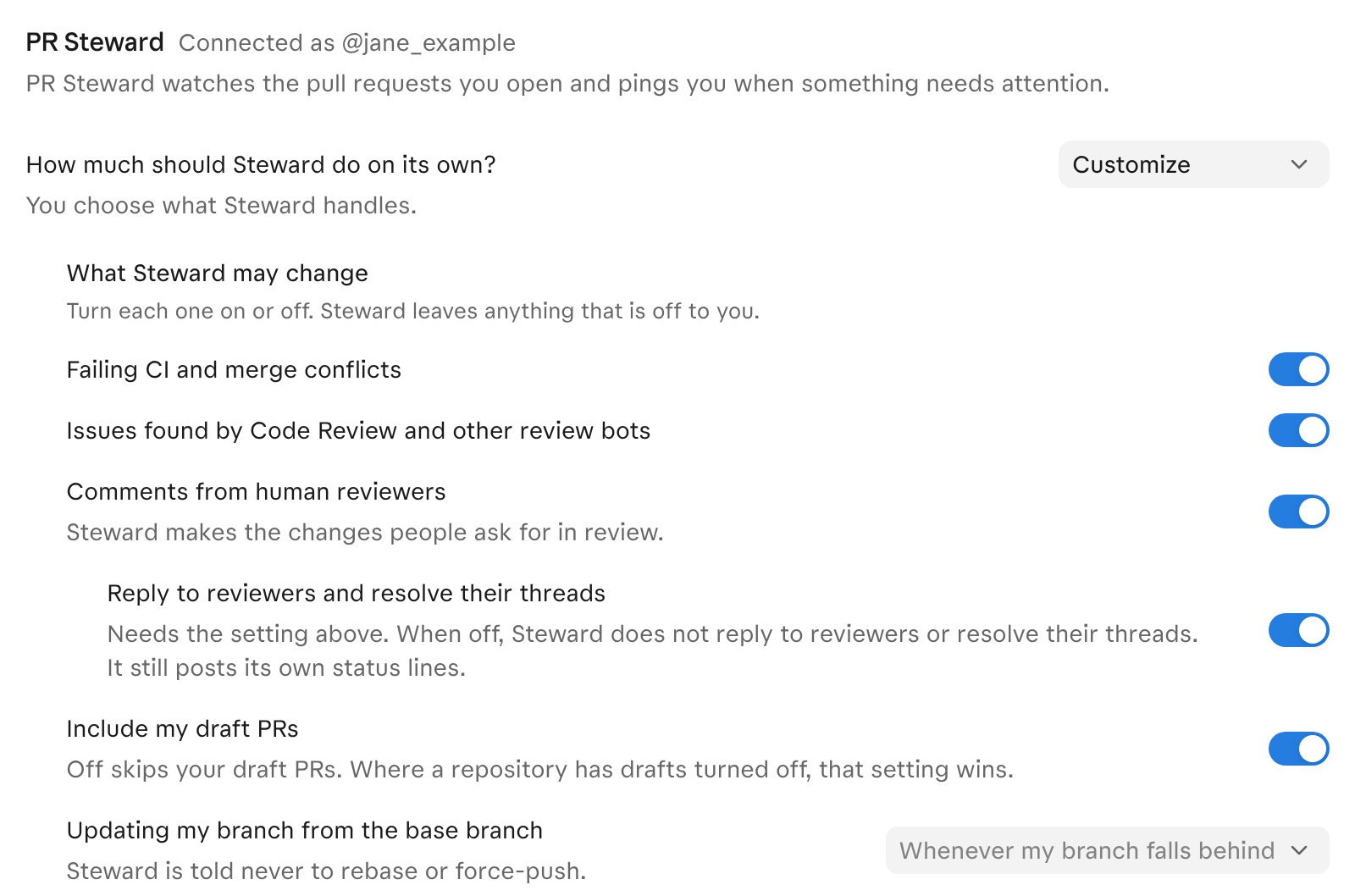
Customize also changes when PR Steward starts: it follows each repository’s own setting. If you had Off or Only when tagged selected before, it can then start by itself.
Save PR Steward instructions for every pull request you open
To give PR Steward the same instructions on every pull request that you open, go to PR Steward in Settings > Code or Settings > Claude Code on claude.ai. Under My instructions for Steward, enter up to 1,000 characters. These instructions ask for small commits and no replies to reviewers:Save PR Steward instructions for everyone in a repository
To set how PR Steward behaves for everyone in a repository, save a file at.claude/skills/steward/SKILL.md and merge it to the default branch.
This example tells PR Steward which work to take on, and how to handle one file and one flaky check:
- Open a test pull request after the file reaches the default branch.
- If the
claude-pr-steward-watchinglabel doesn’t appear by itself, comment@claude steward. - Once the label is on, have a teammate leave a review comment.
CLAUDE.md, .claude/CLAUDE.md, .claude/rules/, and AGENTS.md at the repository’s root. It reads them from the default branch.
The
/ship and /steward commands in Claude Code read the same file. During a watch, Claude follows the copy in your checkout.Which PR Steward instructions take priority
Your settings, the repository’s file, and your comments can disagree. PR Steward settles that this way:- Whether PR Steward starts: the option that you select and Include my draft PRs are checked before PR Steward reads any instructions
- What PR Steward does after it starts: where your own settings and the repository’s
.claude/skills/steward/SKILL.mddisagree, that file applies. Your comments on the pull request override your own settings there, and a comment that asks PR Steward to stop or hold off also overrides that file
Start or stop PR Steward
Use a comment or a label to start or stop PR Steward on one pull request. To turn it off or limit it on every pull request that you open, change your settings.Start or stop PR Steward on one pull request
To stop PR Steward on a pull request, remove theclaude-pr-steward-watching label, or comment @claude stop.
To start or stop PR Steward with a comment, put one of these commands at the start of a top-level comment on an open pull request:
After a stop command, PR Steward removes its labels and confirms in a comment. After you remove the label, it stops without a comment.
PR Steward stays stopped when you push or comment later. To restart it, comment
@claude steward or add the label again. If it doesn’t start, see PR Steward didn’t start on a pull request.
Undo a fix that PR Steward pushed
After a revert, PR Steward can make the same fix again, so take these steps in order:- Hold PR Steward back: stop it.
- Revert the commits: revert the commits by
Claude <noreply@anthropic.com>that you don’t want.