

How the cache is organized
Each time you send a message in Claude Code, it makes a new API request. The model doesn’t remember anything between requests, so Claude Code re-sends the full context: the system prompt, your project context, every prior message and tool result, and your new message. New content is appended at the end, which means most of each request is identical to the one before it. Prompt caching is how the API avoids reprocessing the part that didn’t change. The API caches by matching the start of each request, called the prefix, against content it recently processed. On a normal turn, the prefix is the entire previous request and only the latest exchange is new. The match is exact, so a change anywhere in the prefix recomputes everything after it. There is no per-file or per-segment caching. See how prompt caching works in the API reference for the underlying mechanism.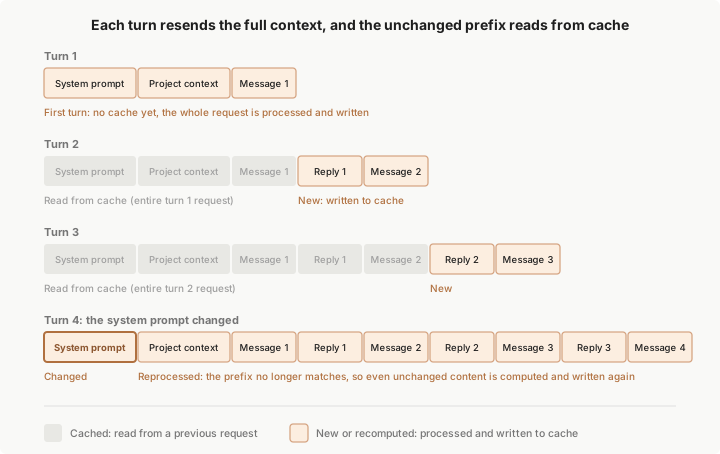

A change to the conversation layer leaves the system prompt and project context cached. A change to the system prompt invalidates everything, because all later content now sits behind a different prefix. The third column gives common triggers rather than an exhaustive list, and the sections below cover the full set.
The prefix-match rule explains most of the behaviors on this page. Plan mode and skill loading, for example, append their instructions as conversation messages, so the cached prefix stays intact.
Two settings don’t appear in the layer table but still affect what stays cached:
- Model: each model has its own cache. Switching models recomputes the entire request even when the content is identical. See Switching models below.
- Effort level: on most models, each effort level has its own cache, so changing effort mid-session recomputes the entire request. On Opus 5.5, Sonnet 5.5, and Fable 5.1 with an API key or a Claude subscription, the cache stays intact by default. See Changing effort level below.
Where the cache lives
Caching happens server-side, in whichever infrastructure serves your model. Where that is depends on how you authenticate:- API key, Claude subscription, or Claude Platform on AWS: the cache lives in Anthropic’s infrastructure, accessed through the Claude API
- Amazon Bedrock or Google Cloud’s Agent Platform: the cache lives in your cloud provider’s serving infrastructure
- Microsoft Foundry: depends on the deployment’s hosting option. Hosted on Azure deployments are served on Azure infrastructure; Hosted on Anthropic deployments are served on Anthropic’s infrastructure
- Custom
ANTHROPIC_BASE_URLor LLM gateway: the cache lives wherever your requests are forwarded, and whether caching works depends on the gateway
CLAUDE_CODE_DISABLE_EXPERIMENTAL_BETAS, in which case that block is sent uncached.
At the provider’s own endpoint, Amazon Bedrock and its Mantle endpoint, Google Cloud’s Agent Platform, and Microsoft Foundry cache the block the same way the Claude API does.
When your requests pass through an LLM gateway, a custom ANTHROPIC_BASE_URL, or a cloud provider base-URL override such as ANTHROPIC_BEDROCK_BASE_URL, what stays cached depends on how the gateway handles the cache_control markers Claude Code sends:
- Forwards them unchanged: the block and your conversation cache the same as at the provider’s own endpoint.
- Rejects the marked request with a
400error namingcache_control: Claude Code re-sends the request with the marker moved off the block and onto your last conversation message, and keeps it there for the rest of the conversation. The block bills as uncached input; your conversation stays cached. - Removes the markers while returning success: your entire conversation history bills as uncached input on every turn. A gateway that converts block-form system content to a plain string drops the marker the same way.
Actions that invalidate the cache
These actions can cause the next request to miss part or all of the cache. You see a one-time slower, more expensive turn, after which the new prefix is cached. Most of them are avoidable mid-task once you know they have a cost. A model switch can feel free until you notice the slower turn that follows.- Switching models
- Changing effort level
- Turning on fast mode
- Connecting or removing an MCP server
- Enabling or disabling a plugin
- Denying an entire tool
- Compacting the conversation
- Accumulating many images
- Upgrading Claude Code
Switching models
Each model has its own cache. Switching with/model means the next request reads the entire conversation history with no cache hits, even though the content is identical.
When you run /model at the terminal, Claude Code asks you to confirm the switch only while the cache is still warm and the new model isn’t the one that produced the last response. The cache stays warm for one cache TTL after Claude Code last sent a request in this conversation or Claude last responded. Once that time passes, the cache has expired, so Claude Code switches without asking.
Before v2.1.238, Claude Code didn’t check the cache TTL and asked even after the cache had expired.
You can also require this confirmation or skip it with a PreModelSwitch hook.
The opusplan model setting resolves to Opus during plan mode and Sonnet during execution, so each plan-mode toggle is a model switch and starts a fresh cache.
Automatic model fallback on Fable models, Opus 5.5, Sonnet 5.5, and Opus 5 is also a model switch. When a safety classifier flags a request in a category that has a fallback model, Claude Code re-runs the request on that model and the session continues there.
When a skill or command’s frontmatter names a model other than the session’s current model, that turn is also a model switch: the next request reads the entire conversation history with no cache hits. The session model resumes on your next prompt. A context: fork skill sets the forked subagent’s model instead.
Changing effort level
On most models, changing the effort level mid-session means the next request reads the entire conversation history with no cache hits. While the cache is still warm, Claude Code asks you to confirm the change first. On Opus 5.5, Sonnet 5.5, and Fable 5.1 with an API key or a Claude subscription, changing effort keeps the cache, and Claude Code applies the new level without asking. This doesn’t apply on Amazon Bedrock, Google Cloud’s Agent Platform, or a Claude apps gateway, or when you setCLAUDE_CODE_DISABLE_EXPERIMENTAL_BETAS or your organization has a HIPAA configuration.
Before v2.1.260, changing effort on Fable 5.1 with an API key or a Claude subscription also invalidated the cache.
Turning on fast mode
Enabling fast mode adds a request header that is part of the cache key, so the first request Claude Code sends with fast mode on reads the entire conversation history with no cache hits. Claude Code sets that header once when a turn starts and keeps it for the whole turn, so when you turn fast mode on while Claude is working, the cache miss from the header happens on the first request of your next turn. Those uncached input tokens are billed at fast mode rates, which is why turning it on at the start of a session costs less than turning it on deep into a long one. If your current model doesn’t support fast mode, enabling fast mode also switches your model, and that switch starts a fresh cache on its own from the next request in the running turn. The cost applies once per conversation. After the first fast mode turn, Claude Code keeps sending the header and varies only the request’s speed setting, which is not part of the cache key. Turning fast mode off, the automatic fallback to standard speed after a rate limit, and turning it back on later all keep the cache. If you run out of usage credits mid-session, Claude Code retries each rejected fast mode request at standard speed the same way, so this fallback also keeps the cache./clear and /compact reset this, since they rebuild the cache at those points anyway.
Connecting or removing an MCP server
Tool definitions sit in the system prompt layer, so the cache invalidates when the set of tool definitions in the request changes between turns. Toggling the advisor tool is an exception: its definition sits after the cache breakpoint, so enabling or disabling/advisor keeps the cached prefix intact. Whether an MCP server change does this depends on whether tool search defers the session’s MCP tools, the default on supported models:
- Tools deferred: Claude Code keeps the tool list from the conversation’s first request for the whole conversation, so a server connecting or disconnecting mid-session doesn’t disturb anything already cached. A server that finishes connecting after the first request supplies its tools as deferred definitions that Claude loads on demand.
- Tools loaded upfront: adding a definition invalidates the cache, and so does removing one on purpose. This applies when tool search is below its
autothreshold, disabled, or unavailable, such as on Google Cloud’s Agent Platform models earlier than the Claude 4.5 generation, with a customANTHROPIC_BASE_URLgateway, or on a Microsoft Foundry deployment hosted on Azure once Claude Code detects that the deployment rejects tool search.
When you resume a conversation whose tools load into the prefix, one of its MCP servers can still be connecting as the first request goes out. If the transcript recorded that server’s tool definitions, that request includes them as recorded, so it doesn’t change when the server finishes connecting with the same tools.
Editing your MCP config does not by itself change the cache. The new config takes effect only after a restart, which is when the server connects or disconnects.
Enabling or disabling a plugin
When you enable or disable a plugin, what the change costs depends on which component types the plugin provides. The cases below cover each component type, when Claude Code applies the change, and what happens when you disable a plugin again in the same session.Plugin components that keep the cache
Claude Code never invalidates the cache for a plugin’s skills, commands, agents, hooks, monitors, or themes. It appends their content after the existing conversation, so the next request pays for that content and still reads everything before it from the cache.Plugins that provide MCP servers
When you enable or disable a plugin that provides MCP servers, Claude Code follows the same rules as when you connect or remove an MCP server.Code intelligence plugins
When you enable a code intelligence plugin, Claude gets the LSP tool.When plugin changes apply
A change you make in the/plugin menu goes through /reload-plugins, which Claude Code runs for you when you close the menu. You pay the cost, whether appended announcements or a full re-read, on the first turn after the change applies. Claude Code can also apply a change on its own:
- For a plugin with a
commandsource, Claude Code can reload the plugin itself. - When you install a plugin from the
/plugininterface, Claude Code can activate it during the install. The install summary tells you whether it did. - When you move the session with
/cdon v2.1.246 or later, Claude Code applies the plugins the new directory’s settings enable as part of the move, without the full re-read warning that holds a/reload-plugins. - In interactive sessions, when you add or remove a plugin in a folder of plugins you passed with
--plugin-dir, the change applies right away. If applying it would trigger a full re-read, Claude Code holds the change instead and shows a notice to run/reload-plugins. Requires Claude Code v2.1.265 or later.
/reload-plugins runs and the reload would trigger a full re-read, Claude Code shows a warning and doesn’t apply the reload. Run /reload-plugins --force to apply it anyway.
/reload-plugins also runs in sessions without an interactive terminal, such as the desktop app, the Agent SDK, and non-interactive mode with -p, when you type it into the session directly. Requires Claude Code v2.1.260 or later.
In those sessions the reload applies everything except plugin MCP server changes, which take effect in your next session and so never cost a full re-read mid-session.
Plugins you enable and then disable in one session
When you disable a plugin you enabled earlier in the session, Claude Code restores the previous request shape. If that prefix is still within its cache lifetime, the next request reads the older cache entry instead of rebuilding.Denying an entire tool
If you add a bare tool name likeBash or WebFetch as a deny rule, Claude can’t call that tool from your next request on, whether you add the rule through /permissions or by editing a settings file directly. That includes a rule you add through /permissions in the middle of a turn.
When tool search is active, which is the default on supported models, the request’s tool definitions don’t change and the cached prefix survives. When tool search is unavailable or disabled, Claude Code removes the definition from the next request, which invalidates the cache, and so does removing the rule later.
Only a deny rule that matches in the tool-name position blocks a tool this way: a bare tool name, the equivalent Bash(*) form, or a tool-name glob like "*". A glob that matches only MCP tools, such as "mcp__*", blocks those tools the same way. Scoped deny rules like Bash(rm *), and all allow and ask rules, don’t change which tools Claude sees. Claude Code checks them when Claude attempts a call, leaving the prefix intact.
Compacting the conversation
Compaction replaces your message history with a summary. By design, this invalidates the conversation layer, since the next request has a new, shorter history that doesn’t share a prefix with the old one. Claude Code reuses the system prompt layer unless the conversation was resumed while keeping a system prompt that would otherwise have changed; in that case the first compaction switches to the current prompt and that layer rebuilds once. It reloads project context from disk, which cache-hits only if CLAUDE.md and memory are unchanged since the session started. To produce the summary, Claude Code sends a separate request with the same system prompt, tools, and history as your conversation, plus a summarization instruction appended as a final user message. While the cache is warm, that request reads your prefix from the cache, so a mid-session/compact costs a fraction of what the context size suggests and spends most of its time generating the summary.
After a break longer than the cache lifetime, there is no cache left to read, so the summarization request reprocesses the full history as uncached input. This is why /compact costs the most when you resume an old session. In both the warm and cold cases, the turn after compaction rebuilds the conversation cache for only the much shorter summary, so that turn is not the slow part.
Accumulating many images
The API limits how many images and PDFs each request can carry. For the current numbers, see Request limits in the API docs. Claude Code also caps the total size of the images and PDFs in a request, so large screenshots reach the limit with fewer images than small ones. When the next request would pass either limit, Claude Code removes a batch of the oldest images and PDFs from what it sends, which leaves room for more before it needs to remove any again. Claude can no longer see the removed images. If Claude needs one of them again, share it again. Removing images changes the messages that held them, so the next request reprocesses the conversation from the earliest of those messages onward. Because Claude Code removes a batch at a time, you see one slower turn per batch rather than one with each new screenshot.Upgrading Claude Code
A new Claude Code version typically updates the system prompt or tool definitions, so the first conversation you start after an upgrade builds its cache from the top. Auto-update downloads new versions in the background but applies them on the next launch, never mid-session, so you see this as an uncached first turn after restarting rather than a surprise during a session. SetDISABLE_AUTOUPDATER=1 to control when upgrades apply.
For what it costs to resume a conversation you started before the upgrade, see Resuming a session.
Actions that keep the cache
These actions either append to the end of the conversation or don’t touch the request at all. Some of them, such as editing CLAUDE.md, keep the cache for the same reason the change doesn’t reach the running session until/clear, /compact, or a restart.
- Editing files in your repository
- Editing CLAUDE.md mid-session
- Changing permission mode
- Changing output style
- Invoking skills and commands
- Running
/recap - Rewinding the conversation
- Spawning a subagent
Editing files in your repository
File contents enter context only when Claude reads them, and reads append to the conversation. Editing a file Claude previously read does not retroactively change the earlier read in history. Instead, Claude Code appends a<system-reminder> noting the file changed, and Claude re-reads it if needed.
Editing CLAUDE.md mid-session
Your project-root and user-level CLAUDE.md files are read once at session start and held in memory. Editing them mid-session does not invalidate the cache, but the edit also doesn’t apply. Claude keeps working with the version that was loaded at session start. The new content loads on the next/clear, /compact, or restart.
Nested CLAUDE.md files in subdirectories and rules with paths: frontmatter load later, when Claude first reads a matching file. Editing one before it loads does take effect. After it loads, the content is part of the conversation history, so a mid-session edit doesn’t retroactively change it.
Changing permission mode
Switching between permission modes, such as from Manual to accept edits, does not change the system prompt or tool definitions, so mode changes are cache-safe. The exception is plan mode with theopusplan model setting, which switches the model between Opus and Sonnet as you enter or leave plan mode. That makes the mode toggle a model switch.
Changing output style
When you switch output styles mid-session with/output-style, /config, or the outputStyle setting, Claude uses the new style starting with your next message. Claude Code delivers the new style’s instructions as a message in the conversation, so that request still reads the system prompt and the earlier conversation from the cache.
Before v2.1.251, a mid-session style switch kept the cache but didn’t apply until you ran /clear or started a new session.
Invoking skills and commands
Skills and commands inject their instructions as user messages at the point of invocation. Nothing earlier in the conversation changes. A skill or command whose frontmatter names amodel can be a model switch for that turn.
Running /recap
/recap generates a summary for display in your terminal. Unlike /compact, it appends the summary as command output rather than replacing your message history, so the cached prefix stays intact.
Rewinding the conversation
/rewind truncates your conversation back to an earlier turn. The remaining history is the same content the cache was built from at that point, and the system prompt and project context layers are unchanged, so the next request hits the earlier cache entry. Every turn since then has read through that prefix, which kept the entry warm even if the original turn was longer ago than the TTL.
Restoring file checkpoints alongside the conversation has no separate effect on the cache. File contents enter context only when Claude reads them, the same as editing files in your repository.
Resuming a session
When you resume a session, Claude Code sends the whole conversation again, and the request reads from the cache whatever part of its prefix is unchanged and still within the cache lifetime. The layer table at the top of this page says what changes each layer. The system prompt would change after a Claude Code upgrade or with different--append-system-prompt text on the resume. By default, the resumed conversation keeps the system prompt it started with, so its history still sits behind the same prompt, and the change takes effect once the conversation is compacted or in a new conversation. System prompt flags in resumed conversations covers the cases where Claude Code rebuilds the prompt on every request instead.
Cache lifetime
Cached prefixes expire after a period of inactivity. Each request that hits the cache resets the timer, so the cache stays warm as long as you keep working. After a long enough gap, the next request recomputes the full input and re-establishes the cache, which is why the first turn back after stepping away can be noticeably slower. On a Pro or Max plan, when you resume a large session after a long break, Claude Code offers to resume from a summary so later requests don’t carry the full history. The time to live (TTL) controls how long a gap the cache survives. The API offers two: a five-minute TTL, and a one-hour TTL that keeps the cache warm through longer breaks but bills cache writes at a higher rate. The longer TTL helps when you leave a session idle and come back to it, because you skip the reprocessing an expired prefix costs. It costs more on short bursts of work that never idle past five minutes, where the higher write rate applies and the longer cache lifetime goes unused.Which TTL each request gets
Claude Code decides the TTL per request, and every request falls in one of two fixed buckets:- Main conversation: your interactive turns, non-interactive
-pruns, and Agent SDK turns, plus the helpers Claude Code runs inline with them - Everything else: the requests Claude Code makes outside that conversation, such as subagents, workflows, in-process teammates, forks, compaction, and session titles
Once you go over your plan’s usage limit and Claude Code draws on usage credits, you are billed for that usage, so Claude Code drops the main conversation to the cheaper five-minute TTL. To keep the one-hour TTL there, choose the TTL yourself.
Choose the TTL yourself
You can set a TTL for either bucket. Each control takes5m or 1h, and Claude Code ignores any other value.
- Main conversation: the
promptCacheTtlsetting, or theCLAUDE_CODE_PROMPT_CACHE_TTLenvironment variable - Everything else: the
subagentPromptCacheTtlsetting, or theCLAUDE_CODE_SUBAGENT_PROMPT_CACHE_TTLenvironment variable
promptCacheTtl to 1h to give the main conversation a one-hour cache. Requests outside it keep the five-minute default until you choose a TTL for that bucket too.
When more than one control applies, Claude Code takes the first match in this order:
FORCE_PROMPT_CACHING_5M=1, which forces five minutes for both buckets- The bucket’s environment variable
- The bucket’s setting
- For a subagent’s requests, the
cacheTtlvalue in the subagent’sexperimentalfrontmatter field, which requires Claude Code v2.1.248 or later. Claude Code ignores a1hthere while your Claude subscription is using usage credits ENABLE_PROMPT_CACHING_1H=1, which requests one hour for both buckets- The default for the request’s bucket
FORCE_PROMPT_CACHING_5M=1 when you’re debugging cache behavior, comparing the two TTLs, or overriding a longer TTL set in managed settings.
To confirm which TTL your main conversation’s cache writes used, run claude -p "hello" --output-format json and read usage.cache_creation in the result. Claude Code reports one-hour cache writes under ephemeral_1h_input_tokens and five-minute cache writes under ephemeral_5m_input_tokens.
Through an LLM gateway you set with ANTHROPIC_BASE_URL, part of the one-hour request travels in the anthropic-beta header, so configure the gateway to forward that header unchanged. The one-hour TTL isn’t available through the Claude apps gateway. On Amazon Bedrock, prompt caching support, minimum cacheable prefix length, and one-hour TTL availability all vary by model. If cache token counts stay at zero, check supported models, regions, and limits in the Amazon Bedrock documentation.
Cache scope
In Claude Code, the cache is effectively scoped to one machine and directory. The system prompt embeds your auto memory paths, and the conversation opens with an announcement of the working directory, platform, shell, and OS version. Two sessions in different directories therefore build different prefixes and miss each other’s cache. Sessions you run in parallel in the same directory build matching prefixes and read each other’s cache. Sequential sessions share the prefix only when the git status snapshot taken at startup matches, since each conversation also carries the branch and recent commits from that snapshot. The underlying API cache is broader. Caches are isolated between organizations, and on some providers, between workspaces within an organization. Within those boundaries, any two requests with the same model and prefix read the same cache. For Agent SDK callers running fleets of automated processes, see improve prompt caching across users and machines to move the auto memory location out of the system prompt and share the system prompt’s cache entry across users and machines.Check cache performance
Cache performance shows up as two token counts the API reports on every response. The most direct way to watch them live is a statusline script that reads thecurrent_usage object:
A high read-to-creation ratio means caching is working well. If creation stays high turn after turn, something is changing in your prefix. The actions that invalidate the cache section lists the usual causes.
For a per-session summary, run
/usage. After the main conversation’s first response, Claude Code adds a Prompt cache (main) line to the Session block, showing the session’s hit ratio, miss count, and whether the cache is warm right now. A status line script can read the same numbers from the prompt_cache object. Both require Claude Code v2.1.251 or later.
The Prompt cache (main) line also names the likely cause of the last miss when Claude Code can identify one, for example likely cause: tool definitions changed. The likely-cause text requires Claude Code v2.1.260 or later.
For visibility across an organization, the OpenTelemetry exporter reports cache read and creation tokens per user and session. See Monitor usage for the metric and event attribute reference.
Subagents and the cache
A subagent starts its own conversation with its own system prompt and tool set, separate from the parent’s. Its first request doesn’t read the parent’s cache, because the two prefixes differ, and it warms a cache of its own across its turns. Subagents fall outside the main-conversation TTL bucket, so they get five minutes even on a subscription until you choose a longer one. The parent’s cache is unaffected. From the parent’s side, the subagent’s call and result append to the conversation, leaving the parent’s prefix intact. A fork, by contrast, inherits the parent’s system prompt, tools, and conversation history exactly, so its first request reads the parent’s cache. Other requests can also read a prefix that an earlier request cached:- Session copies: a session you copy with
/forkreceives its isolation instruction as a message at the end of the copied conversation, so the cache that the original conversation built stays intact. - Compaction: the summarization call described in Compacting the conversation uses the same prefix-sharing approach.
- Resumed subagents: when Claude resumes a subagent, the resumed run’s first request can read the cache the original run warmed.
- Workflow fan-outs: in a workflow fan-out of same-prefix agents, Claude Code holds all but the first for up to 5 seconds by default, so their first requests can read the prefix that the first agent cached.
Disable prompt caching
Disabling caching is occasionally useful when debugging caching behavior with a specific model or provider. To turn it off, set one of these environment variables to1:
DISABLE_PROMPT_CACHING_HAIKU applies to the default Haiku model, the model the haiku alias resolves to. It disables caching wherever that model runs, including the main conversation when it is your main model. Covering the main conversation requires Claude Code v2.1.283 or later.
The variable also covers a background model you set with the deprecated ANTHROPIC_SMALL_FAST_MODEL variable, when that model differs from your main model.
A different Haiku version that you pin as your main model keeps caching; set DISABLE_PROMPT_CACHING to disable caching for it.
DISABLE_PROMPT_CACHING_SONNET and DISABLE_PROMPT_CACHING_OPUS each apply to the model the sonnet or opus alias resolves to. If you set any other Sonnet or Opus model ID as your main model, that model keeps caching. For example, a session on claude-sonnet-5 keeps caching while sonnet resolves to claude-sonnet-5-5. To disable caching for that model, set DISABLE_PROMPT_CACHING.
To set caching policy across an organization, put any of these or the TTL variables in the env block of managed settings. For normal use, leave caching enabled.
Related resources
- Lessons from building Claude Code: Prompt caching is everything: the design rationale for plan mode, deferred tool loading, and compaction
- Explore the context window: what loads into context and when
- Reduce token usage: strategies beyond caching for managing context size
- Track and reduce costs: cache token tracking and TTL configuration for Agent SDK callers
- Prompt caching: the underlying API mechanism, breakpoints, and pricing